
Is SalvageData Legit?
SalvageData is a real company that performs legitimate data recovery work. Their website publishes technical advice that contradicts established storage engineering, including instructions to run CHKDSK on drives with confirmed hardware errors and use failed disks as RAID hot spares. Their pricing is quote-based with non-refundable evaluation fees of $200-$240.
The Better Business Bureau documents complaints of drives withheld pending payment and media disposed of after pricing disputes.
Investigator Kay Dean published August 2026 records on Google, Facebook, and Yelp reviews of SalvageData listings, showing the same accounts reviewing SalvageData locations, astrologers, and a Warsaw car dealer within days of each other. Her conclusions, and a statement of what those records do not show, are in the review findings section.

When Does SalvageData Successfully Recover Data?
SalvageData operates a centralized data recovery laboratory in Highland Heights, Ohio, equipped for head swaps, firmware repairs, and NAND extractions. Independent users have reported successful recoveries for standard hard drive mechanical failures where the drive is shipped to their centralized Ohio facility for evaluation.
The company also publishes data recovery software and operates an extensive blog covering storage topics. Their lab has recovered data in cases where:
- Standard hard drive mechanical failures (head swaps, motor failures)
- Firmware corruption on drives accessible via PC-3000
- File system corruption on otherwise healthy media
- RAID array reconstruction for standard configurations
The analysis below does not question whether SalvageData can recover data. It documents specific technical advice on their website that contradicts established engineering, business practices reported by independent consumers, and pricing patterns documented across public platforms.
What Technically Destructive Advice Does SalvageData Publish?
SalvageData publishes blog posts and service pages that instruct users to run destructive commands on failing hardware, apply RAID 5 rebuild procedures to RAID 0 arrays, execute Windows bootloader utilities on SD cards, and characterize ISO-rated clean bench filtration as inadequate for hard drive recovery. Each operation either destroys data or demonstrates a misunderstanding of the storage architecture being described.
The following findings are from the SalvageData website. Each entry includes the verbatim quote, a screenshot with an archive.org permanent link, and an engineering correction. These findings are also documented on our documented data recovery myths with evidence page.
Destructive Formatting Advice
Instructions to run repair utilities and format commands on drives with confirmed hardware failures.
Should you run CHKDSK on a drive with a fatal hardware error?
“Run CHKDSK The CHKDSK utility helps you fix file system errors and bad sectors on your hard drive.”
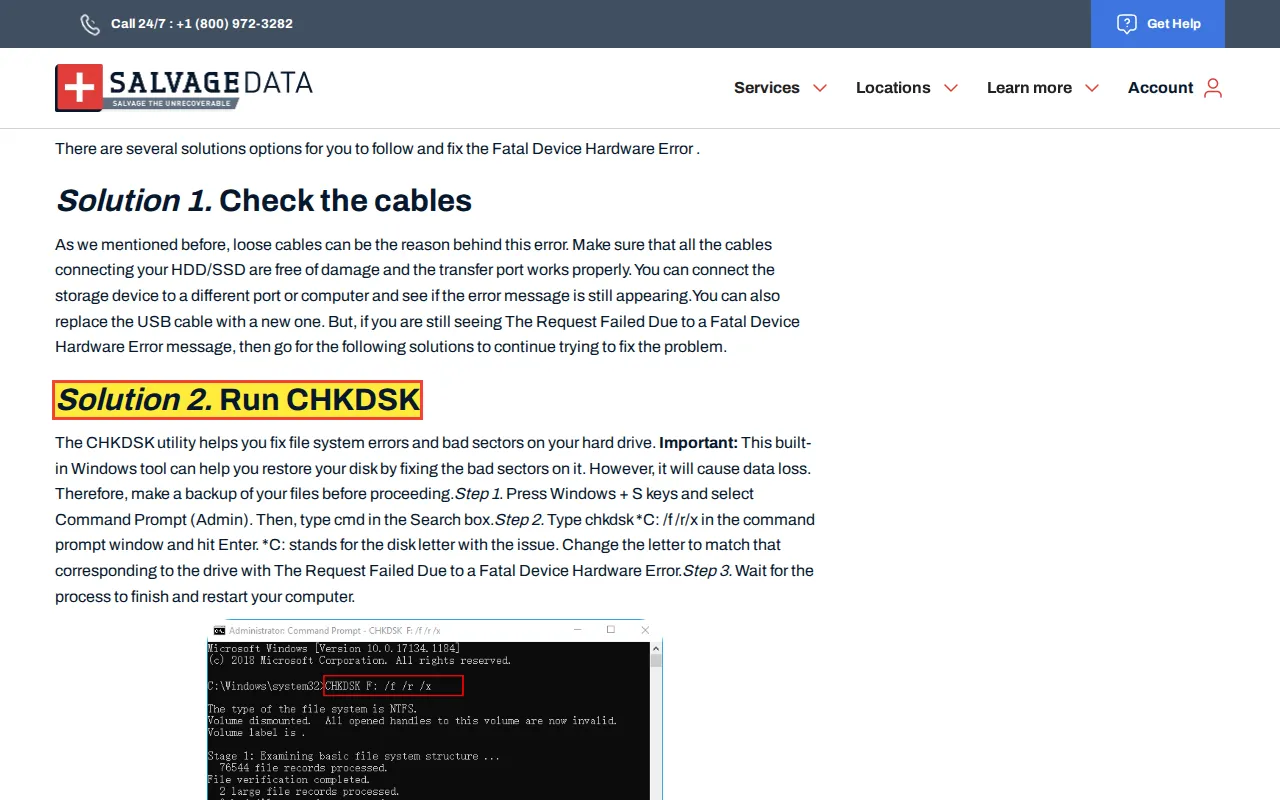
.chkfragments. The sustained mechanical stress generates heat that pushes degraded read/write heads into contact with the platter surface.Consequence: CHKDSK overwrites file system metadata and forces a dying actuator arm through a full surface scan, accelerating mechanical failure and destroying directory structures needed for recovery.
Should you format a drive to fix a fatal hardware error?
“Format the drive If the Request Failed Due to a Fatal Device Hardware Error still appears...”
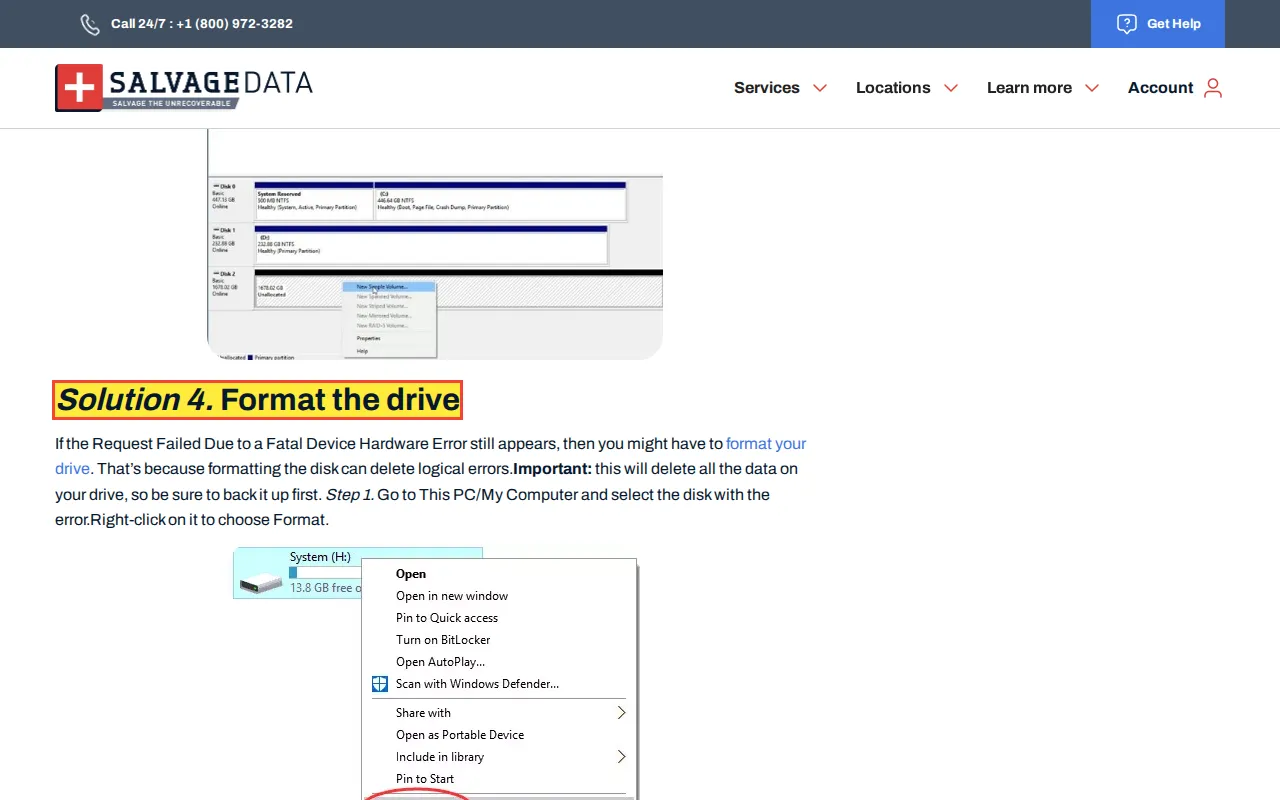
Consequence: Formatting overwrites the MFT and partition table. On a drive with hardware errors, the write operations accelerate mechanical failure while destroying the file system structures needed for recovery.
RAID Rebuild Instructions That Cause Multi-Drive Failure
Advice that applies RAID 5 fault-tolerance assumptions to RAID 0 and recommends using failed drives as rebuild targets.
Should you use a failed drive as a RAID hot spare?
“Making the disk with a history of failure as your spare disk is a quick solution.”
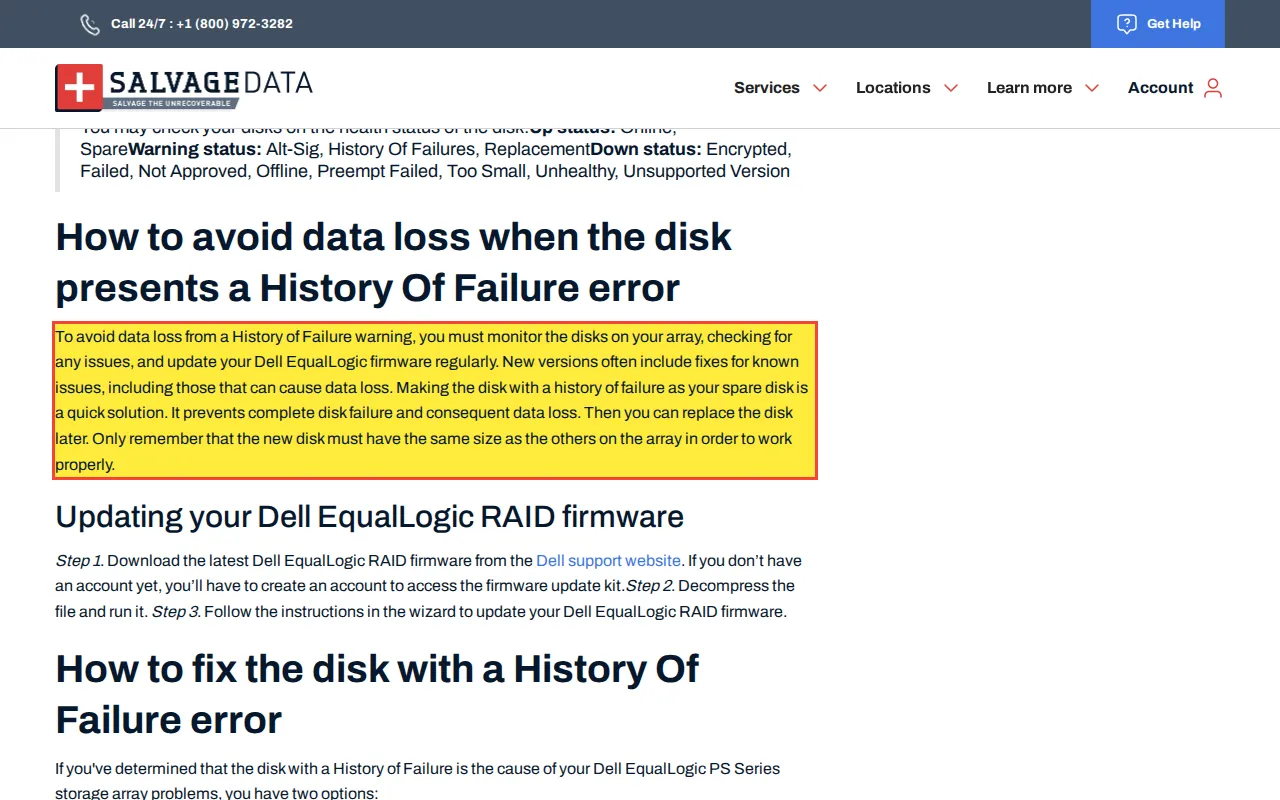
Consequence: A failed drive used as a hot spare will collapse during the rebuild, causing a multi-disk failure that destroys the entire RAID array and all data on it.
Can RAID 0 operate in degraded mode?
“The proper setup for rebuild is... RAID was in degraded mode with minimum amount of disks present and operational...”
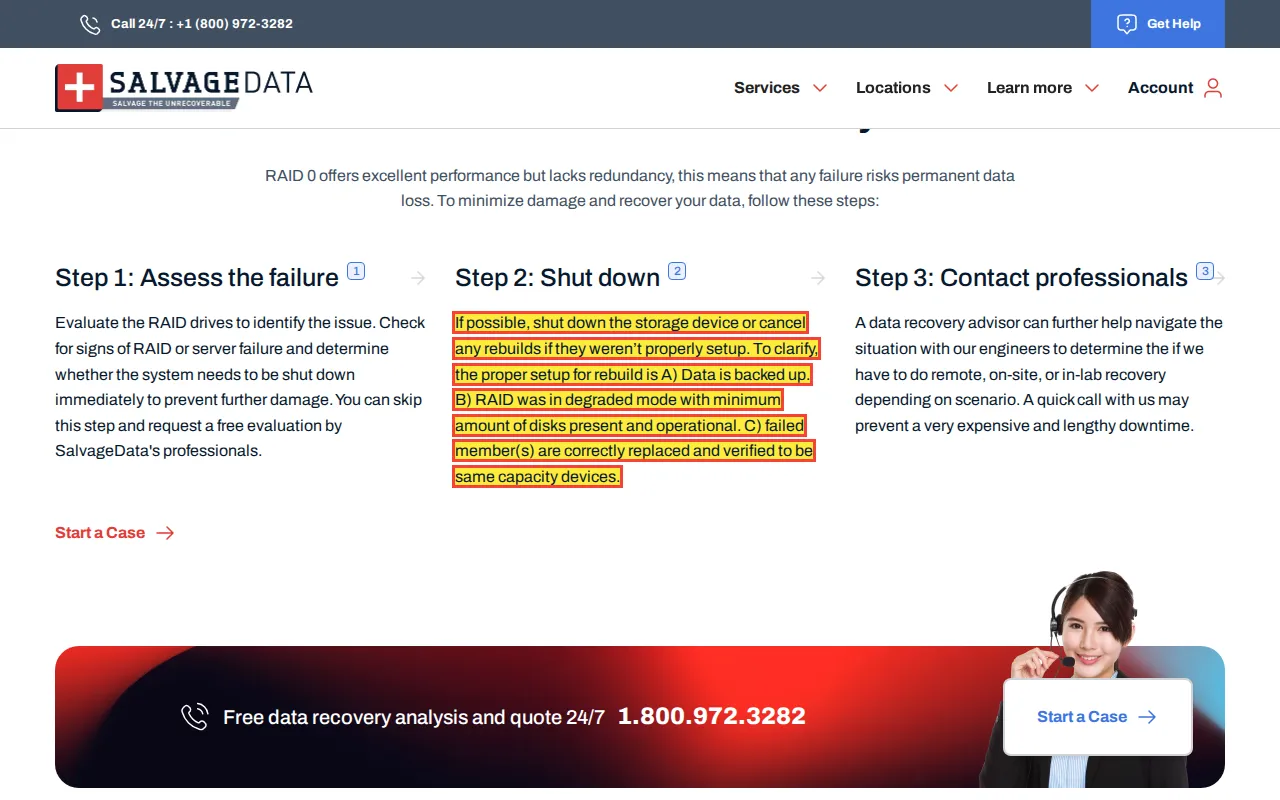
Consequence: RAID 0 has no redundancy. It cannot degrade, and it cannot rebuild. Following rebuild instructions for RAID 0 risks overwriting surviving data on the remaining member drives.
Storage Architecture Errors
Published claims that misrepresent the physical architecture of SSDs and the purpose of Windows bootloader utilities.
Should you run bootrec commands on an SD card?
“CHKDSK, MBR is a Windows computer feature that you can use to check and fix your memory card.”
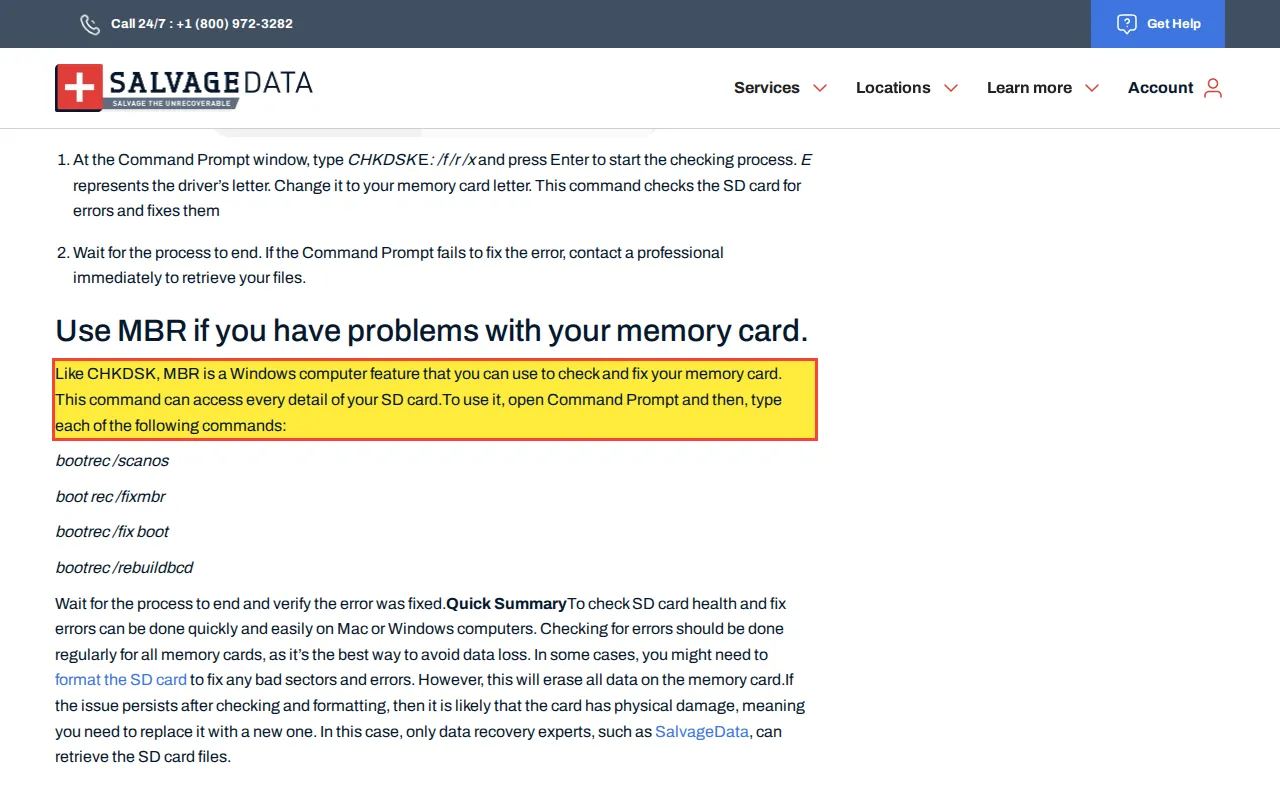
bootrec.exeis a Windows Preinstallation Environment utility whose sole purpose is repairing a corrupted Windows bootloader on an internal OS drive. Executing bootloader repair commands against a removable FAT32 flash storage device will yield terminal errors, and forcing an MBR overwrite on a removable card risks corrupting the partition table, rendering the media inaccessible.Consequence: Running bootrec on an SD card is architecturally impossible and risks corrupting the partition table. The commands are designed for Windows boot drives, not removable flash storage.
Do SSDs travel along specially prepared surfaces?
“The SSD (Solid-state drives) does not use any magnetic material but travels along specially prepared surfaces.”
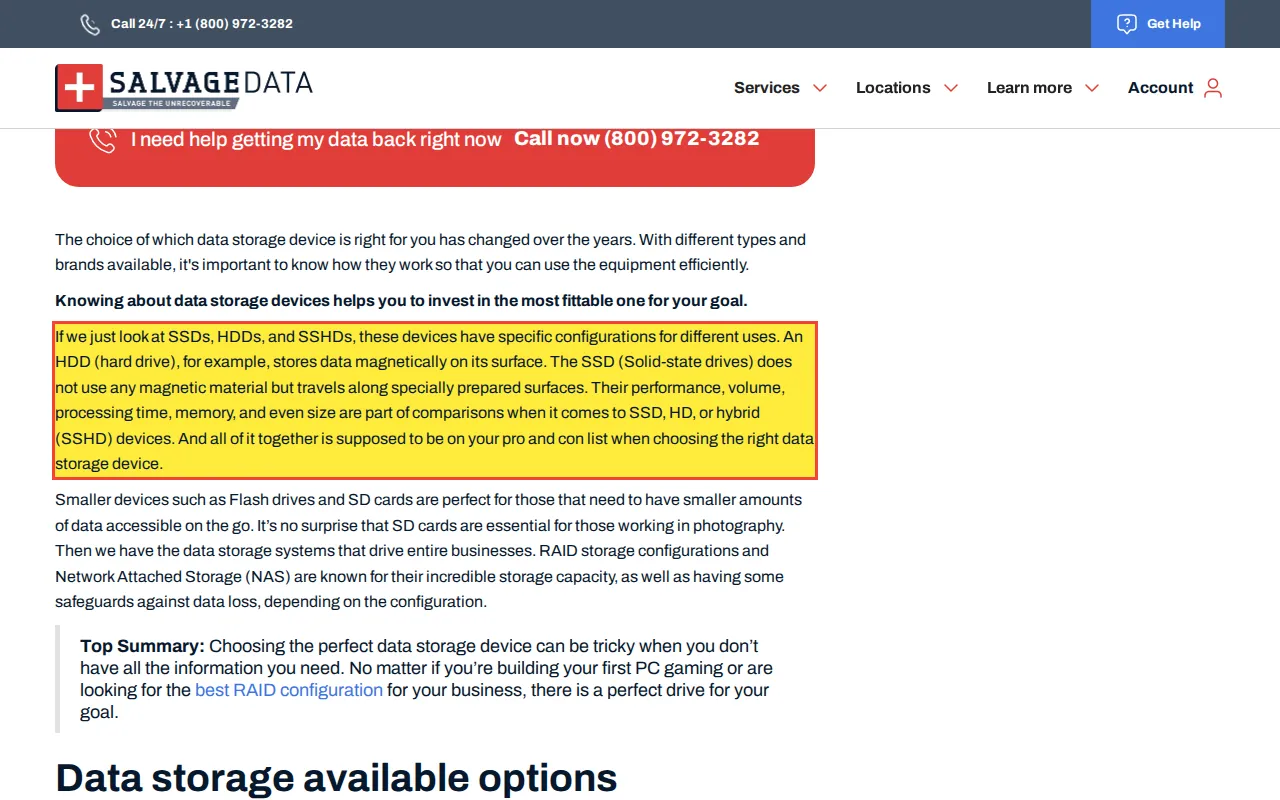
Consequence: Publishing incorrect hardware descriptions on a data recovery company's website erodes trust in their technical capabilities and misleads consumers about the storage technology they are paying to have repaired.
Clean Bench Filtration Accuracy Claims
Marketing claims that characterize ISO 14644-1 Class 5 clean bench filtration as inadequate for hard drive recovery.
Are clean benches inadequate for hard drive data recovery?
“A majority of data recovery providers rely on inadequate portable 'clean bench' enclosures...”
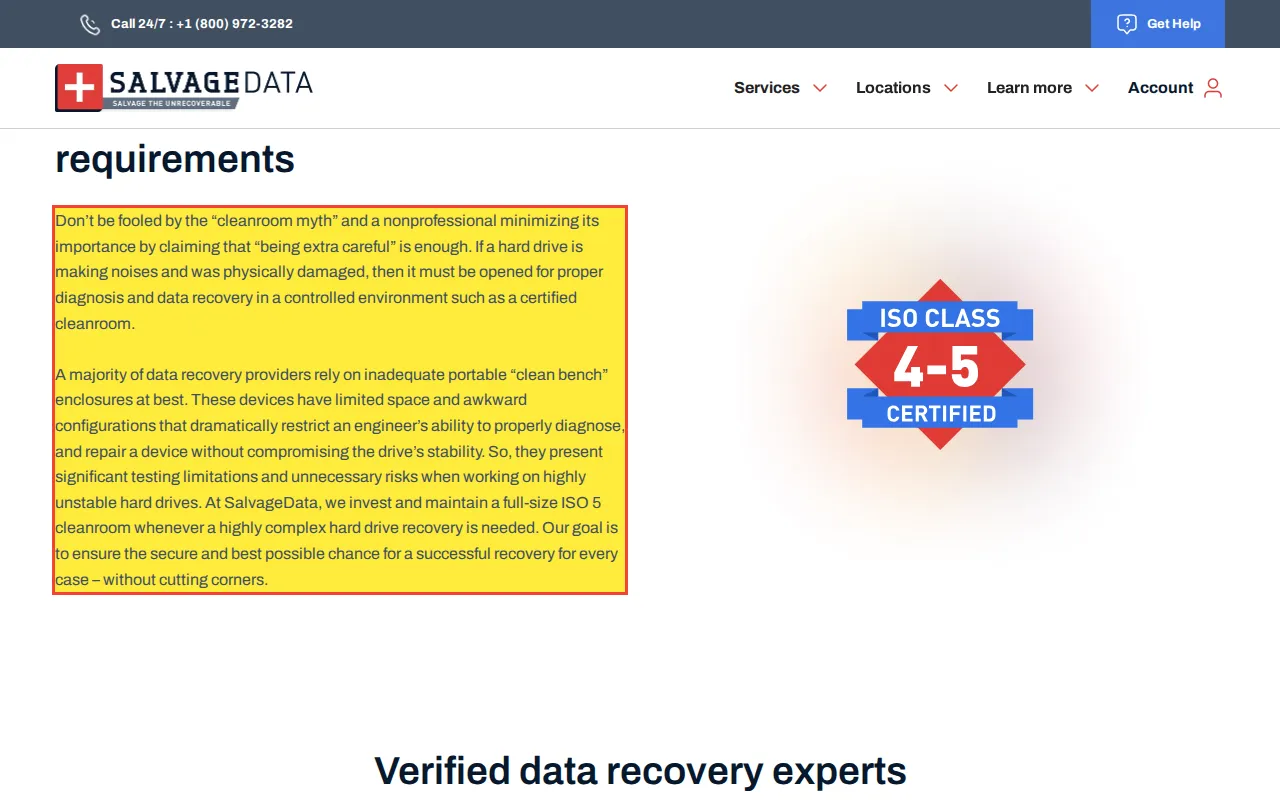
Consequence: This claim implies that clean bench filtration is inadequate for hard drive recovery, which contradicts ISO 14644-1 Class 5 particle filtration standards. A properly rated laminar flow clean bench provides the same controlled environment as a walk-in cleanroom across the exposed work surface.
What Do Independent Users and Professionals Report About SalvageData?
Consumer complaints about SalvageData on the Better Business Bureau, Trustpilot, and Reddit's data recovery communities document a pattern of quote escalation after the drive is shipped, non-refundable diagnostic deposits, unauthorized charges after service is declined, and virtual office locations listed as local labs on Google Maps.
The following reports are from independent users and professionals. Each quote is attributed to its source platform with a direct link.
Cancellation Fee Escalation
Customers who attempt to cancel evaluations or reject quotes report encountering fees that escalate from nominal shipping costs to hundreds of dollars.
“Turns out they were going forward with the repair and customer support said if I wanted to cancel the process it would be $500!”
Charges After Service Was Declined
The BBB documents a case where a customer was billed over a thousand dollars six weeks after declining the recovery quote.
“Then I get a surprise email receipt for $1,296, 1 and 1/2 months after declining... Then there is the fact that the quote I received was for $1,296 for 2 laptops. One laptop had no recoverable data, they only recovered data (that I declined) from...”
Pricing Escalation After Device Shipment
Multiple independent reports document initial quotes being doubled after the drive arrives at the facility, paired with non-refundable evaluation deposits of $200-$240. Customers who decline the revised quote forfeit the deposit and must pay return shipping. SalvageData's pricing patterns are documented alongside three other companies in our bait-and-switch pricing analysis.
“Final price was double what they originally quoted. It took 3 weeks and a direct call to get a response after sending my drive in for diagnostics. They also required a $200 non-refundable deposit...”
A separate BBB complaint filed in 2023-2024 describes an initial quote of over $6,000 per laptop that was reduced to $1,260 for both devices after the consumer declined. The complaint is documented on the SalvageData BBB profile.
Data Recovery Professional Consensus
Independent data recovery professionals on r/datarecovery and r/AskADataRecoveryPro consistently warn users about SalvageData's pricing model, virtual office network, and diagnostic billing practices. The professional community distinguishes between labs that operate from a single, specialized facility and companies that project a nationwide presence through unstaffed drop-off points.
“SalvageData is an extortionately expensive franchise lab... 'Big name' and 'overcharge for it' go hand-in-hand.”
“Both of those companies just spam mailing offices all over the country. Go to their websites, look at how they have a supposed 'lab' in multiple cities of almost every state. This is a way that companies abuse google search and google maps to farm business...”
“I ran the gamut of customer experiences along the way, ranging from completely transparent, return-cost-only companies (i.e. $20 for Kroll Ontrack, $32 for Gillware, $0 for Blizzard, $0 for Rossmann) to the extremely marketing/sales-heavy, pseudo-fronts (i.e. $240 for SalvageData)... it's easily the most disingenuous firm I've ever had the displeasure of dealing with.”
Review Broker Connection
Consumer watchdog Kay Dean's Fake Review Watch investigation identified review broker Michael Monahan of Cash4Reviews.com, who paid $4 to $8 per review. According to Dean's analysis, SalvageData was among Monahan's clients. Dean's full investigation is documented in her video Marketer's Fake Review Operation EXPOSED.
In a separate analysis, Dean's “Google vs. Fake Review Watch” video mapped 148 Google profiles against 14 businesses. According to Dean's analysis, SalvageData appeared as one of the 14 businesses, with 44 reviews from profiles in the network. Multiple SalvageData reviewers on the spreadsheet also reviewed Manhattan financial companies, spray foam contractors, moving companies, and Homage Hospice, a Texas hospice care provider, within the same timeframe. The overlapping review patterns across unrelated industries are documented in the video with a color-coded spreadsheet. Dean returned to SalvageData in August 2026 with a separate video on its Google, Facebook, and Yelp reviews; that later material is summarized in the review findings section below and is distinct from the 2024 spreadsheet described here.
The full analysis of fake review patterns in data recovery is documented in our fake reviews in data recovery investigation.
Local Search Forum Investigation of Listed Drop-Off Points
SalvageData operates as a functional data recovery service processing physical storage media. Third-party evaluations of the company fall into two categories: the technical execution of their data recovery work, and the methodologies used in their local search marketing. The following section focuses on the latter, using independent investigations to help consumers evaluate local search representations.
Between September 2024 and January 2025, Local Search Forum investigator HikingMike documented a SalvageData listing at a UPS Store in Edwardsville, Illinois. The listed address, 6696 Center Grove Rd #299, corresponds to a commercial mailbox facility. The mailbox number was formatted as a suite number to resemble a physical office. Google Business Profile guidelines prohibit using mailbox services as listed business addresses unless the location is staffed by the business during posted hours.
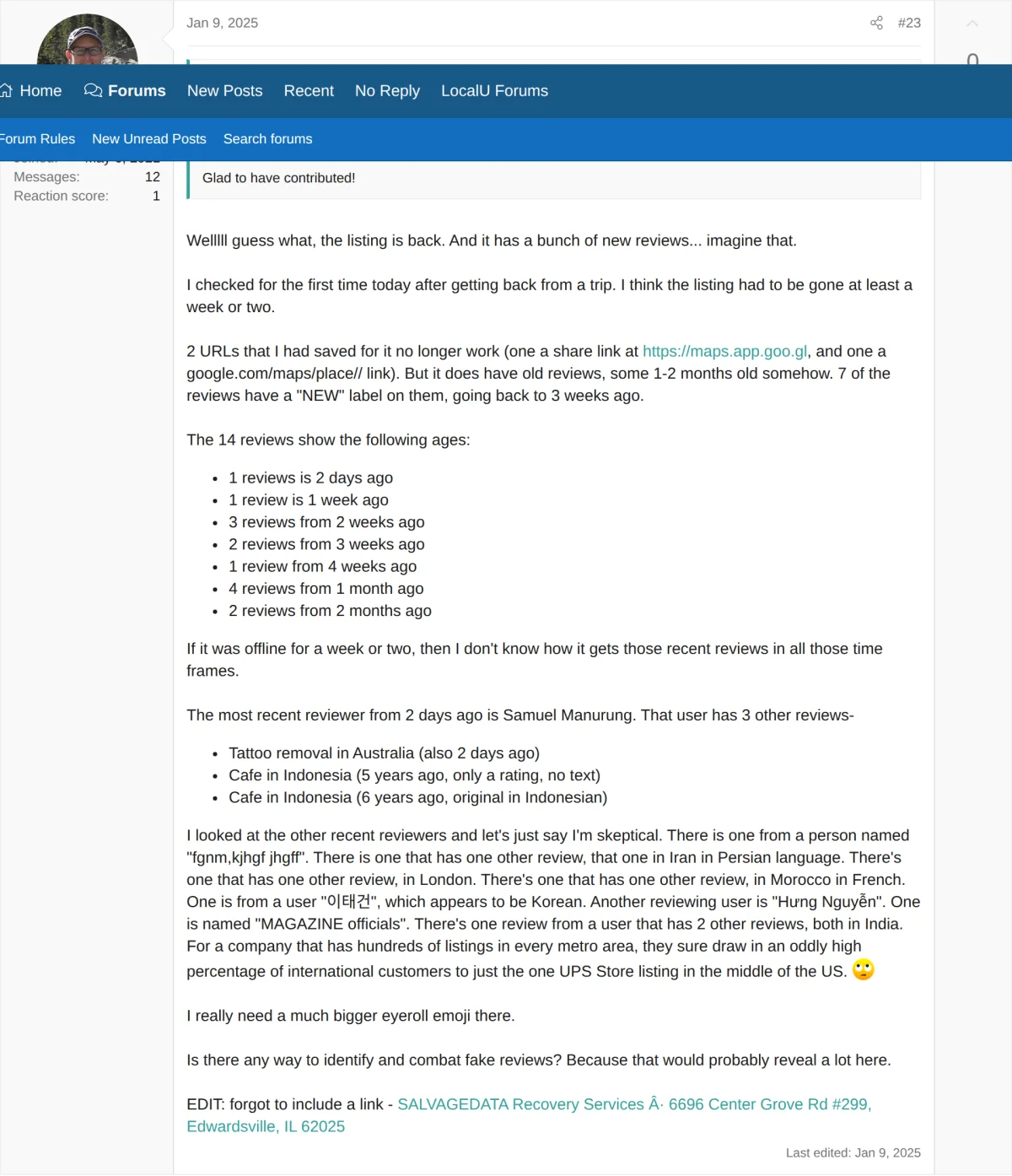
Source: Local Search Forum, September 2024
The investigator submitted multiple edit suggestions, Business Redressal Forms, and escalated through the Google Community Forum with assistance from local search authority Mike Blumenthal. After six weeks of direct communication, Google responded that the listings were "in compliance." During the investigation, the researcher compiled a spreadsheet documenting approximately 60 SalvageData listings within a single metro area, all located at unrelated computer repair shops and cellphone stores. For a detailed breakdown of the address formatting and listing volume, see the analysis of documented location patterns.
When the Edwardsville listing reappeared after a brief suspension in late December 2024, it carried 14 reviews. Seven displayed "NEW" labels with timestamps that overlapped the period the listing was offline. The reviewer profiles included accounts with review histories in Indonesia, Iran, Morocco, India, Korea, Vietnam, and the United Kingdom. One reviewer used keyboard-generated characters as a display name. For the full reviewer profile audit and chronological analysis, see the documentation of geographic review irregularities.
Review findings
What Did Fake Review Watch Find About SalvageData's Reviews?
Kay Dean, a former federal investigator, published a video on August 26, 2026 on the Google, Facebook, and Yelp reviews of SalvageData listings. The pattern: the same Google accounts that review SalvageData also review astrologers and psychics thousands of miles away, hours apart. She concludes, in her words, that SalvageData has “fake reviews in my opinion strewn across Google, Facebook, and Yelp.” Her captures do not establish that SalvageData directed, solicited, paid for, or knew about any review shown.
The captures, with their dates, timestamps, and our redactions, are published in full on Kay Dean's SalvageData findings.
What did the Google profiles show?
Dean pulled the Google accounts reviewing SalvageData and checked what else they reviewed. One five-starred SalvageData in Miami within two hours of an astrologer in Australia. Another paired a Warsaw car dealer with SalvageData in Sherman Oaks in the same week. Another reviewed two Texas SalvageData shops, a Montreal psychic, and that same Warsaw dealer on one day. Her spreadsheet counts 87 accounts like this in two weeks of August 2026, 63 of them pairing SalvageData with an astrologer. At 4:22 she says: “The review patterns here are just not credible.” The captures are on the dossier's Google records.
What did the Facebook timing and overlaps show?
SalvageData's Facebook page got 17, 21, and 16 positive reviews in November 2023, December 2023, and January 2024, then 46 in June and 46 in July 2024, and none since. Dean checked the 56 June and July reviewers: 32 of them also reviewed the same New York brick-pointing contractor, and 27 the same Ohio painter. Two share one stock profile photo. A Pangram check she ran on August 17, 2026 flagged one review as “AI Generated” (“Confidence limited, short text,” per Pangram). At 9:24 she concludes: “I'm confident in concluding that SalvageData has received many fake Facebook reviews.” The captures are on the dossier's Facebook records.
What did the Yelp “First to Review” profiles show?
In September 2025, five accounts with exactly two reviews each became the first reviewers of five different SalvageData Yelp listings. Dean's sheet counts 73 reviews on 61 SalvageData listings in ten weeks (July 28 to October 5, 2025); by her count, over 70% of those listings had never been reviewed before. A Pangram check on August 19, 2026 flagged the first review as “AI Generated” (same “Confidence limited, short text” note). At 12:46 she says: “In my opinion, there was a concerted effort over a two-month period in 2025 to increase SalvageData's presence on Yelp by posting fake reviews.” The captures are on the dossier's Yelp records.
| Platform | What Dean Examined | Capture Window | Dean's Stated Conclusion | Records |
|---|---|---|---|---|
| Contributor pages and a spreadsheet of 87 profiles reviewing some combination of SalvageData listings, astrologers, and a Polish car dealer | August 4 to 14, 2026 | “The review patterns here are just not credible.” (4:22) | Google captures | |
| Review counts by month since December 2017, 56 June to July 2024 reviewers and the businesses they reviewed in common, profile photos, one Pangram check | Reviews from 2017 to 2026; Pangram check August 17, 2026 | “I'm confident in concluding that SalvageData has received many fake Facebook reviews.” (9:24) | Facebook captures | |
| Yelp | Five “First to Review” profiles from September 2025, one Pangram check, and a spreadsheet of reviews on 61 listings by her count | Reviews July 28 to October 5, 2025; data captured August 16 to 21, 2026 | “In my opinion, there was a concerted effort over a two-month period in 2025 to increase SalvageData's presence on Yelp by posting fake reviews.” (12:46) | Yelp captures |
SalvageData has answered the question on the record. On a Facebook thread Dean dates to August 5, 2024, a commenter wrote, “All your reviews seem like they are fake accounts.” Its page account replied:
“I want to assure you that our reviews are from real clients who have used our services and shared their honest feedback.”
The reply is reproduced in full, with the capture, on the dossier's record of the August 2024 thread.
These captures do not establish that SalvageData directed, solicited, paid for, or knew about any of the reviews shown, or that any named profile is not a real customer. The records say nothing about who wrote any review; Pangram's output is a classifier's opinion with a disclosed short-text limitation; Yelp's “recommended” status and badges are Yelp's own; and the accounts and reviews shown may since have been removed or changed. Every conclusion above is Dean's, drawn from the records she assembled and quoted here in her words.
“Fake Reviews for SALVAGEDATA,” Kay Dean, Fake Review Watch, published August 26, 2026. Runtime 16:07. Watch on YouTube.
Google's written rules for Maps reviews, quoted verbatim from Google's policy page with an archive link, are laid beside these records in the dossier's section on what Google's review policies prohibit.
What Happens to Your Drive During a Pricing Dispute?
The Better Business Bureau profile for SalvageData documents three categories of custody complaints: drives withheld pending payment, specific dollar demands for hardware return, and media disposed of after non-payment. These complaints are filed by consumers who shipped drives to SalvageData and later disputed the quoted recovery price.
The following quotes are from complaints filed on the BBB portal for SalvageData Recovery Services in Highland Heights, Ohio.
Property Retention Until Payment
A BBB complaint documents a case where a consumer's hardware was withheld pending payment, with no proof of recovery provided.
“refusing to return my property to me unless I pay but they are refusing to show me what I'm paying for.”
Drive Return Conditioned on $780 Payment
A separate BBB complaint documents a specific dollar amount demanded for the return of a hard drive.
“is refusing to return [the hard drive] unless $780 is paid.”
Media Disposed of After Non-Payment
In a BBB complaint response, SalvageData confirmed that a customer's storage media was disposed of per their terms and conditions when payment was not rendered. This is the company's own statement in response to a formal complaint.
“media was disposed of as per our terms and condition”
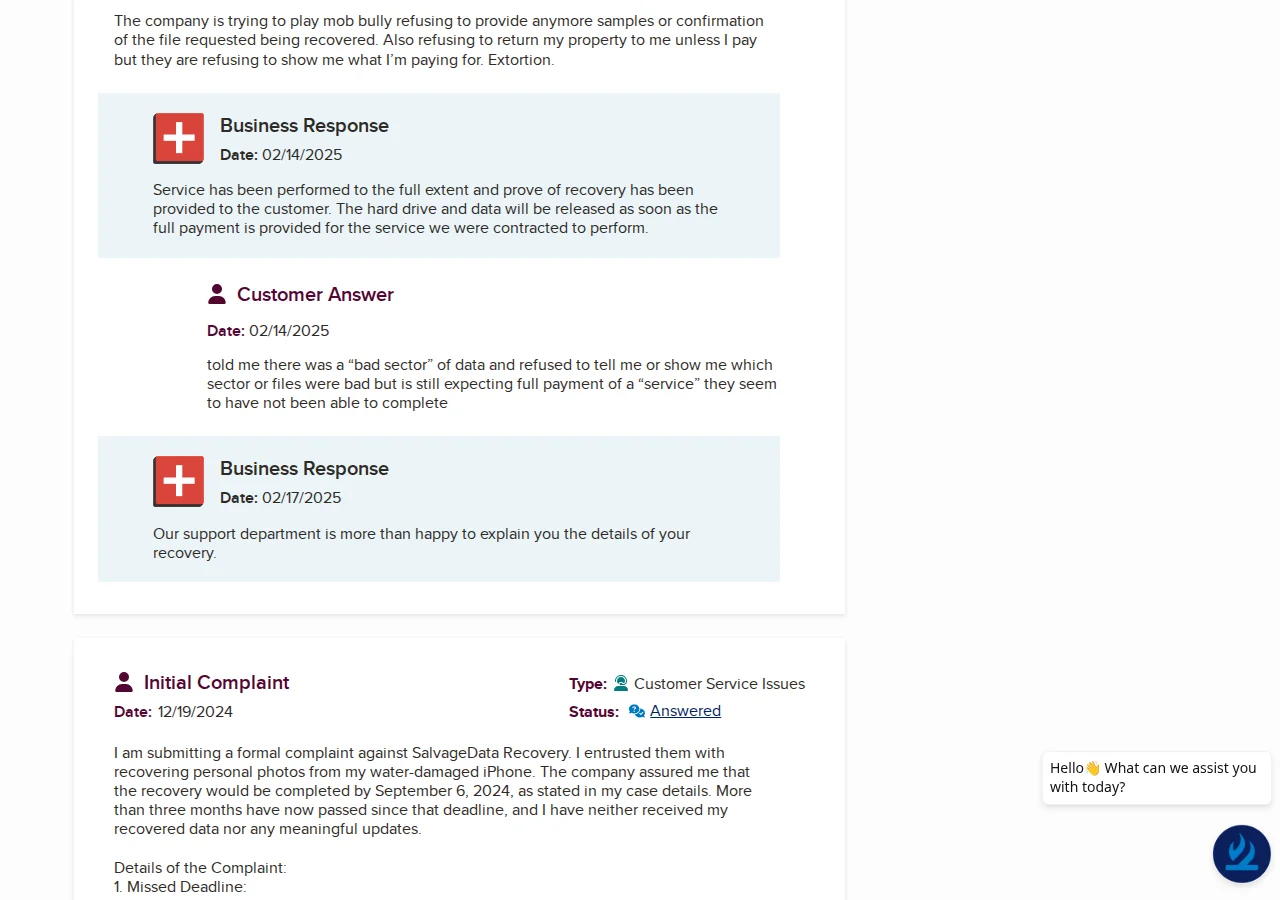
Rossmann Repair Group has had zero complaints filed with the Better Business Bureau since the company was founded in 2008. SalvageData's BBB profile documents 22 complaints in the last 3 years. Both profiles are public records.
At Rossmann Repair Group, your hardware is your property. If you decline a recovery quote, we return your drive for a flat return shipping fee. No evaluation fees. No diagnostic deposits. Before recycling any device, we make repeated attempts to contact the customer by phone. Read about our no-fix-no-fee guarantee.
How Does the Pricing Compare?
SalvageData does not publish fixed pricing tiers on their website. Pricing is quote-based after a non-refundable evaluation deposit of $200-$240. Independent user reports document final quotes ranging from $500 to $3,000+ for standard hard drive recovery, with prices frequently doubling after the drive is shipped.
| Service | SalvageData (Reported) | Rossmann HDD | Rossmann SSD |
|---|---|---|---|
| Starting price | Quote-based ($500+) | From $100 | From $200 |
| Diagnostic / evaluation fee | $200-$240 (non-refundable) | Free | |
| Published pricing tiers | No | Yes, 5 tiers published | |
| No-data-no-fee guarantee | Conditional (deposit forfeited) | No data, no recovery fee | |
| Lab locations | 1 centralized lab + drop-offs | 1 lab in Austin, TX | |
| Nationwide mail-in | Yes | Yes | |
SalvageData pricing from independent user reports on Reddit and BBB (2024-2026). Rossmann pricing from published tiers. SalvageData does not publish pricing on their website.
How Do the Two Labs Compare Operationally?
Both SalvageData and Rossmann Repair Group are hardware-level data recovery labs that handle mechanical failures, firmware corruption, and NAND-level SSD recovery. The operational differences center on pricing transparency, fee structure, BBB complaint history, and how local presence is represented to consumers.
| Operational Detail | SalvageData | Rossmann Repair Group |
|---|---|---|
| Pricing model | Quote after evaluation | 5 fixed tiers, published online |
| Evaluation fee | $200-$240 non-refundable | Free |
| Physical labs | 1 (Highland Heights, OH) + drop-offs | 1 (Austin, TX) |
| Google Maps listings | Multiple cities (FedEx drop-offs, 3rd-party shops) | 1 listing (actual lab address) |
| Clean environment | Walk-in cleanroom (claimed) | 0.02µm ULPA-filtered clean bench |
| Cancellation policy | $75-$500 reported by users | Return shipping only |
| BBB complaint history | 22 complaints in last 3 years | Zero complaints since 2008 |
To compare professional alternatives to SalvageData in more detail, see our dedicated comparison page.
Frequently Asked Questions
Questions about SalvageData focus on whether the company is legitimate, how much recovery costs, whether diagnostic fees are refundable, what independent reviews report, how the company compares to labs with published pricing, and why data recovery professionals criticize the technical advice published on their blog.
Is SalvageData legit?
Is SalvageData a scam?
How much does SalvageData cost?
Does SalvageData charge a diagnostic fee?
Why do data recovery professionals criticize SalvageData's blog?
What happens if I run CHKDSK on a failing drive?
Does SSD recovery require a cleanroom?
What happens if I decline a SalvageData recovery quote?
Does SalvageData return your drive if you don't pay?
What do SalvageData reviews and BBB complaints say?
How does SalvageData compare to labs with published pricing?
Are SalvageData's reviews real?
What did Kay Dean find about SalvageData?
Data Recovery Standards & Verification
Our Austin lab operates on a transparency-first model. We use industry-standard recovery tools, including PC-3000 and DeepSpar, combined with strict environmental controls to maintain drive integrity. This approach allows us to serve clients nationwide with consistent technical standards.
Localized Clean Zone
Open-drive work is performed in a 0.02 micron ULPA-filtered laminar clean bench.
Transparent History
Serving clients nationwide via mail-in service since 2008. Our lead engineer holds PC-3000 and HEX Akademia certifications for hard drive firmware repair and mechanical recovery.
Media Coverage
Our repair work has been covered by The Wall Street Journal and Business Insider, with CBC News reporting on our pricing transparency. Louis Rossmann has testified in Right to Repair hearings in multiple states and founded the Repair Preservation Group.
Aligned Incentives
Our "No Data, No Charge" policy means we assume the risk of the recovery attempt, not the client.
Technical Oversight
Louis Rossmann
Our engineers review all lab protocols to maintain technical accuracy and honest service. Since 2008, his focus has been on clear technical communication and accurate diagnostics rather than sales-driven explanations.
We believe in showing the bench rather than just describing it. Open-drive work runs on a 0.02 micron ULPA-filtered laminar clean bench, and we filmed it.
See the particle counter test at the benchNeed Professional Data Recovery?
Free evaluation. No diagnostic fees. No data, no recovery fee. HDD recovery from $100. SSD recovery from $200.
Since 2008
Established
As Featured In
Related services