
MicroSD Card Data Recovery
MicroSD cards are monolithic: controller and NAND memory sealed in one package. When the controller fails or the contacts break, no card reader will detect it. We bypass the controller by wiring directly into the NAND test points and reading the raw flash memory using PC-3000 Flash.
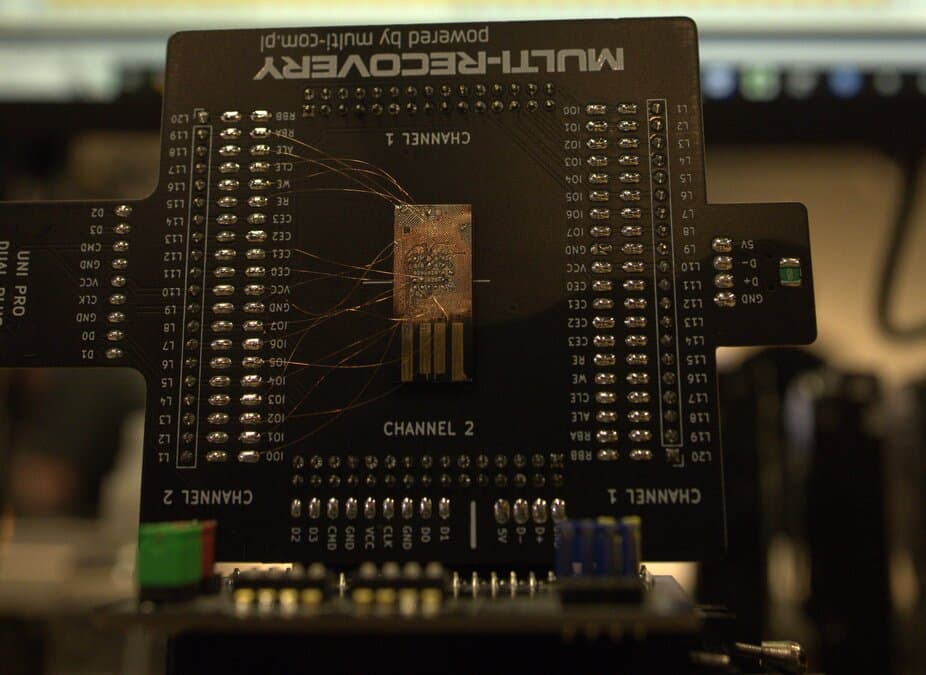

MicroSD data recovery uses a technique called chip-off: the technician sands away the card's protective epoxy, exposes copper test points on the monolithic die, solders fine wires to a spider board adapter, and reads the raw NAND flash through PC-3000 Flash. The raw dump then goes through bad column removal, ECC correction, and XOR descrambling in the order that controller requires, then page reassembly to reconstruct a usable file system. Pricing at Rossmann Repair Group runs $200–$1,500 across 4 tiers, with no charge if the data is unrecoverable.
Why MicroSD Cards Need Chip-Off Recovery
MicroSD cards are built as monolithic flash storage. The controller and NAND memory are sealed together in one tiny inseparable package.
There is no separate memory chip to transplant or read externally.
When the card is damaged or its controller fails, standard card readers cannot communicate with it. The only path to the data is tapping directly into the NAND flash memory interface inside the package.
Full-size SD cards vary by model, and the construction is confirmed on the bench before a route is chosen. See our SD card data recovery page for those cases.
What monolithic recovery requires
Monolithic recovery requires scraping away protective epoxy, locating microscopic pinouts, soldering hair-thin wires, and reading the raw NAND on dedicated lab hardware such as PC-3000 Flash.
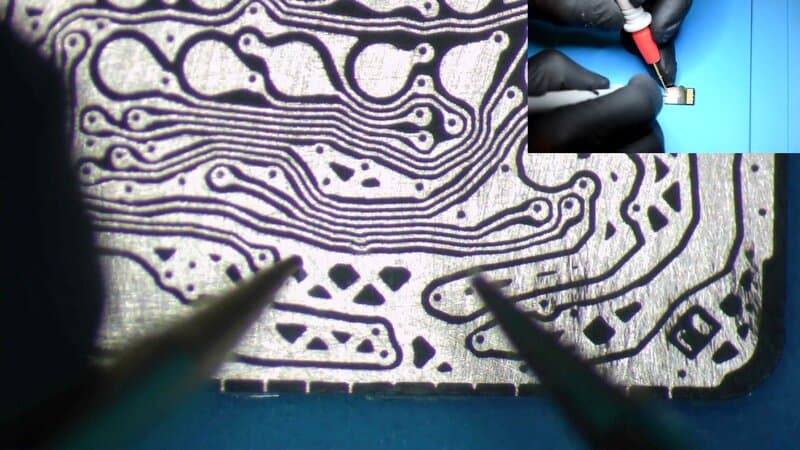
When Recovery Software Can and Cannot Read a MicroSD Card
Recovery software like PhotoRec, Recuva, or R-Studio can only read a microSD card while its controller still presents the card to your operating system as a drive letter. The moment the controller dies or the contacts break, no reader & no software ever sees the card, because no block device is exposed.
If your card still mounts & you only deleted files or ran a quick format, you don't need a lab & you don't need us. Free tools recover that. PhotoRec scans the still-readable file system for orphaned photos & videos at no cost. Try it before you pay anyone, including the $200 simple-copy tier we charge when a healthy card just needs its data moved off.
That changes the second the hardware fails. A controller that no longer enumerates, or a snapped card with severed traces, never hands the operating system a block device, so there is nothing for PhotoRec or R-Studio to scan. No card reader presents the card, & the software sits waiting on a drive that never appears. The same wall stands in front of every flash controller, which is why a failed SSD controller or a dead iPhone NAND chip is a hardware extraction job, not a software one.
On a monolithic card the only remaining path is chip-off: wire into the NAND test points, dump the raw flash through a dedicated NAND reader, then run ECC correction & XOR descrambling in the order that controller requires before reassembling the pages into a file system. That is the work behind our chip-off tier at $1,200–$1,500, & we don't charge it if the data doesn't come back.
MicroSD Recovery Needs No Cleanroom
Some labs advertise a certified ISO 5 cleanroom for every recovery, including flash & microSD cards. That is a billing line, not an engineering requirement.
A clean bench exists to keep airborne particles off bare spinning platters & read/write heads while a mechanical hard drive sits open. A sub-micron speck landing on a platter scores the magnetic surface & destroys data, so head work belongs in a hard drive recovery clean bench filtered to 0.02 micron.
A microSD card has none of that. No platters, no heads, no exposed magnetic media. The whole job is chip-off: sanding the epoxy, soldering to the NAND test points, reading the raw flash through a dedicated NAND reader, then running bad column removal, ECC correction, & XOR descrambling in the order that controller requires, followed by page reassembly in software.
Ordinary room air does nothing to a sealed NAND die. What this work actually needs is microscope time, a steady soldering hand, a flash reader, & a controller-algorithm database covering Phison, Silicon Motion, SanDisk, & Samsung; particle control is irrelevant to it. Our flash & microSD recovery runs $200–$1,500 across 4 tiers, with no charge if the data is unrecoverable.
Chip-Off Recovery Process
- 1
Physical Inspection
Every recovery starts under a microscope. We inspect the card's contact pads for scratches, corrosion, or cracks in the plastic shell. We check whether the controller is responding or if the internal trace connections are severed.
This inspection determines whether a simple contact repair might work or if full chip-off extraction is required.
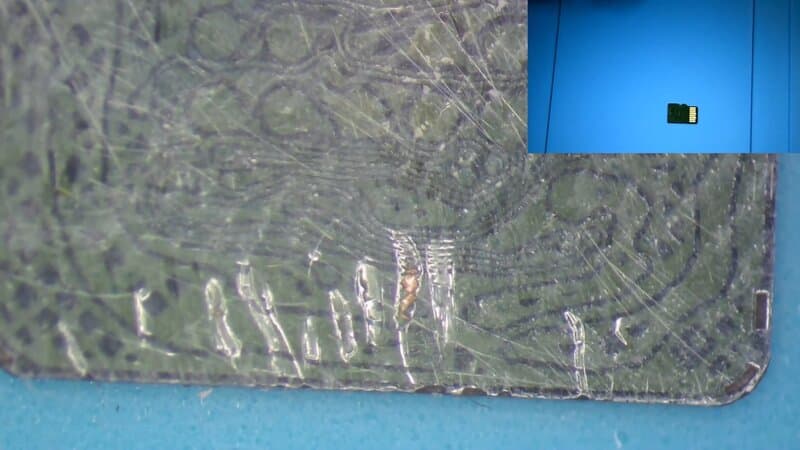
MicroSD card inspection under microscope before recovery. - 2
NAND Interface Exposure
We sand away the protective epoxy coating on the card's underside to reveal the copper test points that connect to the NAND die. This uses fine sandpaper starting at 1000 grit and progressing to 2500 grit to avoid gouging the traces.
One chance only
One slip gouges a trace and renders the data unrecoverable. This decapsulation step can take hours on its own.
- 3
Raw NAND Extraction
With the test points exposed, we solder fine wires to each pad and connect them to a spider board adapter on PC-3000 Flash. The reader sends low-level commands directly to the NAND die, leaving the card's controller out of the path entirely.
The result is a raw memory dump: every page of NAND data, including spare area bytes, read sequentially. A 128 GB card produces a dump that takes hours to complete with multiple verification passes.
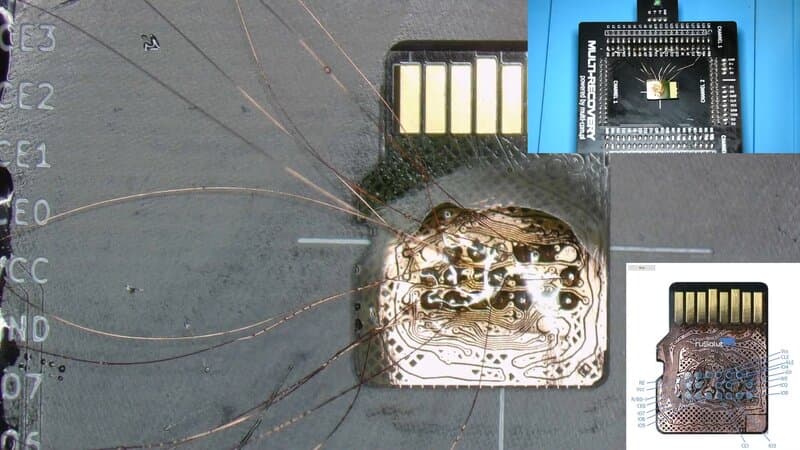
Spider-web wiring from monolithic microSD to PC-3000 Flash adapter: each wire maps to a NAND signal line. - 4
Data Reconstruction
The raw dump is not usable as-is. The controller scrambled the data using proprietary algorithms. We apply four transformations to reconstruct the original file system, in the order that controller family requires:
Bad Column Removal
Digitally realign the raw extracted data to account for defective physical NAND columns that were mapped out and bypassed by the controller during manufacturing. Each controller family uses a different column map.
ECC Correction
Simulate the controller's error correction engine to fix bit errors in each NAND page. Most controllers compute ECC parity over the scrambled data, so correction runs before descrambling; ACE Lab documents ITE, SSS, and AU controllers that need the descrambling first.
XOR Descrambling
Apply the correct XOR key to unscramble the data. Our database covers patterns for Phison, Silicon Motion, SanDisk, and Samsung controllers.
Page Reassembly
Reorder pages and blocks into their original logical sequence, rebuilding the FAT/exFAT file system the card originally used.
After reconstruction, we verify recovered files by opening a sample of photos and videos to confirm they render correctly. The recovered data is delivered on a new storage device.
Technical Terms in MicroSD Recovery
- Monolithic
- A chip design where the controller and NAND memory are separate silicon dies, wire-bonded together and encapsulated under a single protective coating. Most microSD cards use monolithic construction. Unlike PCB-based devices, the components cannot be separated for individual testing or chip-off reading.
- Chip-Off
- A recovery technique that reads NAND flash memory by connecting directly to the silicon die. For monolithic devices, this means exposing internal test points rather than physically removing a chip from a PCB.
- XOR Decoding
- Flash controllers scramble stored data using bitwise XOR operations with a key specific to the controller model. Raw NAND dumps are unreadable until the correct XOR key is applied to reverse the scrambling.
- ECC (Error Correction Code)
- Algorithms (typically BCH or LDPC) used by flash controllers to detect and correct bit errors in NAND pages. During recovery, the technician must replicate the controller's ECC engine to fix errors introduced by NAND wear or read instability.
- Bad Column Removal
- NAND flash dies have defective columns identified and mapped out during manufacturing. The controller bypasses these locations entirely during normal operation. During chip-off reconstruction, the raw dump appears misaligned because the extraction tool reads straight across the die. The recovery software must digitally shift the page layout to account for the bypassed columns.
- Spider Board
- A precision hardware adapter designed to interface with NAND signal lines on a monolithic chip. A precision hardware adapter designed to interface with NAND signal lines on a monolithic chip using microscopic needle probes, eliminating the need for soldering wires directly to the fragile test points. The adapter routes these signals to PC-3000 Flash for data extraction.
Types of MicroSD Failures We Recover
Physical Damage
Severed contact pad traces prevent the card from being detected. We wire directly into the internal test points, bypassing the damaged contacts.
Cards bent, cracked, or snapped in half are recoverable as long as the silicon die is not fractured. We have recovered data from cards broken into two pieces.
NAND flash cells tolerate brief water exposure. We clean the card, resolve shorted components, and perform chip-off extraction if the controller is damaged.
Controller and Logical Failures
Card not detected or showing 0 bytes. The NAND cells are intact but inaccessible through normal interfaces. Chip-off recovery bypasses the failed controller.
The card mounts but freezes, requests formatting, or shows the wrong capacity. Chip-off extraction bypasses the firmware layer entirely.
Heavily used cards develop uncorrectable bit errors. We extract the raw dump and apply ECC correction. Severe degradation limits recovery, but partial recovery is often possible.
For cards that still mount but show missing or corrupted files, we create a forensic image, reconstruct the flash translation layer mapping, and recover files from the rebuilt filesystem. If the filesystem metadata is too damaged, we fall back to file carving using known binary signatures.
Case Study: 128 GB SanDisk MicroSD with Scratched Contacts
A customer sent a 128 GB SanDisk microSD card from a GoPro that stopped being detected. The full recovery is documented in the video embedded here.
Diagnosis
Deep scratches on the gold contact pads had severed several copper traces connecting the card's external interface to the internal NAND. The controller could not communicate with any reader.
Recovery
Sanded down the epoxy coating, identified the pinout, soldered 20+ wires to a spider board, and extracted the raw NAND dump. The controller was a Phison variant requiring XOR decoding before file system reconstruction.
Outcome
Recovered all 1,200+ photos and 20 GB of 4K video. Every video file rendered correctly. Total bench time: approximately 2 days.
Monolithic Flash Challenges
No Standard Pinout
Every monolithic card model has different test point locations and signal assignments. We maintain an internal pinout library and can map new pinouts when a card model is not in our database.
Controller Algorithm Variety
Phison, Silicon Motion, SanDisk, and Samsung each use proprietary XOR keys, ECC implementations, and page ordering schemes. Identifying the correct controller family is the first step in choosing the right reconstruction algorithm.
NAND Density and Error Rates
SLC, MLC, TLC, and 3D TLC NAND have progressively higher bit error rates. Higher-density cards require stronger ECC and more reconstruction passes. TLC cards with heavy wear may have partial recovery limitations.
LDPC Soft-Decision Decoding Sets a Ceiling on Monolithic Recovery
Some monolithic cards stay undecodable after a physically perfect read of the raw NAND. BCH is a hard-decision code: every cell is scored as a firm 1 or 0, so one dump taken at the default reference voltage carries everything the decoder needs, & the correction runs offline on the dump in PC-3000 Flash. LDPC doesn't work that way.
An LDPC decoder reaches its full correction strength only when it is fed soft-bit inputs, per-bit confidence values describing how close a cell's measured charge sits to the boundary between states. That confidence data isn't stored anywhere in the NAND. The controller generates it by re-reading the same page at shifted read-reference voltages, & the opcodes, read-retry tables, & voltage steps behind those re-reads are undocumented & vary by vendor & by firmware revision, so a generic NAND reader can't reproduce them.
The decoding context dies with the controller. Feed an LDPC decoder hard-decision bits alone & its correction strength drops back toward that of the older code, which still clears lightly used pages & doesn't clear heavily worn ones. On a flash card whose controller is dead & whose TLC cells have drifted far, we can hold a complete raw dump of the NAND & still not decode part of it into files.
MicroSD vs USB Flash Drive Recovery
Most microSD cards are monolithic: the NAND die & the controller are wire-bonded inside one epoxy package, so there is no separate memory chip to remove. A USB flash drive is often built the other way, with the NAND in its own TSOP or BGA package soldered to a small board that a technician can desolder & read in a socket. Some USB drives are monolithic too, so the desolder-and-socket route is common but not guaranteed for them.
That construction difference sets the recovery path. On a microSD card the desolder route does not exist, so the only way in is to expose the internal NAND test points, wire them out to a spider-board adapter, read the raw flash through a dedicated NAND reader, then run the same offline reconstruction the discrete route uses. A dead flash-card or USB controller is recovered offline: once the raw NAND is dumped, the flash translation layer is rebuilt in software from the page spare-area metadata, not from anything the failed controller still does. That offline dependence is what separates card & USB work from live SATA & NVMe SSD controller work, where the drive still answers the lab over its own interface.
How Worn NAND Cells Fail in High-Write Cards
High-density 3D-TLC & QLC cards pack three or four bits into a single cell, which narrows the voltage window separating one stored value from the next & caps how many program/erase cycles the cell survives. Continuous-write, high-heat jobs, dashcams, trail cameras, & security recorders, burn through that endurance budget quickly. The same wear ceiling limits any high-capacity flash media, including full-size SD cards.
Charge-Retention Loss
Worn cells leak trapped charge, & a card left powered off for months drifts fastest. As threshold voltages sag below the read reference, bits that were written correctly read back wrong.
Read-Disturb Bit-Flips
Reading one page nudges the charge on neighboring cells. On a heavily read card those small shifts accumulate into bit-flips the controller never wrote, concentrated around the hottest read paths.
Uncorrectable Errors
Once enough cells in a page drift, the error count passes what the controller ECC can fix. The card then starts returning read errors, reports the wrong capacity, or stops enumerating. A card that reported the wrong capacity from the day you bought it is a different problem: a counterfeit microSD card is built to overstate its size.
This is why re-reading a failing card in a consumer reader, or letting scanning software pound on it, makes a worn card worse: every extra read pass nudges more cells past the point ECC can recover. Our reconstruction works the other direction, re-sensing drifted cells at shifted read-reference voltages & applying the BCH or LDPC correction that matches the controller, so bits that dropped just under the read threshold come back within margin. Cells whose charge has leaked too far are gone, which is why a heavily worn TLC or QLC card can be a partial recovery, & why the same wear ceiling in high-write USB flash drives makes an early, careful read matter.
Why DIY MicroSD Chip-Off Attempts Fail
DIY microSD chip-off fails at four points: decapsulation sands through a copper trace, the wire-out is guesswork without a per-model pinout, the raw dump stays unreadable without the controller's XOR key & ECC engine, & consumer tools ship with none of these. Each one alone loses the data permanently.
The test points on a monolithic card sit microns below the epoxy, so decapsulation is the first place a DIY attempt dies. Hand-sanding without staged grits & microscope feedback cuts straight through a copper trace, & a severed conductor is gone; you can't solder back metal you've ground into dust. Our bench steps from 1000 to 2500 grit under magnification to keep from gouging the traces.
Every monolithic model carries a different test-point map, so without the per-model pinout the wire-out is blind. Soldering 20-plus hair-thin wires to the wrong signal lines reads noise instead of NAND, & mapping a new model takes microscope time plus a tracked pinout library, the same per-family discipline that hard drive head matching demands of donor stock.
A raw dump stays unreadable until three controller-specific transforms run in order: bad-column realignment, a BCH or LDPC ECC engine matched to the controller family, & the correct XOR key. Consumer recovery software has none of these; it expects a clean logical volume, not scrambled NAND pages padded with spare-area bytes. It is the same controller-reconstruction problem behind full-size SD card recovery & every other monolithic package.
File carving is the fallback, not the goal. When filesystem metadata survives reconstruction, we rebuild the FAT or exFAT directory & return files with their names & folder structure intact. Carving by binary signature only comes in when that metadata is unrecoverable, & it returns raw photos & videos stripped of filenames. A DIY dump that skipped the XOR & ECC stages carves nothing usable, because the bytes are still scrambled.
Pricing
Low complexity
Simple Copy
Your flash drive or SD card works, you just need the data moved off it
Functional media; data transfer to new storage
Rush available: +$100
$200
3-5 business days
Low complexity
Most Common
File System Recovery
Your flash drive or SD card isn't showing up, but it's not physically damaged
File system corruption. Visible to recovery software (R-Studio, UFS) but not to OS
Starting price; final depends on complexity
$300–$600
2-4 weeks
Medium complexity
PCB Repair
Your flash drive or SD card has shorted components or won't power on
PCB issues: simple shorts, failed components on the drive's circuit board
May require a donor drive (additional cost)
$600–$900
3-6 weeks
High complexity
Chip-off Data Recovery
Your flash drive or SD card needs physical NAND chip extraction to recover the data
NAND chip extraction via soldering, pin-out identification, and raw data reconstruction
50% deposit required
50% deposit required
$1,200–$1,500
4-8 weeks
Hardware Repair vs. Software Locks
Our "no data, no fee" policy applies to hardware recovery. We do not bill for unsuccessful physical repairs. If we replace a hard drive read/write head assembly or repair a liquid-damaged logic board to a bootable state, the hardware repair is complete and standard rates apply. If data remains inaccessible due to user-configured software locks, a forgotten passcode, or a remote wipe command, the physical repair is still billable. We cannot bypass user encryption or activation locks.
No data, no fee. Free evaluation and firm quote before any paid work. Full guarantee details. Chip-off recovery requires a 50% deposit because the extraction process is destructive to the original media.
- Rush fee
- +$100 rush fee to move to the front of the queue
All prices are plus applicable tax.
No Data, No Fee
If we cannot recover your data, you pay nothing. See our no-fix-no-fee policy.
Turnaround
Simple copies: 3-5 business days. PCB repair: 3-6 weeks. Chip-off recovery: 4-8 weeks. Complex monolithic cases may take longer. Rush service available: +$100 rush fee to move to the front of the queue.
Unrecoverable Cases
If NAND cells are physically destroyed or degraded beyond what ECC can correct, we tell you promptly and do not charge.
Data Recovery Standards & Verification
Our Austin lab operates on a transparency-first model. We use industry-standard recovery tools, including PC-3000 and DeepSpar, combined with strict environmental controls to maintain drive integrity. This approach allows us to serve clients nationwide with consistent technical standards.
Localized Clean Zone
Open-drive work is performed in a 0.02 micron ULPA-filtered laminar clean bench.
Transparent History
Serving clients nationwide via mail-in service since 2008. Our lead engineer holds PC-3000 and HEX Akademia certifications for hard drive firmware repair and mechanical recovery.
Media Coverage
Our repair work has been covered by The Wall Street Journal and Business Insider, with CBC News reporting on our pricing transparency. Louis Rossmann has testified in Right to Repair hearings in multiple states and founded the Repair Preservation Group.
Aligned Incentives
Our "No Data, No Charge" policy means we assume the risk of the recovery attempt, not the client.
Technical Oversight
Louis Rossmann
Our engineers review all lab protocols to maintain technical accuracy and honest service. Since 2008, his focus has been on clear technical communication and accurate diagnostics rather than sales-driven explanations.
We believe in showing the bench rather than just describing it. Open-drive work runs on a 0.02 micron ULPA-filtered laminar clean bench, and we filmed it.
See the particle counter test at the benchBefore You Ship Your Card
Do NOT:
- Try to open, sand, or repair the card yourself; one mistake destroys the data permanently
- Run data recovery software on a physically damaged card
- Keep inserting it into different readers or devices
- Apply heat, freeze the card, or clean contacts with abrasives
Do:
- Place the card in a rigid container (pill case, SD holder)
- Store in a cool, dry location away from magnets
- Include a note describing how the failure occurred
- Follow our shipping instructions for safe transit
Frequently Asked Questions
Can you recover data from a physically broken microSD card?
What is the difference between SD card recovery and microSD recovery?
Why is monolithic flash recovery more expensive than standard drive recovery?
Can you recover data from a microSD card that is not detected?
How long does microSD data recovery take?
What does chip-off recovery mean for microSD cards?
Is data still on a dead microSD card?
How should I ship a microSD card for recovery?
Since 2008
Established
As Featured In
Related services
Related Recovery Services
Full-size SD cards with PCB-based designs
Monolithic and PCB-based USB drives
NAND flash recovery from iOS devices
NVMe, M.2, SATA solid state drives
Mechanical HDD recovery
Complete service catalog
Send us your microSD card
Free evaluation. No data, no charge. Mail-in from anywhere in the U.S.