
Data Recovery Education
Why Does Data Recovery Cost Money When Recuva Is Free?
PC-3000 is the hardware that sends vendor-specific commands to a drive's firmware. This page explains what it is, how it works, and what it costs to operate.
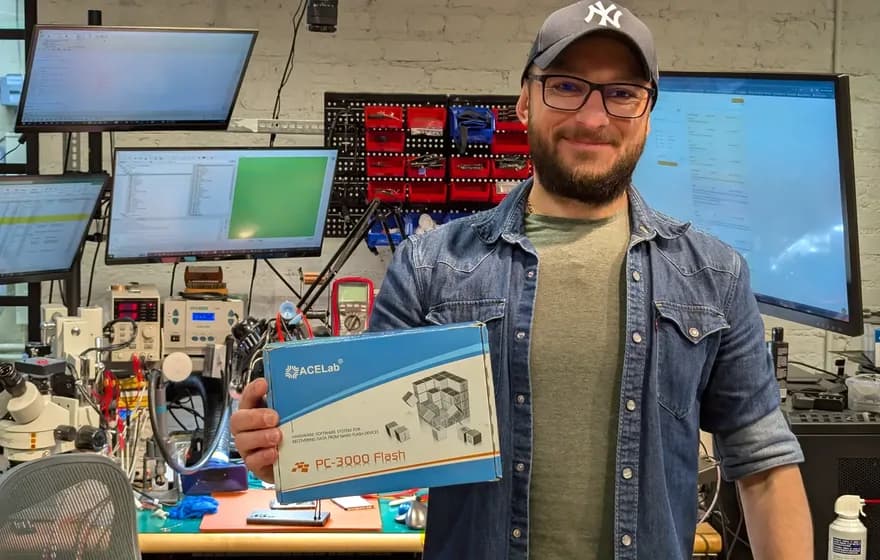

What Is PC-3000?
PC-3000 is a hardware and software system manufactured by ACE Laboratory in Russia (now operating from the EU). The PC-3000 Express consists of a PCI Express card, specialized cables, power control circuitry, and proprietary software that together allow a technician to communicate with hard drive firmware using vendor-specific commands. Technicians and search results use three lexical spellings interchangeably: PC-3000, PC 3000, and PC3000; all refer to the same ACE Lab firmware-level recovery hardware described below.
The module-level bench reference covers the hardware interface and the per-family software modules a technician drives during a recovery.
The product line includes the PC-3000 Express (the flagship PCIe card), the PC-3000 Portable III (standalone portable unit with native NVMe/PCIe SSD recovery support), and PC-3000 SSD (controller-specific firmware access for SATA and NVMe SSDs).
Each system pairs with Data Extractor, ACE Lab's imaging software that works alongside the hardware to read data from drives that would be inaccessible through normal means.
 PC-3000 by ACE Lab
Our hard drive and SSD recovery is powered by PC-3000. It's a high-quality product, and it's what makes our work possible.
PC-3000 Product Line
- Express: PCIe card, fastest imaging
- Portable III: Standalone portable unit, supports SATA, PATA, USB, and NVMe PCIe storage
- Portable PRO: A second standalone portable unit, run in this lab alongside the Portable III
- SSD: Controller-specific firmware access for SATA and NVMe SSDs. The NVMe half of that comes from the PC-3000 SSD Extended add-on, a software layer that reaches NVMe controller firmware during NVMe drive recovery.
Why PC-3000 Exists: Vendor Specific Commands
The ATA specification (the protocol your computer uses to talk to hard drives) reserves a set of command codes for "vendor specific" use. Each manufacturer uses these codes differently to access factory diagnostic modes, read and write firmware modules, and control low-level drive behavior.
Allowing arbitrary firmware writes would be a security risk and could brick drives.
PC-3000's hardware bypasses these restrictions. The PCIe card implements its own SATA controller, and the software contains decades of reverse-engineered knowledge about what commands each drive family accepts. ACE Lab employs engineers who analyze new drive families and add support to the software.
Factory Mode vs User Mode
- User Mode
- Hard drives boot in "user mode" where they respond to standard read/write commands.
- Factory Mode / Technological Mode
- PC-3000 can force drives into "factory mode" or "technological mode" where the firmware itself becomes accessible. In factory mode, a technician can read diagnostic logs, modify firmware modules, rebuild corrupted translation tables, and bypass damaged components.
How Hard Drive Firmware Works
Every modern hard drive contains an embedded computer running proprietary firmware. As Gillware explains in their firmware overview, the firmware zone stores calibration data, defect lists, and translation information unique to each individual drive.
ROM Chip (PCB)
A small flash chip on the circuit board containing boot code and drive-specific calibration parameters called "adaptives." If the PCB dies, these adaptives must be transferred to a donor board or the drive will not initialize correctly.
Flash Memory
Some firmware modules load from flash memory on the PCB.
Service Area (Platters)
Reserved tracks on the platters themselves store the bulk of the firmware: translation tables, defect logs, SMART data, and head calibration. Corruption here often makes the drive undetectable through normal means.
Firmware Failures PC-3000 Addresses
Each of these firmware failures is well-documented in professional data recovery communities.
| Firmware Failure | Symptom | PC-3000 Response |
|---|---|---|
| Seagate 7200.11/7200.12 BSY State | The drive never becomes ready to accept commands. | PC-3000 connects to the drive's serial diagnostic port at 38400 baud, opens the factory terminal, and issues commands to clear the corrupted SMART data or rebuild the translator. |
| Western Digital Slow Responding / Module 32 Corruption | The drive slows to a crawl or stops responding entirely. | PC-3000 accesses the Service Area, backs up all firmware modules, clears the corrupted entries from module 32, and writes the repaired modules back. |
| Head Swap Adaptive Parameters | Donor heads typically click or fail to track properly without transferred calibration parameters. | PC-3000 reads the adaptive parameters from the patient drive's ROM, extracts or calculates the necessary values, and writes adjusted parameters to work with the donor heads. |
| Phison SATAFIRM S11 Firmware Failure | The controller reports itself as "SATAFIRM S11" with 0 bytes capacity. The drive is alive but has no working firmware to load. | PC-3000's SSD utility issues Phison vendor-specific commands to inject a working firmware loader into the controller, bypassing the corrupted service area. |
| Translator Table Corruption | The drive may report 0 bytes capacity, show the wrong size, or appear completely uninitialized despite containing intact data. | PC-3000 can rebuild translator tables, which puts the logical-to-physical mapping back together. |
Seagate 7200.11/7200.12 BSY State
A firmware bug in certain Seagate drives causes the microprocessor to hang during initialization, leaving the drive in a permanent "busy" state. The platters spin, but the drive never becomes ready to accept commands.
PC-3000 connects to the drive's serial diagnostic port at 38400 baud, opens the factory terminal with a Ctrl+Z break (these older families ship the terminal unlocked; modern Seagate drives require a Boot Code RAM patch first), and issues commands to clear the corrupted SMART data or rebuild the translator. The specific procedure varies by firmware revision.
Technical discussion: HDDGuru Forum: Seagate BSY fix procedures | MSFN thread: The Solution for Seagate 7200.11 HDDs
Western Digital Slow Responding / Module 32 Corruption
Western Digital drives maintain a "relo-list" in firmware module 32 that tracks sectors needing reallocation. When this module fills or becomes corrupted, the drive slows to a crawl or stops responding entirely.
PC-3000 accesses the Service Area, backs up all firmware modules, clears the corrupted entries from module 32, and writes the repaired modules back. The drive then operates normally for imaging.
Head Swap Adaptive Parameters
When a drive's read/write heads fail and require replacement from a donor drive, the new heads have different physical characteristics than the originals. Each head assembly is calibrated at the factory, and these calibration parameters ("adaptives") are stored in the ROM chip.
PC-3000 reads the adaptive parameters from the patient drive's ROM, extracts or calculates the necessary values, and writes adjusted parameters to work with the donor heads. Seagate calls these SAP/RAP/CAP; Western Digital stores them in module 47. Without this step, donor heads typically click or fail to track properly.
Technical discussion: Donor Drives: ACE Lab Partnership (adaptive parameters explained) | ACE Lab: Official PC-3000 support
Phison SATAFIRM S11 Firmware Failure
SSDs using the Phison PS3111-S11 controller store their firmware in the same NAND flash that holds user data. When the firmware area degrades or a power loss corrupts the flash translation layer mid-write, the controller boots into a hardcoded fallback mode: it reports itself as "SATAFIRM S11" with 0 bytes capacity. The drive is alive but has no working firmware to load.
PC-3000's SSD utility issues Phison vendor-specific commands to inject a working firmware loader into the controller, bypassing the corrupted service area. From there, PC-3000 rebuilds the translation table from surviving page metadata. Some Kingston A400 and Patriot Burst drives use this controller.
Translator Table Corruption
The translator converts logical block addresses (what your OS requests) to physical locations on the platters. When this table becomes corrupted, the drive may report 0 bytes capacity, show the wrong size, or appear completely uninitialized despite containing intact data.
PC-3000 can rebuild translator tables, which puts the logical-to-physical mapping back together. This is time-consuming but often recovers drives that otherwise appear empty.
Technical discussion: Datarecovery.com: Why is my hard drive showing wrong capacity | Teel Technologies: ACE Lab PC-3000 Training Curriculum
What PC-3000 Cannot Fix
PC-3000 is powerful, but it is not magic. These limitations are inherent to the technology.
| Limitation | Why PC-3000 Cannot Fix It |
|---|---|
| Physical Platter Damage | If the magnetic coating is scratched, gouged, or delaminated, no firmware tool can recover data from those areas. PC-3000 can work around damaged regions, but it cannot read what is physically destroyed. |
| Hardware Encryption Without Keys | Self-encrypting drives (SEDs) and hardware-encrypted external drives store data encrypted on the platters. Without the encryption key (often tied to the original controller), the raw data is unreadable regardless of firmware access. |
| TRIM'd SSD Data | A TRIM command makes the controller mark the underlying flash pages invalid, and garbage collection erases them later. Unlike hard drives where deleted data persists until overwritten, TRIM'd data is often unrecoverable at the hardware level. |
| Unsupported Drive Families | ACE Lab continually adds support for new drives, but there is always a lag. Brand-new drive models, proprietary controllers (like some Apple configurations), and exotic enterprise drives may lack full support. |
The Investment Behind Professional Recovery
Understanding why professional data recovery costs what it does starts with understanding the equipment and expertise required.
ACE Lab does not publish list prices; PC-3000 systems are quoted to labs directly. A PC-3000 Express with Data Extractor and the PC-3000 SSD module is a capital purchase, and that's before a lab buys a single donor drive. Annual software updates are an ongoing subscription on top of that.
Donor drives are consumables. Head swaps require exact-match donors; not just the same model, but often the same firmware revision, head map, and manufacturing site. A busy lab maintains thousands of donors.
The learning curve is steep. ACE Lab offers multi-day training courses, and working technicians typically report years of daily use before handling complex firmware corruption confidently. The software assumes you understand hard drive architecture; it provides capabilities, not hand-holding.
What a Lab Has to Buy
- PC-3000 hardware: quoted directly by ACE Lab; a capital purchase, not consumer software
- Data Extractor: the imaging and file extraction layer that rides on the PC-3000
- PC-3000 SSD: a separate module for controller-level SSD work
- Clean bench: ULPA-filtered laminar flow for open-drive mechanical work
- Donor inventory: consumable matched drives, restocked continuously
- Training: ACE Lab courses plus years of bench time
- Annual updates: ongoing software subscription to keep pace with new drive families
None of this exists in a consumer recovery utility, which is why the two are not interchangeable.
Beyond PC-3000: Full Lab Equipment
PC-3000 handles firmware-level access, but data recovery requires a full signal chain of companion equipment. Each tool addresses a different failure domain: mechanical, thermal, electrical, or physical board damage. Here is what our Austin lab operates alongside PC-3000.
DeepSpar Disk Imager
It controls the ATA/SATA bus at the hardware level: resetting drives that lock up mid-read, managing timeout thresholds per-sector, and selectively skipping unstable regions to return for later passes. PC-3000's Data Extractor handles firmware-level imaging; DDI handles drives that freeze, hang, or produce read errors during the physical imaging process.
For drives with large bad sector regions (common after head crashes or platter scoring), DDI's multi-pass strategy images stable areas first, then makes progressively more aggressive attempts on damaged regions. This prevents a single bad read from stalling the entire imaging session for hours.
Hakko FM-2032 Microsoldering Station
Board-level recovery on SSDs, MacBooks, and Surface devices requires replacing individual surface-mount components: PMIC chips, capacitors, and resistors measured in fractions of a millimeter. We use Hakko FM-2032 irons attached to FM-203 or FX-951 base stations. The composite heating element sits inside the tip itself, giving fast thermal recovery and precise temperature control at the joint.
This precision matters when working near NAND packages. Excessive heat during rework can shift threshold voltage distributions in adjacent flash cells, degrading data retention. The Hakko's closed-loop thermal control keeps heat localized to the target component.
Hot Air Rework Station
Used alongside the Hakko for removing and replacing BGA (Ball Grid Array) packages: storage controllers, NAND chips, and power management ICs that cannot be accessed with a soldering iron. Controlled airflow at calibrated temperatures reflows solder balls without disturbing adjacent components. Required for chip-off procedures where individual NAND packages must be desoldered from the PCB, read on a separate programmer, and the data reconstructed from raw page dumps.
The hot air work runs on an Atten 862 hot air rework station & a set of Zhuo Mao precision BGA rework stations. A BGA package hides its solder balls underneath the package body, where no iron tip can reach them.
FLIR Thermal Imaging Camera
When a drive or SSD board draws excessive current and will not initialize, the fault is often a shorted component on a power rail. Visually inspecting a board with hundreds of surface-mount components for a single short is impractical. FLIR thermal imaging identifies the failed component in seconds: apply bench power supply voltage to the board, and the shorted component heats up relative to its surroundings.
This is standard diagnostic procedure for Surface tablet recovery, MacBook board repair, and any SSD where the controller or PMIC has failed.
0.02 Micron ULPA-Filtered Clean Bench
Hard drive head swaps and platter transplants require a particle-controlled environment. Our clean bench is a 0.02 µm ULPA-filtered laminar flow bench. For context, a human hair is roughly 70 micrometers.
As explained on our cleanroom vs. laminar flow bench page, a full cleanroom is unnecessary for SSD work. For hard drives, the laminar flow bench provides the same functional protection at the point of use where the platters are exposed.
Frequently Asked Questions
Is PC-3000 the only professional data recovery tool?
What percentage of recoveries actually need PC-3000?
Why is reverse-engineering drive firmware legal?
How does PC-3000 compare to free tools like ddrescue?
Our Recovery Services
We use PC-3000 Express alongside DeepSpar and clean bench facilities in our Austin lab. Same equipment as the big labs, no evaluation fees.
See our PC-3000 recovery service in the Austin labDIY Recovery Guide
If your drive mounts and reads (even slowly), you may not need firmware-level tools. Our free ddrescue guide walks through imaging drives that still respond to standard commands.
Read the free DIY guideRelated Symptoms
Since 2008
Established
As Featured In
Related services
Data Recovery Services Using PC-3000
Nationwide Coverage
Nationwide Mail-In Data Recovery Service
We serve all 50 states with secure mail-in data recovery. Ship your failed drive to our Austin lab and we'll diagnose it within 24-48 hours. All work is performed in-house at our Austin, TX lab. There are no other locations and no outsourcing.
Popular Service Areas
Need professional recovery?
Free evaluation. No data, no charge. Mail-in from anywhere in the U.S.