
Is Stellar Data Recovery Safe?
Stellar Data Recovery is a functional utility for recovering deleted files from healthy drives. Their website publishes advice that contradicts established hardware engineering, including instructions to place water-damaged phones in rice and claims that factory-reset iPhone data is "recoverable by hackers." Independent testing documents repeated software crashes and mediocre file recovery rates. Professional engineers consistently rank it among the least effective tools in its category.

What Dangerous Advice Does Stellar Publish on Their Website?
Stellar publishes instructions to place water-damaged phones in rice (which does not remove liquid from under BGA packages), claims that factory-reset iPhone data is "recoverable by hackers" (contradicting AES-256 encryption architecture), and states that Android phone recovery requires cleanroom facilities. Phones are solid-state devices with no exposed platters; cleanrooms are irrelevant to phone repair.
The following findings are from the Stellar website. Each entry includes the verbatim quote, a screenshot, and the engineering reality. These findings are also documented on our documented data recovery myths with evidence page.
Dangerous Liquid Damage Advice
Instructions that accelerate electrolytic corrosion on water-damaged devices instead of mitigating it.
Can rice fix a water-damaged phone?
“drying your phone by keeping it in a bag of uncooked rice or silica gel”

Consequence: Every hour a water-damaged phone sits in rice is an hour of unchecked corrosion dissolving copper traces. By the time the phone is removed, the damage is far worse than it was at the time of the liquid event.
Mobile Recovery Fabrications
Claims about post-reset data recovery that contradict the cryptographic architecture of modern smartphones.
Is factory-reset iPhone data recoverable by hackers?
“Your iPhone data after factory reset is still recoverable by hackers.”
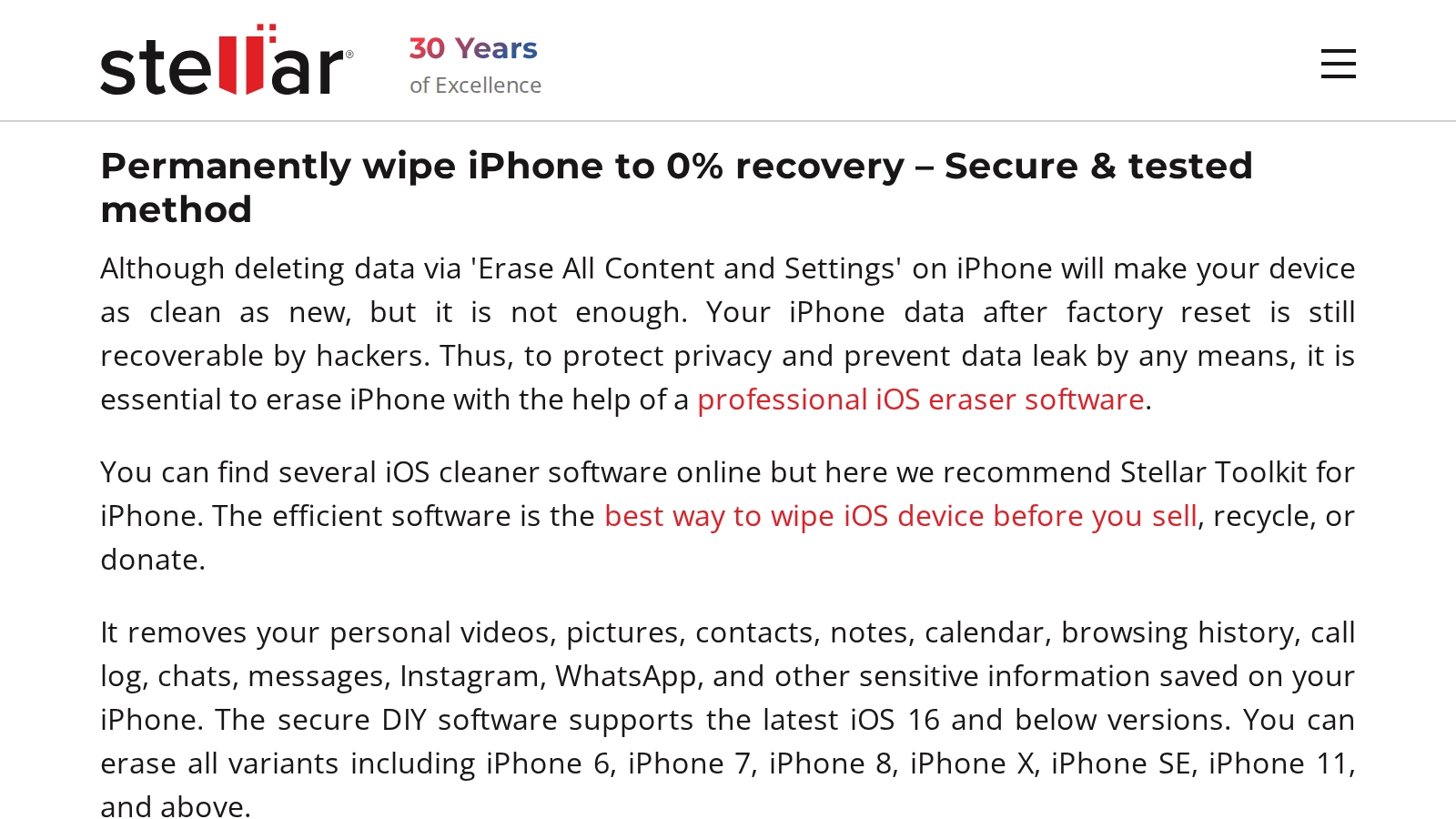
Consequence: Users purchase unnecessary erasure software based on a fabricated security threat. The factory reset already destroyed the encryption keys; no additional software changes that outcome.
Misleading Infrastructure Claims
Fabricated facility requirements that create artificial barriers to recovery or justify inflated pricing.
Does Android phone recovery require a cleanroom?
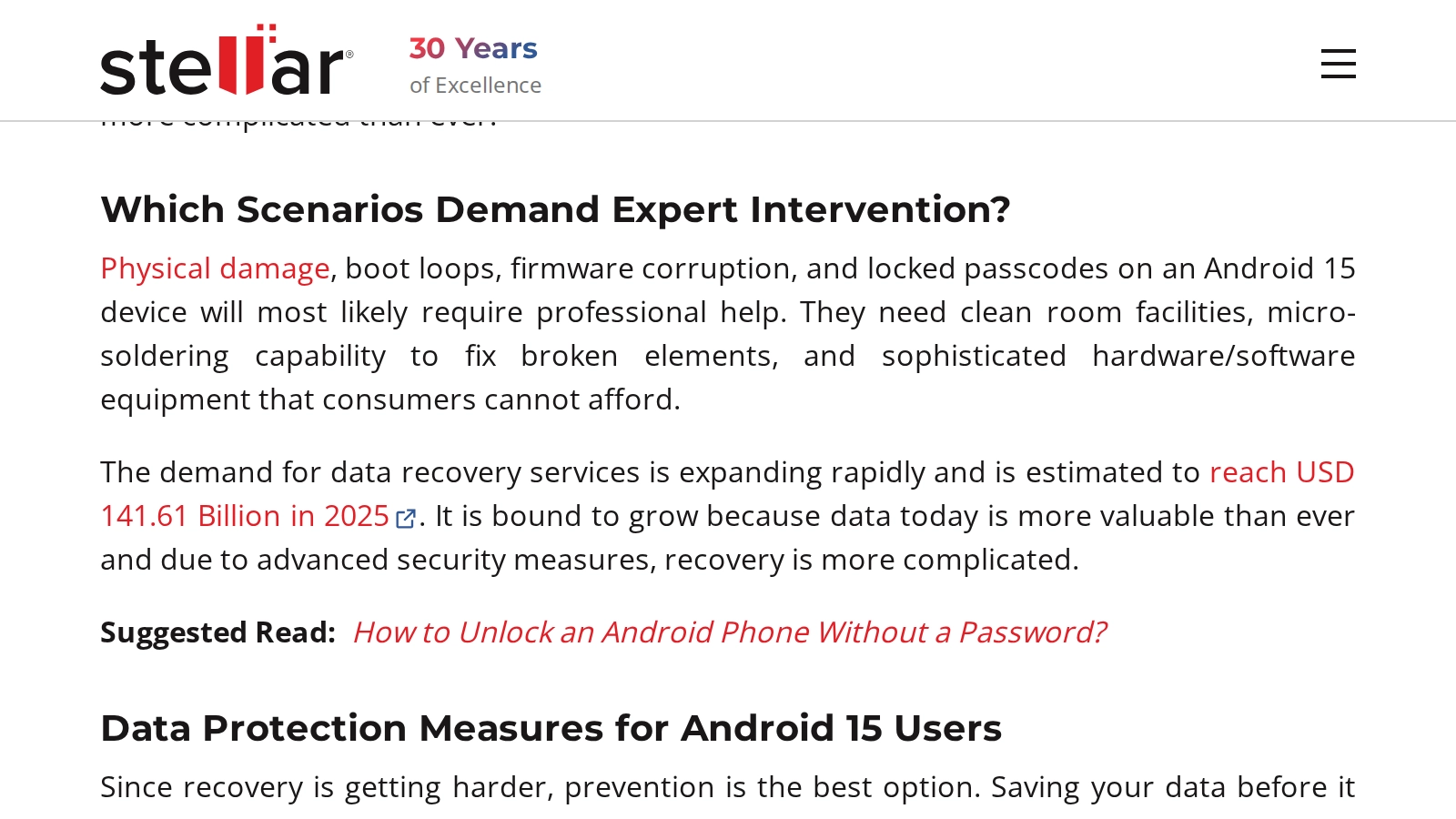
Consequence: Users overpay for unnecessary cleanroom facilities or avoid recovery entirely based on fabricated infrastructure requirements. Android phone recovery does not require particle filtration.
What Do Independent Users Report About Stellar?
Independent users on Reddit, Trustpilot, and r/pcmasterrace report a consistent pattern: the free scan displays file names and thumbnails from surviving MFT metadata, but after payment, recovered files are frequently corrupt or zero bytes. Cancellation requests are stonewalled through cyclical ticketing systems, and negative feedback is suppressed on sponsored platforms.
The following patterns are documented across independent platforms including r/datarecovery, r/AskADataRecoveryPro, r/pcmasterrace, and Trustpilot. These are user reports attributed to their sources, not assertions made by this lab.
Auto-Renewal and Cancellation Obstruction
A detailed breakdown on r/AskADataRecoveryPro documents four distinct billing and support issues encountered by a single user. All quotes below are from the same thread.
Hidden auto-renewal at checkout:
“1st - AUTO renewal subscription after check out (WTF?). I normally don't pay too much detail to the receipts, but luckily I did this time as I noticed they did automatic renewal for me. This was never an option to check during checkout.”
No cancellation path:
“Even you e-mail them, they send you back to the ticket service center, and there's no linkage to any page that said CANCEL.”
Cancellation tickets closed without action:
“When you submit a ticket, they cancel my subscription ticket just because I have other data recovery ticket going on. Seriously WTF? They are two separate issues.”
Per-file upselling after software failure:
“Software does not perform as expected. I purchase the software to repair them. So I sent them two sample files which has failed to repair. And they are asking for $99 additionally for EACH file.”
Source: r/AskADataRecoveryPro (full thread )
The Preview Bait-and-Switch
Stellar's free scan reads surviving Master File Table metadata (file names, timestamps, embedded thumbnails) and displays them as "recoverable" files. The MFT occupies a small, localized region of the disk and often survives even when the actual file data is damaged or TRIM-erased. The software displays these intact metadata entries as proof the data is intact, inducing a $89.99+ purchase. After payment, the software attempts to read the actual payload sectors, which may be damaged, overwritten, or electrically erased. The result is corrupt or 0-byte files.
“Hey any update? I bought a license because I saw my photos too in the preview. But when I tried to get them everything was 0 bytes.. I really don't know what to do”
Professional Engineer Consensus
Data recovery professionals on r/datarecovery and r/AskADataRecoveryPro consistently rank Stellar among the least effective tools in its category. The professional consensus cites simplistic file carving algorithms, documented software instability, and pricing that exceeds superior alternatives.
“Those 'top 10' lists are almost all sponsored by the tools in the list and not actually based on real world use. Stellar is actually among the worst tools out there, along with EaseUs, Minitool, RecoverIT...”
“DMDE, UFS Explorer - good tools with 'bad' marketing. You'll rarely see them anywhere other than Reddit and professional communities. The tools are pretty solid tho. Recoverit, Stellar, Minitool, etc. - 'good' marketing, unimpressive performance”
“Use another tool... R-Studio or Recovery Explorer are both MUCH better tools... and for far less money”
“[Expert 1]: Because it's just trash software. Doesn't do what is supposed... [Expert 2]: Because it's junk. Hey, a broken clock is right twice a day”
Censorship of Consumer Warnings
Users report that negative feedback about Stellar is suppressed on platforms where the company holds sponsorship relationships. This breaks the organic feedback loop that would otherwise protect consumers from inadequate products.
“I am only uploading it here, because when I try to comment and warn people on the YouTube video that I watched and that recommended it to me - my comment get deleted by the YouTuber whose Stellar sponsoring... They are scammers who pretend to be nice. In my case: PayPal ruled in my favor and helped me out after I sent them screenshots of chats”
When Does Stellar Data Recovery Actually Work?
Stellar Data Recovery works for logical file recovery on physically healthy drives. If the storage device is detected by BIOS, makes no abnormal sounds, and the deleted data has not been overwritten or TRIM-erased, the software can locate and recover files by scanning file system metadata and unallocated disk space.
The software scans NTFS Master File Table entries, FAT32 directory structures, HFS+ catalog records, APFS, partition tables, and raw sectors for recognizable file signatures. It works when:
- You accidentally deleted files on a healthy drive (no hardware failure)
- You formatted a partition where TRIM has not yet executed (HDDs or SSDs with TRIM disabled)
- The drive is detected by BIOS/UEFI with its correct model number and capacity
- The drive makes no unusual sounds (clicking, beeping, grinding) when powered on
Stellar offers products for Windows, macOS, iOS, and Android recovery. The Professional license costs approximately $89.99/year. The free version caps recovery at 1 GB.
In these scenarios, Stellar, R-Studio, DMDE, and similar tools are appropriate starting points. Professional lab recovery would be unnecessary overhead for a logical failure on a healthy drive.
How Does Stellar Pricing Compare to Professional Lab Recovery?
Stellar and professional lab recovery address different failure types and are not interchangeable. Software handles logical failures on healthy drives where the hardware can service read commands. Lab recovery handles hardware failures where the device has broken down, including board-level microsoldering for dead phones that no software can access.
| Service | Stellar Professional | Rossmann HDD | Rossmann SSD | Rossmann iPhone |
|---|---|---|---|---|
| Starting price | $89.99/yr | From $100 | From $200 | From $500 |
| Licensing | Annual subscription | One-time fee per device | ||
| Diagnostic fee | N/A (software scan) | Free | ||
| Handles hardware failure | No | Yes (head swap, firmware repair, NAND extraction, microsoldering) | ||
| No-data-no-fee guarantee | Money-back (conditions disputed) | No data, no recovery fee | ||
| Published pricing | Yes | Yes, published pricing tiers | ||
Stellar pricing from stellarinfo.com as of March 2026. Rossmann pricing from published tiers. HDD from $100, SSD from $200, iPhone from $500.
When Should You Use Software vs. a Professional Lab?
Software recovery operates through the operating system's standard storage interface. If the drive hardware can service read commands, software works. If the hardware has failed (the drive clicks, does not spin, or is not detected by BIOS), no software can extract data. The drive requires physical intervention: head replacement, firmware repair, or direct NAND chip reading.
| Failure Type | Software (Stellar, R-Studio, etc.) | Professional Lab |
|---|---|---|
| Accidental deletion (no TRIM) | Functional | Functional |
| Formatted partition (no TRIM) | Functional | Functional |
| Clicking/grinding drive | Destructive (forces dying heads across platters) | Functional (head swap in clean bench) |
| Liquid-damaged phone | Destructive (USB power accelerates corrosion) | Functional (microsoldering required) |
| BitLocker (lost key) | Non-functional | Non-functional |
| SSD deletion (TRIM active) | Non-functional | Non-functional |
For scenarios where both software and lab recovery are functional, software is the more cost-effective path. For hardware failures, no software can help. To compare professional alternatives to Stellar for hardware failure scenarios, see our detailed alternative page.
What Are the Most Common Questions About Stellar Data Recovery?
Common questions about Stellar Data Recovery focus on whether the software is safe to install, why professional engineers rank it among the least effective tools in its category, whether it can recover data from factory-reset phones, and why obtaining refunds often requires filing credit card chargebacks. The answers depend on the failure type and the device's physical state.
Is Stellar Data Recovery safe to use?
Does Stellar actually recover data?
Does Stellar refund if recovery fails?
Is Stellar Data Recovery a virus or malware?
Can Stellar recover photos after a factory reset?
Can Stellar fix a water-damaged phone?
Why do data recovery professionals not recommend Stellar?
Is Stellar Data Recovery free?
Need Professional Data Recovery?
Free evaluation. No diagnostic fees. No data, no recovery fee. HDD recovery from $100. SSD recovery from $200. iPhone recovery from $500.
Since 2008
Established
As Featured In
Related services