
Hard Drive Recovery Specialist
Every recovery is done in-house at our Austin, TX lab; this is a nationwide mail-in hard drive recovery service, so you ship the drive to one address and one team works it from diagnosis to imaging. We handle consumer, NAS, and enterprise nearline drives, including helium-sealed models. Mechanical head swaps, firmware and Service Area repair, platter cleaning, and helium refill all happen on-site. Standard drives have five published pricing tiers, from $100–$2,000, the same tiers as our hard drive data recovery service.
Sealed helium drives are on their own price list, $200–$5,000+. When a head swap or platter repair opens one, we refill it with helium. That adds $400–$800, and the donor has to be an exact match. Helium drive prices

What Is a Hard Drive Recovery Specialist?
A hard drive recovery specialist repairs the drive itself, not just the file system. That means head swaps from matched donors, firmware and Service Area rebuilds on PC-3000, platter cleaning, and helium refill, all done in-house. We publish five pricing tiers from $100–$2,000 and run every case at one Austin, TX lab.
What Defines a Hard Drive Recovery Specialist?
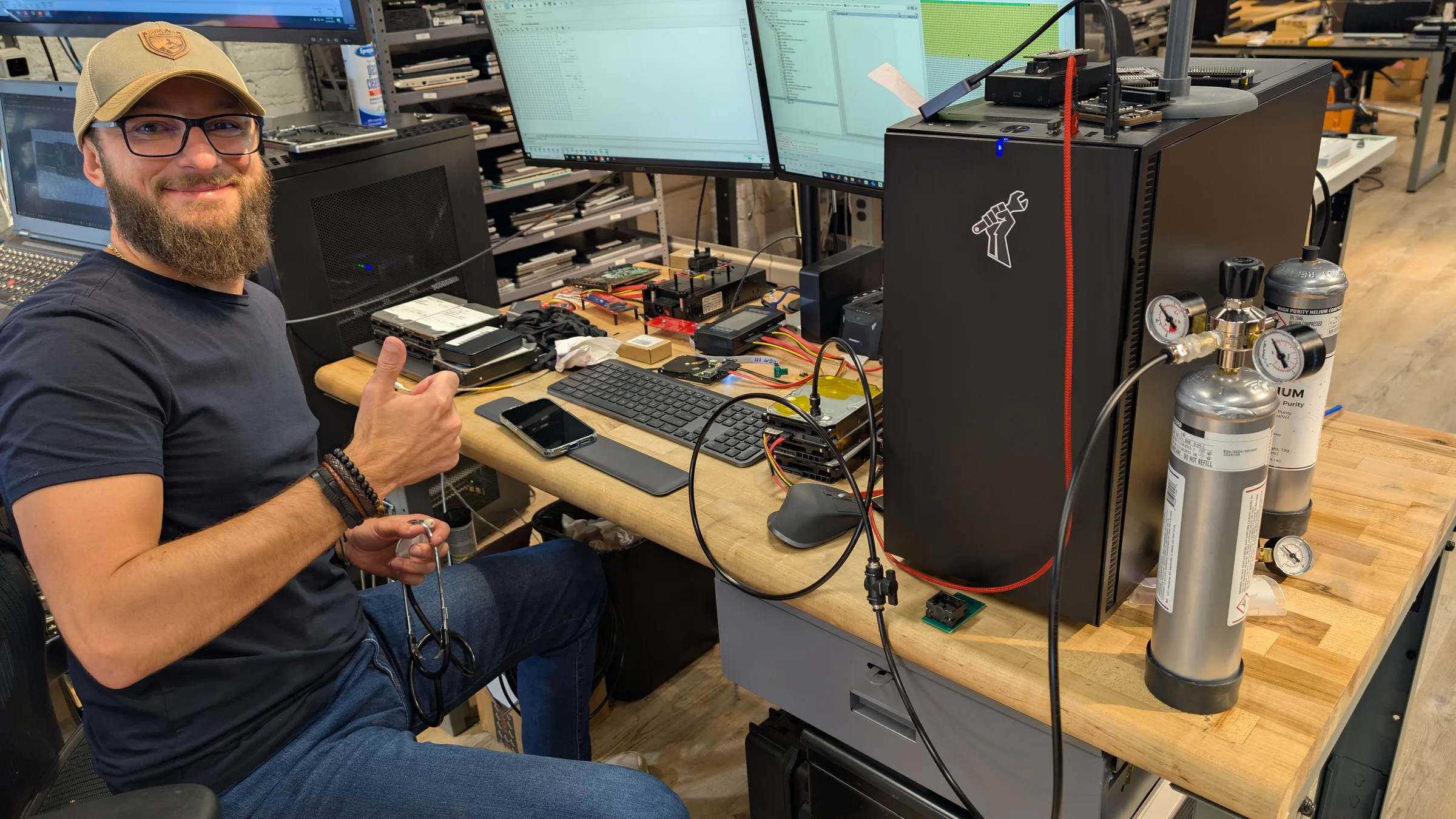
A specialist is defined by in-house mechanical and firmware capability, named hardware, and published pricing. The word means little on its own; the proof is whether the lab can swap read/write heads, rebuild the translator, clean platters, and refill helium on-site, and whether it will quote those jobs in numbers instead of a contact form.
On its own, specialist is just a marketing label: it carries no equipment list, no price, and no address. A verifiable specialist closes those gaps so you can confirm the capability before you ship a drive: the tools are listed by model, the prices are listed by tier, and the address is a single building.
Our bench runs PC-3000 Portable III, PC-3000 Express, and what the PC-3000 actually does on firmware, plus DeepSpar Disk Imager for surface imaging and FLIR thermal cameras for PCB fault-finding. Head swaps happen on a 0.02 micron ULPA-filtered clean bench using cataloged donor head stacks. None of that is outsourced.
| Specialist marker | Marketing label | What we do |
|---|---|---|
| Named hardware | “Advanced tools”, no models listed | PC-3000 Portable III, PC-3000 Express, DeepSpar Disk Imager, FLIR thermal cameras |
| Published pricing | “Contact us for a quote” | Five tiers from $100–$2,000, on the page |
| Mechanical capability | Often a software scan or a third-party referral | In-house head swaps, platter cleaning, motor work, helium refill |
| Firmware capability | Rarely described | Translator rebuild and Service Area repair via PC-3000 terminal |
| Where the work happens | Unstated; franchises or mailers common | One Austin, TX lab. No franchises. No outsourcing. |
How Is a Hard Drive Recovery Service Different From a Repair Shop?
A repair shop's deliverable is the machine. It replaces the failed drive & reinstalls the OS, and a swap-and-reinstall job does not read what was on the old disk, so the laptop drive it swapped out is still exactly as broken as the day it stopped mounting. A recovery service's deliverable is a copy of the data: we image the patient drive sector-by-sector on DeepSpar Disk Imager or PC-3000, & the recovered files land on a customer-supplied or lab-supplied target drive.
Head swaps from a matched donor & translator rebuilds buy a stable read window, not a drive you keep using. Donor heads degrade while the image is being pulled, so the mechanical side of hard drive recovery is aimed at pulling yield before the mechanics give out. The repair-shop reflex is what costs people their data: CHKDSK runs at the file system layer, so it can't reach the firmware Service Area and can't fix a firmware fault. On a mechanically failing drive its sustained read retries stress degraded heads & score platters.
Is My Drive a Logical or Physical Failure?
A logical failure means the platters and heads are healthy and only the file system is wrong. A physical failure means the media or mechanics are degrading. The split decides everything: logical cases can sometimes be handled with software, while physical cases get worse every time the drive spins.
A common mistake is treating bad sectors as a file system problem. A repair utility aimed at them writes to a drive whose media or heads may already be degrading, which drives a marginal drive into total failure. Sort your symptom into the correct column before you touch any software.
Logical failure (file system)
- Accidentally deleted files
- Corrupted or deleted partitions
- Quick-formatted or reformatted volumes
- Lost directory structure, drive still mounts and sounds normal
These map to our file system tier, which starts at $250. If the drive spins, is not clicking, and shows up in BIOS, software may be enough; you may not need us at all.
Physical failure (media or mechanics)
- Bad sectors, reallocated sectors, pending sectors
- Clicking or read instability
- Stuck or scored heads, stiction on power-up
- Seized spindle motor, shorted or burnt PCB
These need a head swap, firmware repair, or platter cleaning. Power the drive off; software will not fix any of these and can make the data unrecoverable.
When Should I Send a Drive to a Specialist?
Send the drive to a specialist when it clicks, will not spin, shows the wrong capacity, or reports bad and reallocated sectors. Those are physical and firmware faults that software cannot fix and usually makes worse. A USB drive that beeps is worth retrying on a powered hub first, since Seagate documents insufficient electrical power as one cause of beeping. DIY tools are fine only when files were deleted or a partition was lost on a drive that still mounts normally.
| Symptom | Failure class | What to do |
|---|---|---|
| Deleted a file or folder, drive still mounts | Logical | Try Recuva or TestDisk first; you may not need a lab |
| Partition gone, no unusual noise | Logical | File system recovery tier from $250 |
| Detected but wrong size or 0 bytes | Firmware | Stop. Translator or Service Area repair, $600–$900 |
| Clicking on power-up | Physical or firmware | Unplug now. Bench diagnosis first; head swap where the heads are the fault, $1,200–$1,500 plus donor |
| Dropped, visible damage, grinding | Physical (surface) | Do not power on. Platter cleaning and head swap, $2,000 |
Running recovery software on a clicking or scored drive grinds the heads into the platters until the data is gone. If you hear any noise the drive never made before, the cheapest move is to stop and ship it. If you would rather hand it to someone in person, our guide to finding a hard drive recovery specialist near you explains why every drive still ships to the one Austin lab that does the work. We evaluate it for free and tell you which tier it falls into before any paid work.
How Does a Specialist Recover a Failed Hard Drive?
Recovery follows the failure type: electrical triage first, then firmware, then mechanical. We confirm whether the fault is on the PCB, in the firmware, or in the head and disk assembly before opening anything, because opening a sealed drive when the real fault is on the board exposes pristine platters to particulate for no reason. That failure-first order is what a real hard drive recovery service runs on, & it's why we diagnose the fault for free before any platter sees air.
- Electrical triage. We check the PCB rails for shorts, inspect the motor driver and preamp power, and use FLIR thermal cameras to find a component running hot. A shorted board can mimic mechanical failure, so the board is cleared before the chamber is touched.
- Firmware diagnosis on PC-3000. We bring the drive up on PC-3000 Portable III or PC-3000 Express and read the Service Area through the diagnostic terminal. If the translator or a firmware module is corrupt, standard reads hang in a busy state, so firmware is diagnosed before any imaging.
- Translator and Service Area repair. When the secondary translator mapping is damaged (WD's T2 or Seagate's Media Cache Management Table), we regenerate it against the current defect map and write the corrected firmware area back so the drive reports its true capacity.
- Donor matching for head swaps. If the heads have failed, we match a donor by model, firmware revision, and head map from cataloged inventory, then swap the head stack assembly on the 0.02 micron ULPA-filtered clean bench.
- Imaging with read-channel tuning. We image sector-by-sector with DeepSpar Disk Imager or PC-3000. We build a selective head map to pull the most data before the donor heads degrade. On later passes, we retune the read-channel adaptives on weak heads to pull marginal sectors.
- Extract and verify. Once the image is captured, we parse the file system, verify file integrity, and copy recovered data to your target drive. No data means no recovery fee.
Why Do SMR Drives Need a Firmware Write-Lock First?
A Drive-Managed SMR drive can rewrite its own shingle bands in the background while it is powered. A SATA hardware write-blocker stops host write commands but cannot stop the drive's internal controller from running garbage collection or flushing the media cache. The only way to halt those rewrites is a firmware-level write lock through PC-3000.
So on a DM-SMR patient the firmware step always comes first. We power the drive on PC-3000 Portable III, command the firmware-level write lock to halt media-cache flushes and background garbage collection, and only then connect it to DeepSpar Disk Imager for user-area imaging. Reverse that order and the drive can overwrite the very bands you are trying to recover.
SMR also raises cost at the firmware and head-swap tiers. SMR (Shingled Magnetic Recording) drives require more work at the firmware and head-swap tiers due to their overlapping track architecture. On the firmware tier that is the difference between $600 for a CMR drive and $900 for an SMR drive. The mechanics of the two recording layouts are covered in our reference on CMR vs SMR hard drives.
How Are Enterprise and Nearline Drives Different?
Enterprise nearline and archive drives push more platters into the same case and seal many high-capacity models with helium. More platters means more heads, tighter tolerances, and a longer, more delicate head swap. The firmware and mechanical work is the same in principle; the part count and the donor sourcing are what change.
Helium-sealed drives from the WD Ultrastar, Seagate Exos, and Toshiba MG families cannot be opened on a standard bench and left in atmospheric air; the read/write heads are tuned for helium's low density and crash into the platters without a refill. We perform that mechanical work in-house, including the head swap and the helium refill, and quote it on a separate tier from $200–$5,000+. Read the full helium drive data recovery breakdown for the refill physics.
For an IT manager, the trust angle is chain-of-custody, not a compliance badge. Your drive stays in one Austin, TX building from intake to imaging, and we don't ship any of it to a third party. We do not process regulated healthcare workloads.
How Much Does Specialist Hard Drive Recovery Cost?
Hard drive recovery runs $100–$2,000 across five published tiers. A simple copy starts at $100, file system recovery starts at $250, firmware repair is $600–$900, a head swap is $1,200–$1,500 plus donor, and platter damage is $2,000. Helium drives are quoted separately.
- Low complexity
Simple Copy
Your drive works, you just need the data moved off it
Functional drive; data transfer to new media
Rush available: +$100
$100
3-5 business days
- Low complexity
File System Recovery
Your drive isn't recognized by your computer, but it's not making unusual sounds
File system corruption. Accessible with professional recovery software but not by the OS
Starting price; final depends on complexity
From $250
2-4 weeks
- Medium complexity
Firmware Repair
Your drive is completely inaccessible. It may be detected but shows the wrong size or won't respond
Firmware corruption: ROM, modules, or translator tables corrupted; requires PC-3000 terminal access
CMR drive: $600. SMR drive: $900.
$600–$900
3-6 weeks
- High complexity
Head Swap
Bench diagnosis found the read/write heads have to be replaced. Clicking can also come from firmware, the preamp, or the spindle
Head stack assembly failure. Transplanting heads from a matching donor drive on a clean bench
50% deposit required. CMR: $1,200-$1,500 + donor. SMR: $1,500 + donor.
50% deposit required
$1,200–$1,500
4-8 weeks
- High complexity
Surface / Platter Damage
Your drive was dropped, has visible damage, or a head crash scraped the platters
Platter scoring or contamination. Requires platter cleaning and head swap
50% deposit required. Donor parts are consumed in the repair. Most difficult recovery type.
50% deposit required
$2,000
4-8 weeks
Hardware Repair vs. Software Locks
Our "no data, no fee" policy applies to hardware recovery. We do not bill for unsuccessful physical repairs. If we replace a hard drive read/write head assembly or repair a liquid-damaged logic board to a bootable state, the hardware repair is complete and standard rates apply. If data remains inaccessible due to user-configured software locks, a forgotten passcode, or a remote wipe command, the physical repair is still billable. We cannot bypass user encryption or activation locks.
No data, no fee. Free evaluation and firm quote before any paid work. Full guarantee details. Head swap and surface damage require a 50% deposit because donor parts are consumed in the attempt.
- Rush fee
- +$100 rush fee to move to the front of the queue
- Donor drives
- Donor drives are matching drives used for parts. Typical donor cost: $50–$150 for common drives, $200–$400 for rare or high-capacity models. We source the cheapest compatible donor available.
- Target drive
- The destination drive we copy recovered data onto. You can supply your own, or we'll provide one. For larger capacities (8TB, 10TB, 16TB and above), target drives cost $400+ extra. All prices are plus applicable tax.
Sealed helium drives are on their own price list, $200–$5,000+. When a head swap or platter repair opens one, we refill it with helium. That adds $400–$800, and the donor has to be an exact match. Helium drive prices
A +$100 rush fee to move to the front of the queue is available when you need priority on the queue. Helium-sealed drives use the separate helium tier from $200–$5,000+, which adds a refill cost. The full tier-by-tier breakdown, with what pushes a case from one tier to the next, lives on our hard drive data recovery cost page. We evaluate every drive for free and quote the exact tier before any paid work; with no data there is no recovery fee.
Hard Drive Recovery Specialist FAQ
- What makes a real hard drive recovery specialist?
- A hard drive recovery specialist does mechanical and firmware work in-house, not just software scans. The verifiable markers are named hardware (PC-3000 Portable III, PC-3000 Express, DeepSpar Disk Imager, a 0.02 micron ULPA-filtered clean bench, donor head stacks), the ability to swap read/write heads from matched donors, rebuild the translator and Service Area firmware, clean platters, and refill helium drives, plus published pricing instead of a quote-only contact form. We do all of that at one Austin, TX lab.
- How much does specialist hard drive recovery cost?
- Hard drive recovery runs $100–$2,000 across five published tiers. A simple copy off a working drive starts at $100, file system recovery starts at $250, firmware and Service Area repair is $600–$900, a head swap from a matched donor is $1,200–$1,500 plus donor, and platter or surface damage is $2,000. All tiers are plus tax and a target drive. +$100 rush fee to move to the front of the queue. Helium drives use a separate tier with a helium refill cost.
- Is a clicking or beeping enterprise drive logical or physical failure?
- Physical. A clicking drive is failing to track its servo data; a beeping drive is not completing spin-up. Neither sound names the part that failed, and both are hardware faults rather than file system problems. Bad sectors, reallocated sectors, and pending sectors are also physical, because they reflect media surface degradation or failing heads. Logical failures are deleted files, corrupted or deleted partitions, and formatted volumes where the platters and heads are healthy.
- When should I send a drive to a specialist instead of running DIY software?
- Send the drive to a specialist when it clicks, beeps, will not spin, shows the wrong capacity, or reports bad and reallocated sectors. Those are physical and firmware faults that software cannot fix and can make worse. DIY tools like Recuva or TestDisk are fine when files were deleted or a partition was lost on a drive that still mounts and sounds normal. If the drive makes any unusual noise, power it off and stop trying.
- Do you recover enterprise nearline and helium drives in-house?
- Yes. We recover consumer, NAS, and enterprise nearline drives, including high-capacity helium-sealed models from the WD Ultrastar, Seagate Exos, and Toshiba MG families. Mechanical helium work, including head swaps and helium refill, is performed in-house at our Austin lab, not outsourced. Helium cases are quoted on a separate tier because the donor sourcing, refill, and high platter count add cost.
- Why publish pricing and equipment when most specialists do not?
- Published tiers and named equipment let you verify what you are paying for before you ship a drive. Our pricing is five tiers, our tools are listed by model, and all work happens at a single Austin, TX lab. No franchises, no outsourcing, and no data means no recovery fee.
- What do I get back at the end of a recovery?
- Your data, on the return media: either a target drive you supply or a new drive we provide. What you do not get back is a repaired hard drive put into service, because a drive that needed a head swap from a matched donor or a translator rebuild is a recovery patient: the donor heads degrade while the image is being pulled, so it is not a drive to keep running afterward. We image the patient sector-by-sector on DeepSpar Disk Imager or PC-3000, then verify the recovered files against that image before the data goes back to you. No data, no recovery fee.
Related Hard Drive Recovery Services
Same lab, same bench, drive-specific pages for the most common cases we see.
- Best hard drive recovery service compares what an honest in-house lab does differently before you ship a drive.
- External hard drive data recovery for USB and bridge-board enclosures.
- Laptop hard drive data recovery for 2.5-inch drives pulled from notebooks.
- Helium drive data recovery for sealed high-capacity enterprise drives.
- Hard drive PCB components explains the board faults we triage first.
Ship the drive. We diagnose it for free.
Tell us what went wrong and we'll reply with next steps. No data, no recovery fee. Every case worked in-house at our Austin, TX lab.
Since 2008
Established
As Featured In