Lab Operational Since: 17 Years, 10 Months, 6 Days·Facility Status: Fully Operational & Accepting New Cases·
Lab Operational Since: 17 Years, 10 Months, 6 Days·Facility Status: Fully Operational & Accepting New Cases·
Lab Operational Since: 17 Years, 10 Months, 6 Days·Facility Status: Fully Operational & Accepting New Cases·
SSD Data Recovery - NVMe, M.2, and SATA Drive Recovery
Nationwide mail-in to our Austin, TX lab, with free evaluation and no data, no recovery fee. You get a firm quote after the evaluation, from $200. From the technician 2 million YouTubers trust. We do component-level board, firmware, and power-path repair so your files can be imaged safely.
We lead with facts you can verify before shipping your SSD: the Austin lab address, published SSD pricing, no diagnostic fees, no data/no recovery fee, and the equipment used on the bench.
SSD recovery comes down to diagnosis, controller behavior, board repair, firmware work, and controlled imaging. Our public trust signals are the rating on our Google profile, the tier prices on this page, the tools in the lab, and the single Austin address where the work happens.
Lab facts
Austin lab, founded 2008
Work is performed in-house at 2410 San Antonio Street in Austin. We have one physical location, no franchises, and no outsourced SSD recovery bench.
Google rating
4.9 stars
Across 1,837 reviews on our Google Business Profile. Open it & read the bad ones, not just the good ones.
Published tier pricing
SATA $200–$1,500
NVMe $200–$2,500
Fixed tiers, not opening bids. Firm quote after the free evaluation.
Outcome guarantee
No data, no recovery fee
Return shipping on failed jobs is the only cost if we can't pull your files. Defined at /no-fix-no-fee.
Named SSD recovery equipment
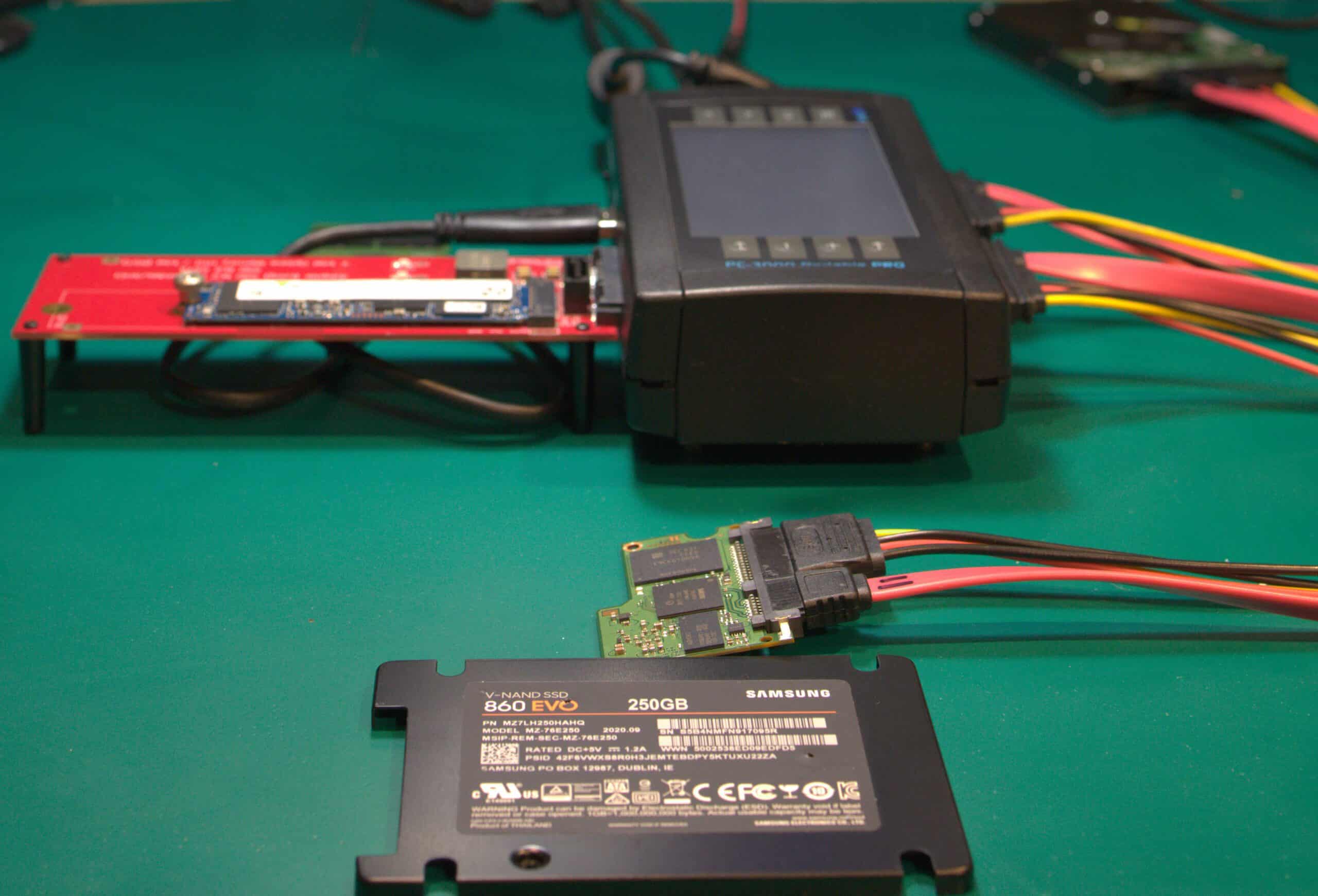
PC-3000 Portable III & Hakko FM-2032
PC-3000 Portable III for controller-mode imaging & FTL reconstruction; Hakko FM-2032 on FM-203 base stations for board-level component repair. In-house at the Austin lab; nothing shipped to a partner.
One location, one bench
2410 San Antonio St, Austin TX
Founded 2008. Single lab. No franchises, no outsourcing, no satellite offices inflating local-pack listings.
Diagnostic & rush policy
Free evaluation, $100 rush option
+$100 rush fee to move to the front of the queue Standard turnaround starts the day the drive lands on the bench.
If your SSD stopped working after a power loss, shows as SATAFIRM S11 in BIOS, or freezes your computer when connected, power it off immediately. Every power cycle risks the controller permanently locking or TRIM and garbage collection overwriting recoverable data on the NAND. Recovery software can't bypass a dead controller.
How it works17/45
How Does SSD Recovery Work?
SSD recovery restores access to NAND flash by repairing the circuit board, reconstructing the firmware, or fixing the power delivery circuit that failed. The process starts with a free evaluation, moves to component-level board repair or firmware reconstruction, and ends with sector-by-sector imaging through PC-3000.
SSD data recovery costs $200–$1,500: $200 for simple data copies from functional drives, $450–$600 for circuit board repair, $600–$900 for firmware reconstruction, and $1,200–$1,500 for advanced board rebuilds. Every case starts with a free evaluation and a firm quote before paid work begins. If we cannot recover your data, you pay nothing.
01
Low complexity
Simple Copy
Your drive works, you just need the data moved off it
Functional drive; data transfer to new media
Rush available: +$100
$200
3-5 business days
02
Low complexity
File System Recovery
Your drive isn't showing up, but it's not physically damaged
File system corruption. Visible to recovery software but not to OS
Starting price; final depends on complexity
From $250
2-4 weeks
03
Medium complexity
Circuit Board Repair
Your drive won't power on or has shorted components
PCB issues: failed voltage regulators, dead PMICs, shorted capacitors
May require a donor drive (additional cost)
$450–$600
3-6 weeks
04
Medium complexity
Most Common
Firmware Recovery
Your drive is detected but shows the wrong name, wrong size, or no data
Firmware corruption: ROM, modules, or system files corrupted
Price depends on extent of bad areas in NAND
$600–$900
3-6 weeks
05
High complexity
PCB / NAND Swap
Your drive's circuit board is severely damaged and requires NAND chip transplant to a donor PCB
Our "no data, no fee" policy applies to hardware recovery. We do not bill for unsuccessful physical repairs. If we replace a hard drive read/write head assembly or repair a liquid-damaged logic board to a bootable state, the hardware repair is complete and standard rates apply. If data remains inaccessible due to user-configured software locks, a forgotten passcode, or a remote wipe command, the physical repair is still billable. We cannot bypass user encryption or activation locks.
No data, no fee. Free evaluation and firm quote before any paid work. Full guarantee details. NAND swap requires a 50% deposit because donor parts are consumed in the attempt.
Rush fee
+$100 rush fee to move to the front of the queue
Donor drives
A donor drive is a matching SSD used for its circuit board. Typical donor cost: $40–$100 for common models, $150–$300 for discontinued or rare controllers.
Target drive
The destination drive we copy recovered data onto. You can supply your own or we provide one at cost plus a small markup. All prices are plus applicable tax.
The price tracks the failure type, not the drive's capacity. If the repair comes in simpler than the estimate, you pay the lower tier.
We recover NVMe, M.2, and SATA SSDs using PC-3000 Portable III for firmware-level repair and Hakko microsoldering stations for component-level board work. Software tools cannot reach data on a drive whose controller is dead.
Unlike hard drive recovery, SSD failures involve dead controllers, corrupted firmware translation layers, and shorted power-management ICs. All work is performed in-house at our single lab in Austin, TX; walk-in or mail-in from all 50 states.
SSD recovery uses firmware platforms, soldering stations, and thermal diagnostics instead of cleanroom equipment. PC-3000 SSD accesses controller diagnostic mode for firmware reconstruction. Hakko microsoldering stations replace failed components; FLIR thermal cameras locate shorted ICs without applying power long enough to cause further damage.
SSD failures are electronic, not mechanical. The tools below are what we use daily at our Austin lab for controller repair, firmware rebuilding, and NAND imaging.
PC-3000 SSD
ACE Lab's SSD-specific firmware recovery platform. Accesses technological mode on Phison, Silicon Motion, and Marvell controllers for service area reconstruction and flash translation layer rebuilding.
Microsoldering Stations
Hakko FM-2032 irons on FM-203 base stations, Atten 862 hot air rework, and Zhuo Mao precision BGA rework. Used for controller replacement, capacitor repair, and NAND chip-off when desoldering is required.
FLIR Thermal Imaging
Identifies shorted components, failed voltage regulators, and overheating controller ICs without applying power long enough to cause further damage. Pinpoints the fault before a single solder joint is touched.
Every Recovery on Camera
No stock photos. Watch SSD recoveries on YouTube. 2.49M+ subscribers see exactly how firmware is rebuilt and components are replaced, start to finish.
What is SSD Data Recovery03/45
What is SSD Data Recovery?
SSD data recovery is the process of extracting inaccessible files from NAND flash memory when the drive's controller, firmware, or electronics have failed. Unlike hard drive recovery, SSD recovery requires board-level electronics repair rather than mechanical work. Software tools cannot reach data on a dead controller.
The repair involves microsoldering failed components, reprogramming corrupted firmware through PC-3000, or repairing the power delivery circuit so the controller can power on and serve its data.
The failure is in the controller or the board, not in the NAND flash cells where your data lives, so SSD recovery is board-level electronics work rather than the mechanical work of hard drive recovery. The data persists; the path to it is broken. Restoring that path means microsoldering failed components, reprogramming corrupted firmware through PC-3000, or repairing the power delivery circuit so the controller can power on and serve its data, not software scans.
TRIM Deletion Mechanics: Conditions for Logical File Recovery
On Windows 7+, on macOS for Apple-supplied SSDs since 10.6.8 (third-party SSDs require enabling it with trimforce), and on Linux distributions that enable continuous or weekly fstrim, TRIM is on by default for any internal SATA or NVMe SSD. Once TRIM executes against a logical block, the controller returns deterministic zeroes (RZAT, commonly called RZAT) or unspecified data (DRAT) on every subsequent read.
Software reading through the host interface cannot reach data the firmware has marked deallocated: the controller answers those reads with zeros regardless of what the cells still hold. Deleted-file recovery from a TRIM-enabled, controller-healthy SSD is not a matter of finding a better scanner.
Recovery on an SSD succeeds when TRIM never reached the drive, or when it did but garbage collection has not yet erased the blocks. The cases we see:
USB enclosure without UASP/TRIM passthrough: the drive was connected through a USB-to-SATA or USB-to-NVMe bridge that does not implement UASP and does not pass the SCSI UNMAP / NVMe Dataset Management command to the device. The host issued TRIM; the bridge silently dropped it. Files deleted in that state remain on NAND until the drive is reconnected internally and the OS re-issues TRIM.
Sudden power loss before garbage collection: TRIM marks blocks as deallocated, but the actual NAND page erase happens later during the controller's background garbage collection cycle. If the drive lost power, suffered a PMIC failure, or was pulled before GC completed, the underlying pages may still hold the original data and be reachable through controller-mode imaging on PC-3000 SSD.
RAW partition without a TRIM-issuing wipe: if the partition table or file system signature was overwritten but no blkdiscard, secure-erase, or full format with TRIM was performed, the underlying file data is intact and recoverable by file carving against a controller-mode image.
Absent something like that, deleted data on a TRIM-enabled SSD is gone before the drive arrives at our bench. Pricing those jobs as logical recoveries would be dishonest. We diagnose the TRIM state first and refuse the recovery rather than charge for a procedure with no physical chance of success.
SSD recovery methods include:
Logical recovery: Repairing corrupted file systems, rebuilding lost partitions, and carving deleted files from drives where the controller is still functional and TRIM has not unmapped the target blocks
Firmware recovery: Forcing the controller into safe/diagnostic mode via PC-3000 , injecting a working firmware loader, and rebuilding the flash translation layer (FTL) so the drive can map and serve its data again; common on SATAFIRM S11 and other Phison/Silicon Motion controller failures
Hardware-level recovery: Component-level microsoldering to repair original controller power circuitry, replace shorted PMICs, or inject factory-mode firmware loaders to bypass failed controllers; perform board trace repair for surge-damaged or liquid-damaged drives; and chip-off NAND extraction for unencrypted drives as a last resort when the PCB is destroyed beyond repair
Last updated: March 2026
Board repair is data recovery03b/45
Why Is SSD Data Recovery Logic Board Repair?
SSD data recovery is electronics work, not mechanical work. The data lives in NAND flash chips that don't need cleaning or realignment; the failure is in the controller IC, the power circuit, or the firmware. Recovery means microsoldering the failed components on the original PCB so the controller boots and serves your data.
How Board-Level Repair Maps to Data Recovery
Pull a dead SSD out of a laptop and the NAND packages are almost always intact. What killed access is a shorted PMIC on the 1.8V or 3.3V rail, a cracked solder joint under the controller BGA, or corrupted firmware modules in the system area. Each failure is fixed at the bench, not behind a cleanroom airlock.
Component-level rework happens with the Hakko FM-2032 microsoldering iron on an FM-203 or FX-951 base; controller lift, ball reattachment, and BGA reflow run on a Zhuo Mao precision rework station with the Atten 862 hot air supplementing for shielded packages. Once the original controller boots, PC-3000 SSD attaches in technological mode, rebuilds the FTL translator, and images the user area to a target drive.
Why Do HDD Recovery and SSD Recovery Use Different Procedures?
Hard drive recovery takes place in a particulate-controlled environment because mechanical disks expose their internals to room air during a teardown. SSDs do not share that vulnerability. The NAND dies are sealed inside BGA packages at the semiconductor fab and never see room air during recovery; the only opening that matters is the solder joint between the controller and the PCB.
That separation is why marketing the 0.02 micron ULPA laminar flow bench as a requirement for SSD work is overhead the customer absorbs without benefit. The ULPA bench is the right tool for HDD platter exposure; on an SSD, the NAND never sees room air, so the bench adds cost without changing the recovery outcome. The lab equipment that actually matters for solid-state work is FLIR thermal cameras for locating shorted components, an ESD-safe workstation, and the microsoldering toolchain above. The same fault-finding and component-level rework procedures used on laptop logic boards are what recover a solid-state drive.
Which Pricing Tier Covers Board-Level SSD Repair?
Most board-repair recoveries land in the SATA Circuit Board Repair tier at $450–$600, with NVMe board work in the same range under Circuit Board Repair at $600–$900. FLIR localization of the failed component, replacement under the Hakko FM-2032, and controller verification through our recovery workflow happen before the firm quote becomes binding. If the controller can't be revived, you don't pay.
Interface & form factor03b-iface/45
Does SSD Data Recovery Work Differently by Interface?
Yes. The interface & form factor decide whether your recovery is a firmware job or a soldering job. A 2.5" or M.2 SATA SSD usually fails at the firmware translator, so the fix is FTL reconstruction on PC-3000 SSD. An M.2 NVMe or U.2 drive draws far more power, so it fails more often as a shorted power circuit that needs board-level microsoldering to revive the original controller. Find your form factor in the table below to see the dominant failure & the recovery path.
The split comes down to physics. SATA caps at 600 MB/s, so SATA SSDs run budget, DRAM-less controllers like the Phison PS3111 or Silicon Motion SM2258XT on simple power circuits; when they die, it's usually the firmware translator, not the board. NVMe runs straight on the PCIe bus & a Gen5 stick can pull 11 to 13 watts under load, so the power stage is the part that burns. That's why two drives with identical NAND take two different paths to your data.
SSD Recovery Path by Interface & Form Factor
Form Factor
Dominant Failure
Why
Recovery Path
Pricing Tier
2.5" SATA SSD
FTL / firmware translator corruption
Budget DRAM-less controllers (Phison PS3111, SMI SM2258XT) on a slow 600 MB/s bus; a sudden power loss during an SLC cache flush corrupts the mapping tables.
Force ROM mode, inject an SRAM loader with PC-3000 SSD , rebuild the FTL from NAND page headers.
SATA Firmware Recovery at $600–$900
M.2 SATA (B+M key)
FTL / firmware translator corruption
Same SATA controllers & AHCI protocol as the 2.5" drive in a smaller stick; the SATAFIRM S11 panic on Phison & the Keep BSY hang on Silicon Motion both show here.
Same firmware-reconstruction route on PC-3000 SSD; board repair only if the PMIC is electrically shorted.
SATA Firmware Recovery at $600–$900
M.2 NVMe (PCIe, M-key)
Board-level power short, then firmware panic
Direct PCIe power draw burns voltage regulators & PMICs; controllers like the Phison PS5012-E12 layer LDPC error correction & hardware AES on top.
Microsolder the failed power stage on the original PCB so the controller boots; a supported Phison or SMI controller then images via PC-3000 SSD over a PCIe M.2 adapter.
NVMe Circuit Board Repair at $600–$900
U.2 / enterprise NVMe
Board-level power short on high-wattage rails
Enterprise NVMe pulls the most power & runs in-house or proprietary controllers; a shorted rail severs the link to the CPU before any firmware runs.
FLIR thermal localization, then component-level rework under the Hakko FM-2032 to revive the original controller; firmware imaging only if the controller family is PC-3000 supported.
NVMe Circuit Board Repair at $600–$900
PC-3000 SSD firmware reconstruction covers Silicon Motion, Phison, & Marvell controllers. Modern in-house NVMe controllers (Samsung Elpis & Pascal on the 980 Pro & 990 Pro, Innogrit, Realtek) are not in the ACELab support list, so for those drives the only path is board-level microsoldering to revive the original controller, not an FTL rebuild. Rossmann does not currently offer in-lab recovery for Samsung Elpis, Samsung Pascal, Innogrit, or Realtek controllers.
Two failure classes set the tier. A firmware panic on a SATA Phison or Silicon Motion drive (SATAFIRM S11, Keep BSY, the Intel 320 8MB bug) lands in the SATA Firmware Recovery tier at $600–$900 because the board is sound & only the translator needs rebuilding. A burned power stage on an NVMe or U.2 drive lands in the NVMe Circuit Board Repair tier at $600–$900 because reviving the controller is microsoldering work. If the controller can't be revived, you don't pay.
Pre-shipment triage03c/45
What Should You Do Before Shipping a Failed SSD?
Stop writing to the drive & power it down. Don't run recovery software on a drive with a failing controller or degrading NAND, don't repeatedly power-cycle a drive that may be electrically shorted, & don't leave a drive online after an accidental delete or format. Pull the drive, anti-static bag it, & ship it. Powered time is the enemy: the controller's background garbage collection can finish erasing the exact blocks that still hold your data.
The window to recover SSD data narrows every minute the drive stays powered. A live controller runs background tasks: garbage collection, wear leveling, & any TRIM/Deallocate commands the OS already queued. Those tasks were designed to make the drive faster for the next write, which means they finalize the destruction of whatever you just lost. The fix for a physical or firmware failure is PC-3000 SSD reading the NAND through the controller in a read-only diagnostic mode, not consumer software hammering a drive that's actively erasing itself.
Five Things That Make SSD Recovery Harder or Impossible
Don't run recovery software on a drive with a failing controller or degrading NAND. Reads don't wear out NAND cells, so that's not the risk. The risk is what a powered controller does in the background. Every hour EaseUS, Disk Drill, or PhotoRec keeps the drive online is an hour garbage collection & queued TRIM commands keep clearing the physical blocks that held your lost files. On already-weak blocks, repeated reads cause read-disturb bit-flips that can push error rates past the controller's ECC budget (LDPC or BCH). Any OS-level write the scan triggers, installing the tool, the page file, search indexing, can overwrite recoverable data outright. An unstable controller bombarded with I/O can also panic into lockdown or a boot loop & cut host access entirely.
Don't repeatedly power-cycle a drive that may have a shorted board. The forum advice to "leave it plugged in for 30 minutes & it'll fix itself" is a myth that kills drives. A shorted MLCC capacitor forces massive current into that short on every power-up, scorching traces with localized heat; a failed voltage regulator or PMIC can instead drive an overvoltage spike onto a logic rail that can't handle it. Cascade that damage across a dozen boot attempts & you turn a single failed component into a dead controller or scorched NAND. A drive that won't enumerate, gets hot to the touch, or trips your USB port's over-current protection should be powered down & shipped, not coaxed.
Don't leave the drive powered & online after an accidental delete or format. On a TRIM-enabled SSD, deletion isn't a logical event you can undo. The OS sends the controller a list of blocks that are no longer needed, the controller unmaps them & returns zeros when those addresses are read, & garbage collection erases the physical cells shortly after. That whole sequence runs in seconds to minutes while the drive is powered. Pull the drive immediately. The only blocks a lab can reach are the ones garbage collection hasn't finished erasing yet.
Don't use a bare SSD as a long-term unpowered archive. NAND stores data as electric charge trapped in floating-gate or charge-trap cells. With no power, that charge slowly drifts, & a worn consumer drive sitting in a drawer for months to years accumulates bit-flips until the controller's ECC can no longer correct them. The JEDEC client retention spec sets the floor (data retained on the order of about a year at 30C for a fully worn drive), & a drive shoved in a hot attic drifts faster. An SSD is not a cold-storage backup medium. If a drive is your archive, power it on periodically so the controller can refresh the cells.
Don't open the enclosure & expose the bare board. Prying a 2.5" SSD case apart or pulling an M.2 stick out & handling it without an anti-static strap exposes the controller, DRAM, & NAND to electrostatic discharge. A static zap you can't even feel carries enough voltage to destroy controller logic, turning a recoverable firmware or logical fault into a dead board. Leave the drive in its housing, drop it in an anti-static bag, & let the bench open it on an ESD-safe workstation.
The pattern across all five is the same. A controller-healthy drive with TRIM off is the one case where consumer software is the right call, & we'll tell you so rather than charge you for it. The moment the drive stops enumerating, reports 0 bytes, shows a factory-ID name, or won't power on, it's firmware-tier or board-tier work that software can't touch: $600–$900 firmware recovery & $450–$600 board repair on SATA, with no data, no recovery fee & no diagnostic charge to find out which one it is.
Encryption & microsoldering03b-enc/45
Why Board-Level Microsoldering IS Data Recovery for Encrypted SSDs
Enterprise and high-end consumer SSD controllers commonly enforce always-on AES-256 XTS encryption that can't be disabled by the user; many mainstream DRAM-less drives omit hardware AES. The Media Encryption Key is generated inside the controller die & wrapped by a Hardware Unique Key fused into that specific silicon. If the controller dies, the encryption keys are trapped in dead silicon; chip-off yields only unreadable ciphertext. The only recovery path is board-level microsoldering to revive the original controller so decryption resumes.
The Encryption Chain Inside the Controller
AES-256 XTS
The symmetric encryption engine built into every modern SSD controller die. It processes data in 512-byte or 4KB sectors as it moves between the host & the NAND; the user cannot disable it.
Media Encryption Key (MEK)
A random 256-bit key generated by the controller's true random number generator at the factory. It encrypts all user data written to the NAND.
Hardware Unique Key (HUK)
The HUK is a device-specific key fused into the controller silicon during manufacturing. The MEK is wrapped by a Key Encryption Key (KEK) that is bound to the HUK. A donor controller from an identical SSD has a different HUK & cannot unwrap the original MEK.
The chain is hardware-bound: the MEK is generated by a hardware TRNG, wrapped by a key tied to fused silicon, & never leaves the die in plaintext. That is the reason chip-off yields only ciphertext on a modern SSD. A dead PMIC or a shorted MLCC capacitor on the 3.3V rail starves the controller of power while the NAND & the keys sit intact in silicon that won't boot. A donor controller can't help: its own HUK is burned into its fuses & can't unwrap your MEK, so a swap returns the same encrypted noise as chip-off. The original controller has to live, which means making its board electrically sound again.
The Microsoldering Workflow
FLIR thermal imaging locates the shorted component on the PCB by showing a hot spot against a cold board.
Hakko FM-2032 microsoldering iron on an FM-203 or FX-951 base station removes the failed PMIC or shorted MLCC & places the replacement.
Atten 862 hot air rework station replaces larger shielded power ICs & reflows multi-pin packages.
Zhuo Mao precision BGA rework station reballs & reflows the controller die when cracked solder joints are the failure mode.
Power verification with a bench supply confirms 1.2V, 1.8V, & 3.3V rails before the NAND is reconnected.
Each step targets the original controller's survival: a drive that boots with its factory-fused HUK intact so the AES engine can unwrap the MEK & decrypt the user area.
Once the board is electrically sound & the controller boots into safe mode or technological mode, PC-3000 SSD takes over. The utility connects through the controller's diagnostic pins, dumps the ROM, & reconstructs the FTL mapping table. Because the original controller is alive, its AES engine decrypts each NAND page as it is read, so the image delivered to the customer is plaintext.
Blown PMICs come across the bench regularly. An over-voltage event on the drive's input rail destroys the voltage regulator, shorted multilayer ceramic capacitors brown out the controller before the host even detects the drive, and liquid-spill traces starve the NAND's VCC while the controller idles. FLIR imaging spots each of these in seconds as a hot component against a cold board. The fix is component replacement, not NAND transplant.
Pricing for Encrypted SSD Board Repair
Encrypted SSD board repair falls under the circuit board repair tier: $450–$600 for SATA & $600–$900 for NVMe. That price covers FLIR fault localization, component replacement under the Hakko FM-2032, & electrical verification before the PC-3000 SSD imaging phase begins. If the controller can't be revived, you don't pay.
The NAND-swap tier at $1,200–$1,500 for SATA & $1,200–$2,500 for NVMe is only for cases where the original PCB is too damaged for repair. It requires a 50% deposit & a matched donor drive.
Operator workflow03b-op/45
How a PC-3000 SSD Operator Pulls Plaintext Off a Live Encrypted NVMe Drive
Once the board is electrically sound, a PC-3000 SSD operator forces the controller out of its firmware panic loop, loads a volatile microcode loader into its SRAM, & disables TRIM & background garbage collection so the spare-area metadata survives the read. Provided the drive is not locked behind an ATA security password or a TCG Opal PIN, the live original controller's AES engine then decrypts each page in-line as it images, so what lands on the target drive is plaintext, not ciphertext.
A hardware-encrypted NVMe drive with corrupt firmware doesn't sit quietly waiting to be read. The controller powers up, fails to load its on-NAND firmware, & reboots into the same fault again, a firmware panic loop that locks the host out & reports a raw factory ID or a 0GB capacity. The operator breaks that loop with the controller's vendor-specific command set. On Phison & Silicon Motion architectures, PC-3000 SSD issues those diagnostic commands to bring the controller up in Technological Mode, a maintenance state that runs the silicon without loading the corrupted on-NAND firmware, so the utility can attach instead of watching the drive reboot into the same fault.
With the controller held in that state, PC-3000 SSD injects a volatile microcode loader straight into the controller's SRAM. Volatile means it lives in RAM & evaporates on the next power cycle; it never writes to the NAND, so it can't overwrite anything it reads. The loader runs the silicon independent of the dead on-NAND firmware, which gives raw read access to the flash so the operator can rebuild the Flash Translation Layer (FTL) from the ground up.
The first thing that loader does is shut off TRIM & background garbage collection. Most recovery write-ups skip past this step, & it's the one that decides whether the data survives the imaging pass. The FTL is reconstructed from the logical-to-physical fragments written into each NAND page's spare area; if garbage collection runs even once during the read, it erases blocks & rewrites that spare-area metadata, & the map you're trying to rebuild shifts under you. Disabling it freezes every block in the state it arrived in.
Because the loader runs on the original live controller, the drive's AES engine decrypts each page in-line as the image is pulled, so the delivered clone is plaintext as long as the drive carries no separate ATA password or TCG Opal PIN that gates the key. That is why board repair beats chip-off on an encrypted drive: the key is bound to that specific silicon, so a desoldered NAND or a swapped donor controller returns the same encrypted noise a chip-off produces, while the revived original controller decrypts the pages itself. The full key chain behind that binding is in the AES / MEK encryption barrier section.
Why Board Repair Recovers an Encrypted SSD
The encryption key is generated on & locked inside the original controller silicon; it never leaves the die in plaintext.
Chip-off desolders the NAND & reads it on a foreign decoder, which returns ciphertext only.
Board repair restores power to the original controller so it boots with its key still intact.
The revived controller's AES engine decrypts each page on the fly, delivering a plaintext image when no user-set ATA password or TCG Opal PIN gates the key.
This is firmware-tier & board-tier work, not a software job. Component-level board repair to revive the controller is $450–$600 on SATA & $600–$900 on NVMe; FTL reconstruction once the controller is alive is $600–$900 on SATA & $900–$1,200 on NVMe. If we can't revive the controller, you don't pay.
Apple Silicon storage03c/45
Apple Silicon (T2/M-series) Storage Reality
On Apple T2 Macs (2018+) and every M1/M2/M3/M4 Mac, the NAND is soldered to the logic board and encrypted by a key that lives only inside the Secure Enclave on that specific chip. Chip-off NAND extraction is impossible: desoldering the flash yields ciphertext with no path to the key. The only recovery route is repairing the original logic board so the Secure Enclave powers on and decrypts in place.
Why Can't a Lab Just Read the NAND Chips on an Apple Silicon Mac?
The volume encryption key (VEK) is wrapped by a key encryption key (KEK) that is tied to the hardware Unique ID (UID) sealed inside the Secure Enclave Processor at manufacture; with FileVault on, the KEK is also derived from the user's password. The keys never leave the silicon in a usable form. The NAND stores ciphertext only. Removing the BGA NAND packages with hot air, reading them on a programmer, and reassembling the raw image produces an encrypted blob that no software, FBI lab, or nation-state actor can decrypt without the matching Secure Enclave. This is by design; Apple documents it in the Apple Platform Security guide.
What Does Recovery Look Like on a T2 or M-series Logic Board?
Recovery is logic-board repair, not data extraction. The bench work is the same work that revives a non-booting MacBook: trace the failure with the FLIR thermal camera, replace shorted PMICs, repair damaged power rails, and restore enough board functionality for the M-series SoC and its integrated Secure Enclave to power on. On Apple Silicon, the storage controller is integrated into the SoC itself, not a discrete chip on the board, so the work is power-rail and support-circuitry repair, not controller replacement. Once the board boots into Share Disk mode via macOS Recovery (or DFU on T2 Macs), the Secure Enclave decrypts the internal storage and the data images out normally. Hakko FM-2032 microsoldering on FM-203 or FX-951 base stations, Atten 862 hot air rework, and Zhuo Mao precision BGA stations cover the entire procedure.
When Is the Data Unrecoverable on Apple Silicon?
If the Secure Enclave itself is destroyed (severe board fire damage, chemical etching, or physical fracture of the SoC package), the keys are gone and the NAND is permanently unreadable. The same is true if FileVault crypto-shredding has been triggered (Erase All Content and Settings, or a wiped iCloud key) before the board failed. We diagnose Secure Enclave viability before quoting and refuse jobs where the keys cannot be reached.
What This Is Not
We do not bypass, crack, defeat, or hack T2 or M-series security. We repair the original logic board so it functions normally and the Secure Enclave performs its documented decryption against its own keys. That is electronics repair, not security circumvention.
SandForce DuraClass
Why Can't a SandForce SF-2281 Be Recovered by Chip-Off?
A dead SandForce SF-2281 controller leaves the NAND holding compressed, parity-striped data, AES-encrypted ciphertext on AES-enabled drives, that cannot be reassembled off-board. PC-3000 SSD has no SandForce utility, so firmware reconstruction is not commercially available. Rossmann does not currently offer in-lab recovery for SandForce.
The SF-2281 (and the wider SF-1200 / SF-2200 line) ran in older Kingston HyperX, Corsair Force GT, and Intel 520 drives. This DRAM-less controller leaned on a feature suite called DuraClass to cut write amplification. When the firmware fails to load, the controller drops to ROM mode and stops presenting its real capacity to the host. The user data is still in the NAND, behind three transforms that only the original silicon can reverse.
The Three DuraClass Transforms
DuraWrite real-time compression
The controller compresses every incoming write before it reaches the NAND. Because the compression ratio tracks the entropy of the data, the physical block size on flash is variable and non-linear; a raw dump has no fixed sector geometry to reassemble against.
AES encryption on AES-enabled drives
On AES-enabled drives the payload is AES-encrypted by the controller after compression, transparently to the host, and the key does not leave the controller.
RAISE parity striping
RAISE stripes the compressed, encrypted data across the NAND dies and reserves parity space to survive a page or block failure. The interleave pattern is proprietary to the controller firmware.
Desolder the NAND and a programmer hands you compressed, parity-striped bytes, AES-encrypted on AES-enabled drives; reversing them needs the decompression dictionary, the exact interleave map, and on encrypted drives the AES key bound to the dead SF-2281, none of which leave the silicon. That is the same chip-off barrier that blocks modern encrypted NVMe controllers, reached by a different route. Rossmann does not currently offer in-lab recovery for SandForce. PC-3000 SSD carries active utilities for Phison, Silicon Motion, and Marvell; SandForce is absent from that list, so we cannot inject a loader or rebuild the FTL on these drives. We diagnose the controller during a free evaluation and tell you when there is no path, rather than charge for a procedure with no chance of success.
Controller family reference
Which SSD Controllers Can Be Recovered, and How?
PC-3000 SSD supports firmware-level recovery for Phison, Silicon Motion, and Marvell. Samsung in-house NVMe, SandForce, Apple T2/M-series, and InnoGrit are not on the supported list; for those, the only path is board-level repair so the original controller boots and decrypts in place. Rossmann does not currently offer in-lab recovery for Samsung Elpis, Samsung Phoenix, SandForce, Apple T2/M-series, or InnoGrit.
The table reads in one direction: support status decides whether firmware reconstruction is even on the table. A supported family means PC-3000 SSD can drop the controller into technological mode and rebuild the FTL. A non-supported family means the data only comes back if the original controller can be electrically revived to decrypt in place. Pricing is the SATA Firmware Recovery tier at $600–$900 for firmware work and the Circuit Board Repair tier at $450–$600 for board work.
Firmware exception reverts the drive to a 2 MB / 2.1 GB silicon descriptor
Board-level repair to revive the original controller; no loader path exists
Not supported. Rossmann does not currently offer in-lab recovery for InnoGrit.
The support column comes from the ACELab PC-3000 SSD supported-drives list (v3.8.10). Phison, Silicon Motion, and Marvell get firmware-tier work because the loader and FTL tools exist. For Samsung Elpis, Samsung Phoenix, SandForce, Apple T2/M-series, and InnoGrit, the honest answer is board repair to keep the original controller alive, not a firmware rebuild; where the controller is dead and the silicon is non-supported, we say so during the free evaluation. There is no data, no recovery fee either way.
Trust signals04/45
At a Glance
We use PC-3000 Portable III for firmware-level repair and Hakko FM-2032 microsoldering stations for component-level board work. Free evaluation, firm quote before paid work, and no charge if we cannot recover your data.
$Cost: SATA SSD recovery runs $200–$1,500 depending on failure type. Firm quote after a free evaluation. If recovery fails, you pay nothing.
Equipment: PC-3000 Portable III , FLIR thermal cameras, and Hakko FM-2032 microsoldering stations on FM-203 base stations.
Guarantee: No data recovered = no charge. Free evaluation. No diagnostic fees.
Do SSDs Require an ISO 4 Cleanroom for Data Recovery?
No. ISO 4 and ISO Class 10 cleanrooms are not required for SSD data recovery. NAND flash dies are factory-sealed inside BGA, TSOP, or monolithic packages; the media is never exposed to air during recovery; board-level microsoldering and PC-3000 firmware repair happen on an ESD-controlled bench.
Full technical breakdown: SSD cleanroom myth .
Board Repair vs Cleanroom
Why SSD Recovery Is Board Repair, Not Cleanroom Work
SSD data recovery is a microsoldering discipline. When an SSD fails, the NAND memory is usually fine; the controller, PMIC, or power-rail components on the PCB have died. Recovery means component-level board repair to revive the original controller so it can decrypt & present its own data.
A cleanroom solves a mechanical hard drive problem that does not exist on solid-state media.
SSDs have no platters, no heads, no exposed media; the NAND dies stay sealed inside their BGA packages through the whole recovery, so particulate control buys nothing. The full mechanism, from FLIR fault localization through controller reball to PC-3000 SSD imaging, lives in one place: why SSD data recovery is logic board repair.
That's why the circuit board repair tier runs $450–$600 & advanced board rebuilds reach $1,200–$1,500. It's the same bench discipline Louis Rossmann built over 16+ years of logic board repair, applied to storage controllers instead of MacBook power management.
Microsoldering Mechanics
What Are the Physical Mechanics of SSD Data Recovery?
Board-level microsoldering is the physical mechanism of SSD data recovery. When a controller shorts, a PMIC dies, or a power rail collapses, a technician removes, reflows, or replaces BGA packages on the PCB to bring the drive back to a responsive state. That work happens on an ESD-controlled bench. Airborne contamination is irrelevant to a plastic or ceramic encapsulated package of silicon.
A vendor selling a Class 100 cleanroom as a requirement for SSD work is selling overhead, not physics; the NAND dies are sealed in plastic or ceramic BGAs with no airborne pathway to the data. The reasoning behind that, and the HDD comparison, sits in why SSD recovery is board repair. This section covers the bench tools themselves.
The tools that matter for SSDs are electronics tools. A Hakko FM-2032 microsoldering iron on an FM-203 or FX-951 base station handles pads, passives, and fine-pitch rework. An Atten 862 hot air rework station lifts and reflows QFN packages and smaller BGAs.
A Zhuo Mao precision BGA rework station handles full controller reballing with stencil-aligned solder spheres. PC-3000 SSD then injects volatile microcode into the controller SRAM to rebuild the Flash Translation Layer once power delivery is back.
Pricing follows the work the drive actually needs. SATA SSD circuit-board repair starts at $450–$600; NVMe controller firmware reconstruction runs $900–$1,200; a simple data copy from a healthy SATA SSD begins at $200. Competitors inflate those numbers with cleanroom overhead that the hardware does not require.
Why Does a Logic Board Repair Channel Perform SSD Data Recovery?
The component-level diagnostic and microsoldering work shown on Louis Rossmann's YouTube channel is the exact physical mechanism that recovers a dead SSD. Diagnosing shorted PMICs under FLIR thermal imaging and reballing BGA controllers on a Zhuo Mao station are identical skills, applied to a storage PCB.
The cleanroom-first labs that dominate the SSD data recovery SERP grew out of mechanical hard drive recovery. Their authority story is a 1980s pedigree, a particulate-controlled room, and a corporate R&D department. None of those assets repair a fractured BGA joint on a Phison PS5018-E18 controller or reflow a shorted VCCQ power IC on a Samsung NVMe board. The work that recovers a dead SSD is electronics rework on a microscope bench, and that bench is what Rossmann Group has spent 14+ years doing in public on camera.
The procedural overlap is exact:
FLIR thermal diagnosis. The same under-power thermal sweep that finds a shorted U7000 charging IC on a MacBook board finds a shorted VCCQ NAND rail or a leaking PMIC on an SSD board.
Hot air rework on shorted components. The Atten 862 hot air rework station that lifts a failed SMC on a logic board is the same tool that lifts a cracked QFN PMIC or a small BGA off an SSD PCB.
BGA reflow and reballing. The Zhuo Mao precision BGA station used to reball a Touch Bar T1 or T2 chip is the station that reballs a Phison, Silicon Motion, Marvell, or Samsung SSD controller before donor transplant.
Fine-pitch passives and pad repair. The Hakko FM-2032 on an FM-203 or FX-951 base station handles 0201 passives, lifted pads, and trace repair on both MacBook power rails and SSD power rails. The skill set is the same skill set.
Firmware-side recovery via PC-3000 SSD. Once power delivery is restored, PC-3000 SSD injects a controller-specific loader into SRAM and rebuilds the Flash Translation Layer so the original controller can serve its data through its own native decryption path.
The cost of that work is published. SATA SSD circuit-board repair runs $450–$600; NVMe controller firmware reconstruction runs $900–$1,200; a simple data copy from a healthy SATA SSD starts at $200. Every tier is backed by a no data, no recovery fee guarantee.
Why Is SSD Data Recovery a Board-Repair Problem, Not a Cleanroom Problem?
SSD data lives inside NAND flash dies that are already epoxy-encapsulated at the factory in BGA, TSOP, or monolithic packages. The media is sealed before the drive ever leaves the fab, so opening the SSD enclosure exposes nothing to air. Recovery is a board-repair problem.
Desolder or reball the failed controller, inject a loader into SRAM, rebuild the translator, and image through PC-3000 SSD. A cleanroom solves an HDD particulate problem that does not exist on solid-state media.
The procedures are electronics procedures, not mechanical ones: controller reballing on a Zhuo Mao precision BGA rework station, chip-off NAND reads when the controller is unrecoverable and the NAND is not hardware-encrypted, ROM pin-shorting on controller-specific diagnostic pads to force Safe Mode, and SRAM loader injection through PC-3000 SSD. Why none of that needs particulate control is covered in why SSD recovery is logic board repair and the full teardown on the SSD cleanroom myth page. The HDD-versus-SSD requirements that drive the distinction are in the table below.
Physical Requirement
HDD Recovery
SSD Recovery
Particulate control
Required. Particulate-controlled environment used during teardown of the mechanical assembly.
Not required. NAND dies are sealed inside BGA, TSOP, or monolithic packages at manufacture.
Primary recovery bench
Particulate-controlled bench with donor-drive parts inventory.
ESD-controlled microsoldering bench with hot air, BGA rework, and thermal imaging.
Core tool for physical work
Donor-mechanism transplant tooling.
Hakko FM-2032 microsoldering iron, Atten 862 hot air rework, Zhuo Mao BGA rework station.
Core tool for logical work
PC-3000 Express or Portable III with drive-family firmware modules.
PC-3000 SSD with controller-specific loaders, translator rebuild, and raw NAND imaging.
Typical physical failure
Head crash, seized spindle, scored platter surface.
Shorted PMIC, failed controller, cracked BGA solder joint, dead power rail.
Diagnostic entry path
Preamplifier access; head-map detection via vendor commands.
ROM pin-shorting to force Safe Mode; SRAM loader injection via PC-3000 SSD.
Encryption handling
Usually absent at media layer; BitLocker or FileVault handled after image.
Hardware AES on nearly all modern SSDs. Keys live in the controller, so chip-off alone yields ciphertext. Board repair restores the original controller and its keys.
Sources for the tool list and procedure descriptions live on our PC-3000 reference page. Pricing on every tier referenced above is published on this page and backed by our no data, no recovery fee guarantee.
How Hardware Encryption Forces Board-Level SSD Recovery
A self-encrypting NVMe SSD generates its AES-256 Media Encryption Key inside the controller die and wraps it under a Hardware Unique Key fused into that specific controller. When the PCB suffers electrical damage, the controller cannot boot, so it cannot decrypt the NAND. Chip-off returns ciphertext.
The only physical recovery path is board-level microsoldering to revive the original controller with its root key intact.
On every write, the controller encrypts the data block with AES-256 in XTS mode and uses the logical block address as the per-sector tweak. On every read, it decrypts inline before handing the bytes back to the host. The Media Encryption Key (MEK) is generated by the controller on first power-on and never leaves the silicon.
On a TCG Opal 2.0 drive the MEK is wrapped by a Key Encryption Key (KEK) bound to the Hardware Unique Key fused into that controller die. That binding is irreversible: the wrapping key on one controller cannot be reproduced on another controller of the same model.
That binding also kills the donor-controller swap: a donor of the same model has its own root key and cannot unwrap the MEK bound to the original die, so the data is locked to the specific piece of silicon that wrote it. Reviving that original controller through board-level microsoldering, then imaging through PC-3000 SSD, is the recovery; the full FLIR-to-PC-3000 mechanism lives in why SSD data recovery is logic board repair. It is the same board-repair discipline Louis Rossmann built over 16+ years of filmed logic-board work, applied to storage controllers instead of MacBook power management.
The published pricing follows the work the silicon actually requires. SATA SSD circuit-board repair runs $450–$600; NVMe circuit-board repair runs $600–$900. Both tiers may require a donor board for harvest of clean passives, which is quoted on top of the labor tier.
Every tier is backed by our no data, no recovery fee guarantee, and a +$100 rush fee to move to the front of the queue is available to move the drive to the front of the queue.
What That Price Pays For
Cleanroom Myth vs Microsoldering Reality
An SSD has no moving parts, so ISO-rated cleanroom airflow around the whole drive is not a recovery requirement. The bench cost on an SSD is microsoldering time on specific equipment. For hardware-encrypted NVMe drives, the encryption key is bound to the original controller silicon, which means the only viable physical recovery path is board-level repair to revive that controller. Chip-off onto a donor controller does not work because the keys never leave the original silicon.
The tiers above price bench hours on real failure modes, not cleanroom overhead. Solid-state drives store data in NAND packages that are factory-sealed against particulate intrusion. Recovery work happens on the controller, the PMIC, and the power rails.
None of those steps require ISO-rated airflow around the entire device. For the rare case where chip-off NAND extraction is needed, exposed die are handled on a particulate-controlled bench so debris does not land on the bond pads; that is local particulate control during a single procedure, not the marketing cleanroom that high-priced labs sell as a baseline. More on why SSD recovery is not a cleanroom problem .
Why Does Hardware-Encrypted NVMe Force Microsoldering?
Modern NVMe drives implement AES-XTS encryption in the controller by default. The media encryption key is generated by, wrapped inside, and bound to the specific controller silicon that shipped on the board. TCG Opal 2.0, BitLocker eDrive, and Apple T2 or Secure Enclave architectures all share this property.
If the controller dies, the only mathematically viable physical path is to revive the original controller so it can decrypt the NAND in place. Desoldering the NAND and reading it on a donor controller returns ciphertext, because the donor does not hold the original key. See the controller-bound encryption reference .
What Equipment Does SSD Board Repair Use?
A Hakko FM-2032 microsoldering iron on an FM-203 or FX-951 base station handles the fine-pitch rework on the controller, PMIC, and power rails.
An Atten 862 hot air rework station preps for chip removal and reflow.
A Zhuo Mao precision BGA rework station handles the controller reball when the controller itself has to come off.
A FLIR thermal camera locates the shorted component before any iron touches the board.
Once the controller is powered and stable, the drive is imaged through PC-3000 SSD or PC-3000 Portable III to reconstruct the flash translation layer and pull the logical file system. That sequence is what the tiers above pay for. All of it happens in-house at the Austin, TX lab.
Estimate Your SSD Recovery Cost06/45
Estimate Your SSD Recovery Cost
SSD recovery pricing depends on the failure type. Controller failures and board-level microsoldering cost more than firmware repairs; firmware repairs cost more than logical file system rebuilds. Select your symptoms and drive type below for a preliminary cost range. Final pricing comes after a free evaluation.
What Does My SSD Symptom07/45
What Does My SSD Symptom Mean?
Each SSD symptom maps to a specific hardware failure, recovery method, and cost tier. A drive not detected in BIOS points to a dead controller or shorted PMIC. A drive showing SATAFIRM S11 or 0 bytes indicates firmware translator corruption. A hot drive signals a shorted component drawing excessive current.
Use the table below to match your symptom to the repair type and cost tier before shipping the drive. Prices are starting points; a free evaluation confirms the exact tier.
Logical damage (TRIM status determines feasibility)
File system rebuild if TRIM has not unmapped blocks
From $250
Prices are starting points. We provide a firm quote after a free evaluation.
Identify Your SSD Failure Type08/45
What Type of SSD Failure Do You Have?
SSD failures fall into four hardware categories: controller failure (drive not detected in BIOS), firmware corruption (SATAFIRM S11 or 0 bytes), PMIC failure (drive gets hot on contact), and NAND degradation (slow reads and freezes). Each category maps to a specific PC-3000 recovery workflow and published pricing tier.
Select the symptom your SSD is showing. This tool explains what the failure likely is, how we recover from it, and the approximate cost.
Logical or Physical SSD Failure
How Do I Tell If My SSD Failure Is Logical or Physical?
An SSD failure is logical if the drive still shows up at its correct capacity and you only lost files. It's physical if the drive won't power on or isn't detected, and a firmware failure if it reports the wrong size, 0 bytes, or a factory name. Logical failures sometimes respond to software; physical and firmware failures need a lab.
The split matters before you spend a dollar. A logical failure on a healthy drive can be a From $250 file system rebuild, or free if recovery software reaches your files. A physical or firmware failure can't be touched by software, because the controller either won't respond or has lost the map that turns NAND addresses into your files. Match your drive's behavior to a row below, then read the DIY column before you ship anything.
What the drive does
Failure class
DIY software feasible?
Recovery path
Shows correct capacity; files deleted or a folder is missing
Logical
Yes, if TRIM hasn't run. Try R-Studio, Disk Drill, or PhotoRec before paying a lab.
Software first; From $250 lab file system rebuild if software can't read it
Shows correct capacity but reads as RAW, unformatted, or unallocated
Logical
Sometimes. Read-only carving may work; do not format, initialize, or write to the drive.
Lab file system rebuild from From $250
Detected but reports wrong size, 0 bytes, or SATAFIRM S11
Firmware
No. The controller lost its translator; consumer tools see no usable capacity.
Liquid contact, burnt smell, or visible board damage
Physical
No. Powering a shorted board draws excess current and heats adjacent NAND. Stop.
Component repair, then NAND swap if the PCB is past repair; $1,200–$1,500 SATA, $1,200–$2,500 NVMe
One rule covers every physical and firmware row: stop powering the drive. A shorted PMIC draws current and bakes the NAND beside it, and repeatedly power-cycling a degraded controller can collapse the marginal service area data we need to rebuild the translator. Ship the bare drive for a free evaluation. We confirm the class with FLIR thermal imaging and PC-3000 SSD before any paid work, and there's no data, no recovery fee.
Cost comparison09/45
How Does SSD Recovery Pricing Compare to Large Labs?
Rossmann Group publishes 5 pricing tiers from $200–$1,500 with a firm quote after a free evaluation. Most large national labs quote by phone after a paid evaluation rather than publishing exact tier pricing.
The table below compares pricing model, published price ranges, and the no-data-no-fee policy across Rossmann Group and major national labs. Pricing model differences matter: a paid evaluation fee applies before a quote at most large labs, so the total cost includes that fee even if recovery is declined.
Provider
Price Range
Pricing Model
No Data, No Fee
Rossmann Group
$200–$1,500
5 published tiers with exact prices, firm quote after free evaluation
Yes
DriveSavers
Quote on request
Call for quote, percentage-based legacy model
Varies
Ontrack / Secure Data
Quote on request
Call for quote
Varies
Industry estimates based on published customer reports and competitor pricing pages (2024-2025). Actual quotes vary by case.
Rossmann publishes 5 SSD recovery pricing tiers from $200–$1,500 because the cost of a firmware rebuild doesn't change based on who is asking. Every recovery is performed in-house at our Austin lab by the same technicians who diagnose the drive, with flat-rate pricing based on the required repair rather than perceived urgency.
Most data recovery labs hide their pricing behind a phone call because their business model depends on quoting based on how desperate you sound. We publish ours because we are confident in what we charge. A firmware rebuild is a firmware rebuild whether you found us through Google or through a referral. The price does not change based on who is asking.
Every recovery listed on this page is performed in-house at our single lab in Austin, TX. We do not outsource to a third-party lab. We do not broker your drive to another company. The same technicians who diagnose your SSD are the ones who repair it, image it, and verify the files.
You can watch the actual work on Louis's YouTube channel, where we record live recoveries, including the failures. That level of visibility is the opposite of what large labs offer.
Rossmann Repair Group is also one of the most visible advocates for the Right to Repair movement. Louis has testified before the FTC and state legislatures to fight manufacturer restrictions that block independent repair shops from accessing the parts, tools, and documentation needed to fix your devices.
That fight is not separate from what we do here. When a manufacturer designs an SSD so that only their authorized service center can access the encryption keys, that is a repair restriction. We work around it with engineering, not permission.
Can Data Be Recovered From11/45
Can Data Be Recovered From a Dead SSD?
Yes, in most cases: a dead SSD usually means the controller has failed, the firmware translation layer is corrupt, or a power management IC has shorted. None of these conditions erase the data in the NAND flash. A dead controller does not mean dead data; the failure blocks the path to the NAND.
Flash cells hold charge without power. The data persists even when the controller cannot read it.
The three hardware paths that cause SSD death are controller failure, firmware corruption, and PMIC shorting. All three are recoverable as long as the NAND die itself is intact. The failure blocks the path to the NAND; it does not wipe the NAND itself.
For shorted components, we locate the failure with a FLIR thermal camera and replace the damaged IC under a Hakko microsoldering station. For firmware corruption, we force the controller into diagnostic mode via PC-3000 and rebuild the flash translation layer from raw NAND metadata. For controller death, we repair the surrounding power delivery circuit so the original controller can power up and serve its data.
The one scenario where SSD data is permanently gone: hardware-encrypted drives where the controller is destroyed beyond repair. On a self-encrypting NVMe SSD the AES-256 media encryption key is wrapped under a Hardware Unique Key fused into the silicon. If the controller cannot be revived through board-level repair, the keys are lost and the NAND contains only unreadable ciphertext.
This is why we focus on repairing the original board rather than attempting chip-off; the decryption chain depends on the original controller functioning.
Is SSD Data Recovery Worth12/45
Is SSD Data Recovery Worth It?
SSD data recovery is worth it when the files are irreplaceable and no backup exists. Business records, research data, project files, and family photos have no replacement cost. If the files exist in cloud storage or a separate backup drive, recovery is unnecessary. Reputable labs perform risk-free diagnostics before any paid work begins, allowing customers to assess viability in advance.
SSD recovery pricing ranges from $200–$1,500. A file system rebuild costs From $250; board-level repair costs $450–$600; firmware reconstruction costs $600–$900.
A free evaluation confirms the exact tier before any paid work starts. We do not start work until you approve the price.
You pay nothing to find out whether recovery is possible, and you only pay if we deliver your files under our no data, no fee guarantee. National labs that handle the same firmware rebuild quote after a paid evaluation rather than publishing tier pricing.
How Long Does SSD Data13/45
How Long Does SSD Data Recovery Take?
SSD data recovery typically takes 3 to 8 weeks, depending on the failure type. Firmware repairs take 3 to 6 weeks. Board-level microsoldering and NAND degradation cases take 4 to 8 weeks, covering diagnostics, controller stabilization, translator rebuilding, multi-pass NAND imaging, and file system extraction to a target drive.
SSD data recovery at the Austin lab takes 3 to 8 weeks. A +$100 rush fee to move to the front of the queue is available to move to the front of the queue.
Multi-pass read retries with adjusted voltage thresholds and cooling periods
We provide a time estimate alongside the price quote after the free evaluation. A +$100 rush fee to move to the front of the queue is available to move to the front of the queue. If your case is time-sensitive, mention that when you ship the drive; we prioritize urgent cases.
Why software fails14/45
Why Can't Software Recover a Dead SSD?
Software recovery tools require a functioning controller to access NAND flash memory. When the SSD controller fails, the drive does not enumerate in the operating system. No software on earth can reach flash it cannot see. Retrieving files requires component-level board repair to restore power to the original controller, then imaging through PC-3000.
Three hardware conditions make software recovery impossible: a dead controller, TRIM-erased blocks, and hardware encryption without the original controller intact. Each condition is addressed in the cards below.
Software requires a functioning controller to communicate with the drive over USB, SATA, or NVMe. If the controller is dead, the drive does not enumerate. No interface, no access, no recovery path for any software tool.
TRIM Deallocation
When you delete files on an SSD, the operating system sends a TRIM command. The controller marks those blocks as invalid and returns zeroes to any read request. Software cannot access data the controller has logically unmapped. This is the opposite of hard drives, where deleted files persist until overwritten.
Encrypted NAND
Modern SSD controllers encrypt all data at rest using AES-256. The encryption key lives inside the controller. Even if you desolder the NAND chips, without the controller's key the raw data is unreadable ciphertext.
Software SSD repair addresses logical file system corruption on a drive whose controller is alive and responding. Board-level SSD repair addresses hardware failures where the controller is offline and no software command can reach the flash memory.
Software SSD repair (CHKDSK, partition managers)
The top search results for "SSD repair" recommend running CHKDSK /f /r, updating firmware through manufacturer dashboards, or using third-party partition managers to "fix bad sectors." These methods work only when the controller is alive. Running CHKDSK on a drive with degraded NAND forces intensive write operations that overwrite file system metadata needed for a clean data extraction. Partition manager "bad sector repair" tools cannot rejuvenate physically worn floating-gate transistors; by the time the OS reports bad sectors, the drive's internal spare block pool is already exhausted. Forcing a failing controller to map these new writes can trigger a catastrophic failure of the flash translation layer.
Board-level SSD repair (FLIR, Hakko, PC-3000)
When an SSD fails from a shorted PMIC, a dead controller IC, or degraded NAND that has exhausted its spare block pool, the controller is the sole gateway to the flash memory, and it is offline. SSD repair for data recovery is component-level board work: locating a shorted capacitor with a FLIR thermal camera, replacing the failed part under a Hakko microsoldering station, and stabilizing the controller long enough to image the NAND through PC-3000 Data Extractor .
If your SSD is detected with correct capacity and responds to read commands, software tools may help. If the drive shows 0 bytes, reports a wrong model name, gets hot on contact, or is invisible to BIOS, the failure is electronic. Power it off and request a free evaluation. We provide a firm quote under our no data, no fee guarantee before any paid SSD repair work begins.
Software vs lab15/45
How Do You Know If Your SSD Needs Software or Lab Recovery?
The failure mode determines the recovery path. If the SSD controller is alive and the drive reports its correct capacity to the operating system, software tools can recover data. If the controller is dead, the firmware is corrupt, or the drive is not detected in BIOS, no software can reach the NAND. Board-level repair comes first; imaging comes second.
The two cases below define the boundary. In logical failure (detectable drive), free software tools are worth trying first. In hardware failure (undetected drive), they cannot help because there is no interface to target.
Software-recoverable (try first)
Lab case (stop and ship)
OS detects the drive with its correct model name and full capacity
Drive shows 0 bytes, wrong capacity, or the wrong model name
File deletion on a USB enclosure that blocks TRIM passthrough, so blocks were never unmapped
Drive reports SATAFIRM S11 or any factory-default identity (firmware translator lost)
File-system or partition-table corruption on a controller that still responds to read commands
Drive is not seen in BIOS on any system, or gets hot within seconds of power
Quick-formatted volume where no new data was written and TRIM has not executed
Drive died from a power event, liquid contact, or a burning smell after power-on
For any condition in the right column, cut power and do not run recovery software. A non-enumerating controller gives software nothing to scan. If the controller still partially boots, every power-on lets it run background garbage collection that erases the NAND blocks holding your files.
If TRIM is inactive (external USB enclosures, some Linux configurations, older macOS without trimforce enable), deleted file data remains on the NAND until overwritten by new writes. Software scans the raw blocks and rebuilds file signatures. Once TRIM has executed, those blocks return zeroes and software recovery is not possible.
Formatted Partition on a Healthy Drive
A quick format destroys the file table but leaves underlying data intact. If no new data has been written and TRIM has not unmapped the blocks, software can reconstruct the partition map and recover files. Full formats on SSDs trigger TRIM across the entire volume, making recovery impossible after completion.
Drive Recognized by OS with Correct Capacity
If the SSD appears in Disk Management (Windows) or Disk Utility (macOS) with its correct model name and full capacity, the controller and flash translation layer are functional. The failure is at the file system level. Software can target logical corruption without hardware intervention.
When Does SSD Failure Require Lab Recovery?
When the hardware path between NAND and host is severed, software has no interface to work with. Running recovery tools on a drive in these states forces the controller to retry reads on failing NAND, accelerating degradation.
Controller Failure: Drive Not Detected in BIOS
A dead controller or shorted PMIC prevents the drive from enumerating. No operating system sees it; no software can address it. We locate the short with a FLIR thermal camera, replace the failed component under a Hakko FM-2032 microsoldering iron, and restore power to the controller before imaging through PC-3000 . Cost: $450–$600 to $1,200–$1,500.
Firmware Corruption: Drive Stuck in Safe Mode
When the flash translation layer corrupts, the SSD may report as SATAFIRM S11, show 0 bytes, or display the wrong model name. The controller cannot map logical addresses to physical NAND pages. PC-3000 SSD forces the controller into diagnostic mode and rebuilds the translator from raw NAND metadata. Cost: $600–$900.
NAND Degradation: Accumulating Read Errors
As NAND cells wear past their rated program/erase cycles, read errors exceed the controller's ECC correction threshold. Software receives corrupted data or timeout errors. Lab recovery uses PC-3000's Read Retry with adjusted voltage thresholds and thermal stabilization to shift sensing margins back into readable range. Cost: $600–$900 to $1,200–$1,500.
TRIM-Unmapped Data: Zeros Returned by the Controller
After TRIM executes, the controller returns zeroes to all read requests for the affected addresses. Software sees empty space. If the drive died from a hardware failure before garbage collection reached those blocks, the data may still be on the NAND. Otherwise the controller erases the block on its own schedule, and after that there is no charge left to read.
Encrypted Controller: AES-256 Key Bound to Dead Silicon
A self-encrypting SSD encrypts data at rest with AES-256 and wraps the media encryption key under a Hardware Unique Key fused into the controller die. If the controller dies, desoldering the NAND yields only ciphertext. Chip-off is not a viable path. The only recovery option is component-level board repair to revive the original controller so it can decrypt its own storage. Cost: $450–$600 to $1,200–$1,500.
If you are unsure which category your drive falls into, check BIOS first. A drive that appears with its correct model name and capacity is a candidate for software recovery. A drive that is invisible, shows the wrong identity, or gets hot on contact needs lab evaluation. Our evaluation is free, and we provide a firm quote under our no data, no fee guarantee before any paid work begins.
Lab triage16/45
What Does the Lab Check When Your SSD Arrives?
When an SSD arrives, we run a fixed sequence of checks: SATA or NVMe handshake, the capacity and model string the drive reports, the ATA BSY signal, PCB power rails, and NAND readability. Each observation maps to one recovery classification and one pricing tier, so the free evaluation ends with a firm quote, not a guess.
The evaluation costs nothing & commits you to nothing. We read what the drive does on the bench, sort it into a failure class, & quote the matching tier before any paid work starts. The table below shows how each diagnostic observation routes a drive.
Diagnostic check
What we observe
Lab action
Recovery classification & tier
SATA / NVMe handshake
Drive enumerates but reports 0 bytes, the wrong capacity, or a factory identity string (a Phison PS3111-S11 showing "SATAFIRM S11", a Silicon Motion SM2259 reporting 0 LBAs)
Force the controller into its technological (safe) mode, inject a volatile loader into controller SRAM with PC-3000 SSD, & rebuild the lost FTL translator from the raw NAND structures
Firmware / FTL reconstruction. SATA $600–$900; NVMe $900–$1,200
ATA BSY bit held high
The drive never clears its busy signal, so no host can issue read commands; the controller is stuck in a firmware panic loop on power-up
Force the controller into safe mode by shorting its diagnostic test points, issue vendor-specific commands over the SATA or PCIe interface to clear the panic state, & repair the corrupted system-area module that triggers it
Firmware panic resolution. SATA $600–$900; NVMe $900–$1,200
PCB power rails
A rail reads shorted to ground or the drive draws no current; the PMIC or a voltage regulator is dead, so the controller never powers up
Localize the short with a FLIR thermal camera, replace the failed component with a Hakko FM-2032 on an FM-203 base, & restore power to the original controller
Board-level electrical repair. SATA $450–$600; NVMe $600–$900
NAND readability
The controller responds but the NAND configuration is unreadable, or read errors blow past the controller's ECC budget so pages stop decoding
Read raw pages through PC-3000 SSD with shifted reference voltages so the controller's ECC engine can clear the read errors, then rebuild the translator from the decoded pages
Complex firmware reconstruction. SATA $600–$900; NVMe $900–$1,200
Every drive runs through these checks before we name a price. The evaluation is free, we never charge a diagnostic fee, & we hold to one firm quote under our no data, no fee guarantee before any paid SSD work begins.
2.49M SubscribersBBC FeaturedRight to Repair
A Message from Our Lead Engineer
A Personal Guarantee from Louis Rossmann
The data recovery industry is filled with “flat rate” scams and companies that prey on your panic. I started this business to be the antidote to that.
I have testified before Congress and State Legislatures fighting for your Right to Repair. I have built a YouTube channel with over 2.5 million subscribers by showing our work; honestly and transparently; for over a decade. I am not going to throw away that reputation to make a quick buck on your hard drive.
My promise is simple: If we cannot recover your data, you do not pay a cent.No “attempt fees,” no “clean room fees,” no surprises. You deal with engineers, not salespeople.
Our Austin lab operates on a transparency-first model. We use industry-standard recovery tools, including PC-3000 and DeepSpar, combined with strict environmental controls to maintain drive integrity. This approach allows us to serve clients nationwide with consistent technical standards.
Serving clients nationwide via mail-in service since 2008. Our lead engineer holds PC-3000 and HEX Akademia certifications for hard drive firmware repair and mechanical recovery.
Our "No Data, No Charge" policy means we assume the risk of the recovery attempt, not the client.
LR
Technical Oversight
Louis Rossmann
Our engineers review all lab protocols to maintain technical accuracy and honest service. Since 2008, his focus has been on clear technical communication and accurate diagnostics rather than sales-driven explanations.
We believe in showing the bench rather than just describing it. Open-drive work runs on a 0.02 micron ULPA-filtered laminar clean bench, and we filmed it.
The Austin lab handles four SSD failure types: controller shorts located by FLIR thermal imaging, SATAFIRM S11 firmware translator corruption rebuilt through PC-3000, liquid-damaged MacBook logic boards repaired so the Secure Enclave decrypts the NAND, and degraded NAND cells imaged through multi-pass thermal reads. Each has a distinct recovery path and published pricing tier.
Each scenario below describes the symptom the customer saw, the hardware-level cause, and the specific repair sequence that recovered the data. All cases are from our Austin lab.
Samsung 980 Pro 2TB
Controller Short
When a Samsung 980 Pro is dead to the system, FLIR thermal imaging can reveal thermal runaway on the PMIC. Replacing shorted capacitors and reflowing the power management IC can restore the power path, allowing the drive to boot in PC-3000 for image extraction.
When a drive enumerates with the wrong model string and zero capacity, the firmware translator is typically corrupt. Rebuilding the translator and service area modules via the PC-3000 SSD utility can restore access to the file system.
When an SSD drops offline after years of heavy writes, the service area can become partially unreadable. Forcing the drive into safe mode via PC-3000 allows translator reconstruction from surviving metadata, followed by multi-pass reads using thermal stabilization to recover degraded sectors.
Typical recovery path
MacBook Air (Soldered SSD)
SSD Shorted & Smoked
Board-level short caused the SSD controller area to overheat and smoke. Thermal imaging located the failed component. Replaced the shorted IC, restored power path, and imaged the soldered NAND through the repaired board. Watch this case.
Full recovery
Lab verification19/45
Bench Equipment
Tools Behind Every SSD Recovery
Tool
What it does on the bench
PC-3000 SSD with SSD Extended add-on
Controller-level SATA and NVMe access, firmware reconstruction, translator rebuilds
PC-3000 Portable III and Portable PRO
Drive imaging with per-sector read control and read-retry handling on degraded NAND
FLIR thermal cameras
Locating shorted controllers and power-path components on dead boards
Zhuo Mao BGA rework stations
Controller and NAND chip removal and transplant when board repair requires it
All work happens in-house at the Austin, TX lab. No data, no recovery fee.
Videos20/45
Watch Real SSD Recoveries
These four filmed cases show complete SSD recovery workflows from diagnosis to file extraction: NVMe firmware injection via PC-3000, MacBook Secure Enclave board repair after thermal failure, Samsung 970 EVO NAND degradation recovered with multi-pass reads, and a MacBook Pro question mark folder fixed through V2.7 NAND power rail trace repair. Every case is filmed at the Austin lab.
Each video shows the full recovery sequence from bench power-on through verified file extraction. No stock footage, no narrated re-enactments. You can watch the same tools and procedures described on this page running on real customer drives.
Full walkthrough: save mode activation, firmware injection, translator rebuild, and heat-assisted NAND reading on a failing NVMe drive.
Video Summary
This video walks through a complete NVMe SSD recovery case from initial diagnosis to final file extraction. The drive fails to enumerate in the operating system, showing no capacity and no model string. The PC-3000 Portable III with its PCIe SSD adapter communicates with the failed controller at the hardware level, bypassing the normal host interface entirely. The first step is placing the controller into Techno Mode, a diagnostic state that halts normal controller logic and allows the recovery tool to issue low-level vendor commands. From there, PC-3000 reads the service area modules where the firmware translation layer (FTL) is stored. Several FTL modules are corrupt, preventing the controller from mapping NAND addresses to logical block addresses. The repair involves injecting a working firmware loader and rebuilding the translator using surviving metadata from the NAND chips. Because the NAND cells have accumulated write wear and some pages show charge retention loss, standard reads return ECC errors. The video demonstrates the heat-assisted read technique: controlled warming of the NAND package shifts the voltage threshold distributions back into readable range, reducing uncorrectable bit errors enough for the ECC decoder to reconstruct the data. After the translator rebuild, the drive becomes accessible through the PC-3000 imaging pipeline. The case shows why controller failure on an NVMe drive does not mean permanent data loss, provided the NAND itself still holds valid charge and the service area metadata can be reconstructed.
This video covers a MacBook Air that arrived with visible thermal damage: the SSD controller area on the logic board had shorted, drawing excessive current, and the area around the NAND package showed heat discoloration. The SSD is soldered directly to the logic board with no removable module. The diagnosis begins with a FLIR thermal camera to locate the shorted component before applying power. The failed IC is identified near the NAND power rail. Repair involves desoldering the failed component under a Hakko microsoldering station, fitting a matching donor part, and rebuilding the damaged board traces adjacent to the pad. Because this is an Apple Silicon MacBook, the NAND is encrypted by the Secure Enclave inside the M-series SoC. Chip-off recovery is not viable: desoldering the NAND packages produces only AES-256 ciphertext with no accessible key. The only path to the data is restoring enough board functionality that the Secure Enclave can power on and decrypt in place. After component replacement and trace repair, the board powers on. The Secure Enclave initializes, the APFS volume mounts, and the data is extracted through the repaired board. The case illustrates why board-level microsoldering capability is required for Apple T2 and M-series SSD recovery, and why labs without soldering capability cannot handle these cases.
Samsung 970 EVO recovery: Samsung Magician reported "healthy" while NAND sectors degraded silently. PC-3000 multi-pass reading extracts data that consumer diagnostics missed entirely.
Video Summary
A Samsung 970 EVO 2TB NVMe drive passed every Samsung Magician health check, yet the customer experienced intermittent file access failures. The Phoenix controller's aggressive error correction silently handled degraded NAND sectors without escalating them to SMART alerts. Samsung Magician sampled only healthy sectors during speed tests, masking the real condition. PC-3000 Portable III connects at the PCIe hardware level and maps every physical sector, exposing large zones of degraded NAND that consumer tools cannot detect. The recovery uses multi-pass reading with varying voltage thresholds to coax readable data from cells where charge retention has dropped below the standard sensing margin. This case demonstrates why drives with Samsung Phoenix controllers fail suddenly with no prior warning from built-in diagnostics.
MacBook Pro A1706 question mark folder: liquid damage corroded a single probe point on the V2.7 NAND power rail. Board-level trace repair restored SSD detection without replacing the drive.
Video Summary
An A1706 MacBook Pro arrived with a question mark folder at boot, indicating the SSD is not detected by the firmware. The drive module itself was physically intact. Liquid damage corroded a single probe point on the V2.7 NAND power rail, breaking the power path to the SSD. The repair demonstrates board-level trace repair: identifying the corroded point under magnification, cleaning the corrosion, and rebuilding the electrical connection. Once the V2.7 rail is restored, the SSD powers on, the MacBook detects it, and data is accessible again. No SSD replacement needed. This is a common failure pattern on liquid-damaged MacBooks where the drive hardware is fine but a board-level power path is broken.
Rossmann Group has performed data recovery in-house since 2008. All SSD recovery today happens at our Austin, TX lab. No outsourcing, no diagnostic fees, 4.9 stars across 1,837+ Google reviews, and a published no-data-no-fee guarantee. Every recovery is done by the same technicians who diagnose the drive.
The tech who diagnoses your SSD repairs it, images it, and verifies the files. One shop, one lab, one address: 2410 San Antonio St, Austin TX 78705. No brokering, no franchise, no outsourcing.
Component-level diagnosis
Microscope work, BGA rework, board-level repair; real component-level diagnosis, not just software.
YouTube transparency
We show the work, not stock photos. Founder Louis Rossmann is a Right-to-Repair leader.
In-house only
Your device stays in our Austin lab. No outsourcing, no middlemen.
No BS pricing
Clear ranges, free evaluation, no data = no charge.
Component-Level Repair
No Data = No Fee
All Work In-House
2M+ YouTube Followers
Diy check22/45
Can You Recover the Data Yourself?
Software recovery tools work only when the SSD controller is alive and the drive reports its correct capacity to the operating system. If the SSD is not detected in BIOS, shows 0 bytes, gets hot on contact, or reports as SATAFIRM S11, no software can reach the NAND. Component-level board repair is required before any data can be imaged.
Software recovery tools (Recuva, R-Studio, Disk Drill) work by scanning the file system through the operating system. They require the OS to see the drive. If the SSD controller is dead, the drive does not enumerate, and no software on earth can reach the NAND. There are no spinning platters to image with a sector reader; the controller is the only gateway to the flash memory.
A dead controller means zero access at the software level. Board-level repair restores the controller's power path first, then imaging follows through PC-3000.
Scenario
Software Tools
Board-Level Lab
Controller dead
No access. Drive not detected by OS.
Component-level board repair restores access for imaging.
Files deleted (TRIM ran)
Blocks logically unmapped. Unrecoverable.
Only on a controller we can hold in diagnostic mode, and only before garbage collection erases the block.
Ultrasonic cleaning, component replacement, then imaging.
NAND degraded
ECC errors cause read failures and corrupted output.
Multi-pass thermal reads via PC-3000, FTL reconstruction.
Software tools require a functioning controller and visible drive. Board-level lab work addresses the hardware failure first, then images the data.
Safe to Try
✓Open Disk Management (Windows) or Disk Utility (macOS) and check if the drive appears at all, even without a partition
✓Try a different USB-to-NVMe or USB-to-SATA adapter; cheap enclosures fail often and mimic a dead drive
✓Check BIOS/UEFI detection; if the drive shows its correct model and capacity, the controller is alive and software tools have a chance
Stop Immediately
✗Drive gets hot to the touch within seconds of connecting; this indicates a shorted component drawing excessive current
✗Burning smell from the drive or enclosure; continued power destroys adjacent NAND chips
✗Drive reports as SATAFIRM S11 or shows 0 bytes capacity; the firmware translation layer is corrupt and repeated power cycles risk overwriting the service area
Diy dangers23/45
What Happens If You Try DIY Data Recovery on a Failing SSD?
Plugging a failing SSD into a computer triggers automatic TRIM commands, journal replays, and garbage collection that erase data the controller had flagged for deletion. Running CHKDSK or fsck on degraded NAND overwrites the directory structure needed for clean extraction, turning a firmware-level recovery into a fragmented carving job that costs more and recovers less.
Here is the sequence of damage that happens when you connect a failing SSD to a computer:
The OS attempts to mount the volume. It replays its journal and issues queued TRIM commands. If the controller responds, it begins background garbage collection, physically erasing pages the OS flagged for deletion.
Background operations corrupt FTL metadata. Each garbage collection cycle updates flash translation layer (FTL) metadata distributed across the NAND chips. On a drive with degraded NAND, those writes push worn cells past their ECC correction threshold, corrupting the mapping tables that PC-3000 needs to reconstruct the data.
Running CHKDSK or fsck makes things worse. Running CHKDSK /f /r (Windows), fsck (Linux), or Disk Utility First Aid (macOS) on a physically failing SSD is worse than doing nothing. These utilities detect ECC read timeouts from degraded NAND cells and misinterpret them as logical file system corruption. CHKDSK responds by deleting corrupted directory index entries, stripping orphaned files of their original paths, and rewriting the Master File Table (MFT). On a drive with failing NAND, it overwrites the original directory structure with a version that references blocks the controller can no longer read, turning a firmware-level recovery into a fragmented data carving job that costs more and recovers less.
Recovery software (Recuva, R-Studio, Disk Drill) is safe only when the SSD controller is alive and the drive reports its correct capacity to the OS. If the drive shows 0 bytes, reports as SATAFIRM S11, gets hot on contact, or is invisible in BIOS, the failure is at the firmware or hardware level.
Power it off. Do not install recovery software onto the same drive. Do not let the OS attempt repairs. Ship it to a lab that can access the NAND through the controller's diagnostic interface without triggering background operations. We provide a free evaluation and a firm quote under our no data, no fee guarantee before any work begins.
Each failure has its own diagnostic path and repair strategy. Controller failures and firmware corruption are recoverable in most cases. TRIM-erased files on a drive that kept running are not.
Controller failures and firmware corruption are recoverable in most cases. TRIM-erased files on a drive that kept running are not. An SSD has no platters, no heads, and no spindle motor. The fix is component-level electronics repair under a microscope, not a platter swap or head transplant.
Most data recovery labs are built around hard drives. Their tooling is clean rooms, platter swaps, and head stacks. None of that applies to SSDs. An SSD has no platters, no heads, and no spindle motor.
When an SSD fails from physical or electronic damage, the fix is component-level electronics repair under a microscope. Labs that lack microsoldering capability send these cases back as unrecoverable. SMART monitoring can catch wear-related failures on SSDs, but controller lockups and firmware bugs bypass SMART entirely.
Controller Failure
Symptoms:not detected, shows 0GB/8MB, instant disconnects, shows as SATAFIRM S11, or runs unusually hot. Common controllers: Phison, Silicon Motion, Marvell, Samsung, SandForce.
Our approach: diagnose PMIC/power rails, replace shorted components, or inject factory-mode firmware loaders to bypass a failed controller. We then use PC-3000 to initialize firmware and image.
Typical outlook: These are usually recoverable. A dead controller doesn't mean dead NAND. Depending on encryption architecture, we replace the controller IC or repair its power path.
Our approach: rebuild translator and metadata , direct NAND read if necessary, then extract the data by applying ECC and rebuilding the flash translation layer.
Typical outlook: Good odds when the corruption is logical rather than physical. The data is still on the chips - we just need to make sense of the scrambled map.
What Board-Level Repair Techniques Does SSD Recovery Use?
Power Rail Repair
A shorted capacitor or blown PMIC (power management IC) kills the drive instantly. We use a FLIR thermal camera to locate the short, then replace the failed component under a Hakko microsoldering station. Common on Samsung 970/980 EVO drives after power surges.
Controller Failure Recovery
A dead controller does not always mean dead data. While older architectures sometimes allowed for direct controller transplantation, modern solid-state drives use complex internal mapping that makes simple chip swapping impossible. Instead, we bypass the failed controller by repairing the surrounding power delivery circuitry, correcting localized shorts, or injecting specialized factory-mode firmware loaders via PC-3000 directly into the controller's diagnostic interface to initialize the drive and reconstruct the translation layer.
Trace and Connector Repair
Bent M.2 edge connectors, cracked PCBs from drops, and corroded traces from liquid damage all sever the electrical path between NAND and controller. We repair broken traces with jumper wires under magnification and rebuild corroded pads with fresh solder.
NAND Chip-Off
Modern NVMe controllers use complex, proprietary error-correction algorithms (LDPC). Because the data is heavily mathematically encoded across the NAND chips, traditional "chip-off" data recovery is often impossible without functioning controller hardware. We focus on advanced logic board repair and firmware manipulation to temporarily revive the original controller, allowing it to decrypt and decode your data natively. The exception is monolithic NAND devices (USB flash drives, MicroSD cards, eMMC modules) where the controller and flash are fused into one package; these require direct NAND access through test pads and wire bonding rather than controller revival.
Every SSD repair listed above is temporary: we restore controller functionality long enough to image your data through PC-3000 Data Extractor , then retire the drive. A physically repaired SSD should not be reused as a production drive. The underlying failure (NAND wear, thermal damage, voltage regulator degradation) means the drive will fail again. SSD repair for data recovery is board-level component work to extract files, not a permanent refurbishment.
Liquid damage note: corrosion spreads every hour a wet drive sits unpowered. If your SSD got wet, do not try to dry it with rice or a hair dryer. Ship it to a lab. We ultrasonically clean the board, neutralize corrosion, and assess component damage before applying power.
SSD failures divide into four hardware-level conditions: controller lock, NAND degradation, translation layer corruption, and PMIC failure. Each has a distinct symptom pattern and recovery path through PC-3000 diagnostic mode or board-level microsoldering. Understanding which condition applies determines whether recovery is feasible before any work begins.
Controller Lock
The SSD controller IC enters a protective state after detecting internal errors, preventing all data access. The NAND retains your files, but the controller refuses to serve them. Recovery requires forcing the controller into a diagnostic mode via PC-3000 or repairing the failed power delivery circuit that caused the lockup.
NAND Degradation
Flash memory cells lose their ability to hold charge after repeated program/erase cycles. TLC NAND is rated for roughly 1,000 to 3,000 P/E cycles; QLC NAND for roughly 100 to 1,000. As cells wear, read errors increase until the controller's ECC can no longer correct them. We use PC-3000's Read Retry with adjusted voltage thresholds and thermal stabilization to recover sectors that fail at standard sensing margins.
Translation Layer Corruption
The flash translation layer (FTL) maps logical block addresses to physical NAND pages. When this map corrupts from power loss or firmware bugs, the drive appears empty, shows wrong capacity, or reports as SATAFIRM S11. PC-3000 rebuilds the translator tables by scanning raw NAND metadata and reconstructing the address map.
PMIC Failure
The power management IC regulates voltage to the controller and NAND. A power surge or voltage spike shorts the PMIC, killing the drive instantly. The NAND is unaffected because flash cells hold charge without power. We locate the short with FLIR thermal imaging and replace the failed PMIC under a Hakko microsoldering station.
Trim27/45
What Happens to Deleted Files on an SSD?
When you delete a file on an SSD, the operating system sends a TRIM command that marks those blocks as invalid. The controller returns zeroes to any read request for those addresses, making deleted data inaccessible through software from that point on. Physical NAND erasure follows later during garbage collection, but the controller blocks access the moment TRIM completes.
When you delete a file on an SSD, the operating system sends a TRIM command telling the controller which LBAs (logical block addresses) are no longer needed. The controller marks those pages invalid in its flash translation layer (FTL) but does not erase the NAND cells yet. Because most modern SSDs implement DRAT or RZAT (Deterministic Read After TRIM / Deterministic Read Zero after TRIM), the controller immediately returns zeroes for those addresses through the normal interface even though the cells still hold their original charge. Physical erasure follows asynchronously during garbage collection.
Once TRIM is fully processed, the controller blocks access to the deleted files through standard interfaces, so unless the drive suffered an immediate hardware failure before TRIM executed, the data is permanently unrecoverable through conventional software. This is the opposite of how hard drives work: on a spinning disk, deleted files sit untouched until new data overwrites them.
The distinction that matters: if you deleted files and the drive kept running, TRIM has already done its job and those blocks are logically unmapped. If the drive died from a hardware failure (dead controller, shorted PMIC, firmware corruption), the data may still exist on the raw NAND.
On modern drives with hardware-level encryption (virtually all contemporary NVMe and many SATA SSDs use Self-Encrypting Drive technology by default), the decryption keys are tied to the controller. If the controller is permanently dead and cannot be revived through firmware repair or component-level microsoldering, extracting the raw NAND yields only unreadable ciphertext. Recovery in these cases depends entirely on restoring controller functionality, not on chip-off NAND extraction.
How Do Controllers Block Access to TRIMmed Data? (RZAT and DLFEAT)
SATA SSDs block access to deleted data via RZAT; NVMe SSDs use the DLFEAT field in namespace metadata. Both mechanisms return zeroes at the controller's protocol layer before garbage collection physically erases the NAND cells. Software tools see only zeroes, even if the original charge remains on the floating gates.
RZAT (Deterministic Read Zero after TRIM)
A SATA SSD capability where the controller immediately returns all-zero data to any read request targeting a TRIMmed logical block address. Drives that support RZAT, such as the Samsung 860/870 SATA families, enforce deletion at the protocol level independent of the physical NAND cell state. RZAT is required on enterprise and NAS-optimized SATA SSDs for RAID parity consistency. Drives with DRAT (Deterministic Read After TRIM) return a fixed, consistent payload that may or may not be zeroes; budget controllers with non-deterministic TRIM return unpredictable data patterns.
DLFEAT (Deallocate Logical Block Features)
The NVMe equivalent of RZAT. The DLFEAT field in the drive's namespace metadata specifies what the controller returns for deallocated blocks. When DLFEAT reports 001b, the controller returns all zeroes for any read targeting a deallocated LBA. The vast majority of modern NVMe SSDs, including the Samsung 980 NVMe series, enforce deterministic zeroes upon deallocation. Once TRIM or Deallocate executes, the data is inaccessible from any software perspective. The pages can still be physically present on the NAND: the drive may have lost power or failed before garbage collection erased the block, or the TRIM may never have reached the controller at all.
What Happens Physically When an SSD Receives a TRIM Command?
The command depends on the bus. On SATA the OS issues DATA SET MANAGEMENT (opcode 0x06) with the TRIM bit set; on NVMe it issues Dataset Management (opcode 0x09) with the Deallocate attribute; on SAS it issues SCSI UNMAP. A USB-to-NVMe bridge such as the Realtek RTL9210 has to tunnel SCSI UNMAP into NVMe Deallocate, or the unmap never reaches the drive; that gap is one of the rare windows where deleted data survives on an external SSD. The deterministic-read behavior is advertised in IDENTIFY DEVICE word 69: bit 14 marks DRAT (the controller pins a fixed value, not necessarily zeros) and bit 5 marks RZAT (synthetic all-zeros), with the NVMe DLFEAT field carrying the same contract.
The zero return is synthetic, not physical: the NAND cells can still hold the original charge for a window after the unmap. The physical erase is background garbage collection driving an erase pulse through the NAND substrate and using Fowler-Nordheim tunneling to pull electrons off the floating gates, returning the block to its erased state. Once that pulse runs, the charge that represented your data no longer exists. The window is the transient state after the logical unmap but before the Fowler-Nordheim erase: reaching it means powering the drive down at once and reading raw NAND pages through PC-3000 SSD in technological mode, ahead of the garbage collector. If TRIM has run and garbage collection has swept the block, we tell you the data is gone rather than bill for a recovery the physics rules out. That diagnosis happens during the free evaluation.
How Does Windows Handle TRIM on SSDs?
Windows enables TRIM automatically on any SATA or NVMe SSD using native Microsoft drivers. The Storage Optimizer (formerly Disk Defragmenter) schedules a weekly "Retrim" pass that re-issues TRIM commands for all previously deleted blocks, ensuring the controller stays current even if the initial TRIM was missed.
On a healthy Windows system, deleted data is typically logically unmapped and rendered inaccessible within seconds of deletion during normal use, and any stragglers are caught by the next weekly Retrim cycle.
How Does macOS Handle TRIM on Apple SSDs?
On Macs with a T2 chip (late 2017 through 2020, starting with the iMac Pro) or Apple Silicon (M1/M2/M3/M4), every byte written to the internal SSD is encrypted by default using AES-256 in XTS mode, with keys managed by the Secure Enclave inside the SoC. This encryption is always-on and transparent; you do not need to enable FileVault for it to be active.
When files are deleted, macOS sends a standard TRIM command, and the controller handles it like any other SSD: the LBAs are marked invalid in the FTL and reads return zeroes. The Secure Enclave does not destroy any keys in response to individual file deletions.
What makes T2/M-series recovery different is not TRIM behavior; it is the always-on hardware encryption tied to the specific SoC. Because every block on the NAND is AES-256 encrypted with keys that exist only inside the Secure Enclave on that specific chip, desoldering the NAND yields only ciphertext regardless of whether TRIM has run.
Chip-off is useless on these machines. The only recovery path when the logic board is dead is board-level microsoldering to get the Secure Enclave operational again so it can decrypt in place. We will not accept payment for a case we know cannot succeed.
Crypto-shredding, where the Secure Enclave destroys the volume encryption key and makes all data on the drive permanently irrecoverable, happens only during a full disk erase (Erase All Content and Settings, or a DFU restore). That operation is instant and absolute. It is distinct from per-file TRIM, which leaves the encryption keys intact.
On older Macs without a T2 chip using third-party SSDs, TRIM is not enabled by default. Users must run sudo trimforce enable to activate it. Until that command is run, deleted files persist on the NAND and standard recovery applies.
How Does Linux Handle TRIM on SSDs?
Linux TRIM behavior depends entirely on the distribution and file system. Many distros batch TRIM commands via a weekly fstrim.timer service, creating a window where deleted data remains on the NAND before the timer executes. However, modern setups (such as Btrfs) increasingly default to asynchronous real-time discard, which unmaps blocks in the background continuously. If real-time discard is active, the data is unmapped immediately and is unrecoverable through the controller.
How Do Write Amplification and Garbage Collection Destroy SSD Data?
TRIM tells the controller which blocks are free. Garbage collection is what the controller does with that information: it consolidates valid pages from partially-empty blocks into new blocks, then erases the old ones to create clean write targets. This runs continuously in the background whenever the drive is powered on and idle. Every consolidation cycle means extra writes to the NAND that the host never requested. That ratio of actual NAND writes to host writes is called write amplification. A drive with a write amplification factor of 3x wears its cells three times faster than the host workload alone would suggest. Heavy random writes, a nearly full drive, and aggressive garbage collection all push the factor higher, accelerating the path toward ECC failure and controller lockup.
The practical takeaway: if your SSD died from a hardware failure and never had the chance to run garbage collection after the crash, the metadata in the service area is likely intact, giving us a strong chance to reconstruct the FTL. If the drive was running for days in a degraded state, grinding through garbage collection cycles before it finally locked up, the controller may have already damaged the service area beyond repair. The sooner a failing drive is powered off and sent to a lab, the better.
SSD Recovery Feasibility by Failure Scenario
Operational Condition
Encryption Status
Physical / Logical State
Recovery Feasibility
TRIM enabled (NTFS, APFS)
Unencrypted
Logical deletion
Near zero; controller has zeroed the blocks
TRIM enabled (exFAT, FAT32)
Unencrypted
Logical deletion
Moderate; these file systems issue TRIM less aggressively
Depends on board repair feasibility; TRIM cannot execute on a dead controller
TRIM cannot execute on a physically dead controller. If the drive died from a hardware failure before the OS sent TRIM commands, deleted data is still on the NAND.
Form factors28/45
Which SSD Form Factors and Interfaces Can Be Recovered?
We recover data from SATA 2.5-inch, M.2 NVMe, and M.2 SATA form factors. Each uses a different protocol and controller architecture, requiring distinct PC-3000 modules and adapter hardware for firmware-level diagnostic access and NAND imaging. SATA SSDs use the AHCI protocol; NVMe drives communicate over the PCIe bus.
SATA (2.5-inch)
SATA SSDs use the same AHCI protocol as spinning hard drives, capped at 600 MB/s. Controllers from Samsung (MEX/MJX), Silicon Motion (SM2259), and Phison (S12) follow well-documented architectures, common in laptops and desktops. Phison S11 controllers are the most common source of SATAFIRM S11 firmware failures.
M.2 and NVMe
M.2 is a physical connector shape, not a protocol. An M.2 slot can carry either SATA or NVMe. NVMe drives communicate over the PCIe bus with multi-queue command sets that reach 7,000+ MB/s on Gen 4 hardware. Recovery requires the PC-3000 Portable III with its dedicated PCIe SSD adapter; the tool issues low-level vendor commands over PCIe lanes to force controllers into safe/diagnostic mode, load custom firmware, and read NAND directly. Standard USB enclosures cannot do this.
USB flash drives, MicroSD cards, and eMMC modules use monolithic NAND : the controller and flash memory are fused into a single silicon package. When the controller dies, no standard interface exists for recovery software. The recovery path requires identifying the NAND die's test pads, connecting via wire bonding or microprobing, and reading the raw flash through a dedicated NAND reader for FTL reconstruction.
How Does NAND Cell Architecture Affect Data Recovery?
Data Retention Warning: Unlike magnetic hard drives, SSDs do not hold data indefinitely when powered off. While solid-state storage is reliable, data can eventually degrade if the drive is left unpowered for years. Drives that have endured heavy write activity (exhausting their rated endurance) are particularly vulnerable to charge leakage and can begin losing data in as little as a year if stored in warm environments without power. If your SSD fails, do not leave it in a drawer for months before seeking recovery; the charge in the NAND cells will leak, leading to uncorrectable bit errors.
As NAND flash cells degrade through program/erase cycles, their voltage distributions widen and the margins between states shrink. The controller compensates using error correction (LDPC or BCH), but once bit errors exceed the ECC threshold, the controller cannot resolve the page. If the corrupted pages sit in the service area where the firmware and flash translation layer (FTL) live, the controller loses its map of where data is stored. The drive drops offline and reports 0 bytes or fails to enumerate entirely. The NAND still holds the data; the controller has lost the ability to find it.
At that point, PC-3000 forces the failed controller into diagnostic mode (Techno Mode), injects a working firmware loader, and rebuilds the translator from NAND metadata. For drives with severe NAND degradation or charge retention loss, we apply controlled heat to shift voltage thresholds back into readable range; a technique demonstrated in our NVMe recovery walkthrough.
Recovery steps29/45
What Does the SSD Recovery Process Look Like Step by Step?
SSD recovery follows five stages: current profiling to identify shorts, safe mode access to prevent garbage collection, translator rebuilding to reconstruct the NAND address map, multi-pass imaging with adjusted read parameters, and file system extraction to a target drive. Each stage isolates a distinct failure class, from shorted PMICs to corrupted flash translation layers.
SSD recovery follows five stages: current profiling to identify shorts, safe mode access to prevent garbage collection, translator rebuilding to reconstruct the NAND address map, multi-pass imaging with adjusted read parameters, and file system extraction to a target drive.
Every SSD that arrives at our Austin lab goes through these diagnostic and repair stages. The specific path depends on the failure type, but the workflow is consistent.
Current Profiling: We connect the SSD to a bench power supply with current limiting and measure draw at 5V (2.5" SATA) or 3.3V (M.2 NVMe). A healthy SSD draws minimal current at idle but shows initialization spikes when it tries to load firmware. A shorted PMIC or controller pulls well above normal and shows as a hot spot on our FLIR thermal camera within seconds. This tells us whether the failure is a short circuit (needs component replacement) or a firmware/logical issue (needs PC-3000).
Safe Mode Access (ROM Mode / Pin Shorting): A failing NVMe or SATA controller left to power up normally will attempt to load its corrupted firmware and may execute background garbage collection, permanently erasing NAND blocks flagged by prior TRIM commands. To prevent this, we physically isolate the controller from the NAND by shorting specific Vout or clock pins on the PCB before applying power.
This forces the controller into a minimal ROM mode (called "Techno Mode" on Phison, "Test Mode" on Silicon Motion) where it accepts commands but does not execute autonomous background tasks. Modern Samsung NVMe controllers are controller-bound and have no equivalent loader-based factory-access mode, so recovering a modern Samsung SSD depends on board-level repair of the original controller rather than the loader path below.
Once in ROM mode, PC-3000 Portable III uploads a custom microcode loader directly into the controller's SRAM. This loader replaces the corrupted on-NAND firmware with a minimal instruction set that enables stable, single-channel read access to the flash. With the loader active, the controller responds to vendor-specific commands without running garbage collection, wear leveling, or TRIM execution, preserving every NAND block in its current state for imaging.
Translator Rebuilding: PC-3000 scans raw NAND metadata to reconstruct the flash translation layer (FTL), which maps logical addresses to physical NAND pages. Without this map, the drive cannot locate any files. The rebuild process reads spare area bytes from every NAND page to piece together the correct logical-to-physical mapping.
Multi-Pass Imaging: Using PC-3000 Data Extractor, we image the SSD sector by sector. Sectors that fail on the first pass get queued for retry with adjusted read parameters. For degraded NAND, we apply thermal stabilization to shift voltage thresholds into a readable range. The result is a sector-by-sector clone on a target drive.
File System Extraction: We mount the cloned image, verify file integrity, and transfer recovered data to the customer's choice of media. The original failed SSD is returned or securely retired per the customer's instructions.
Encryption30/45
How Does Hardware Encryption Affect SSD Recovery?
Virtually all contemporary NVMe and many SATA SSDs use hardware-level AES-256 encryption at the controller by default. The encryption key is generated by and bound to the controller silicon. When the controller fails, desoldering the NAND yields only ciphertext; chip-off and cleanroom workflows cannot bypass this. Board-level microsoldering to revive the original controller is the only viable physical recovery path.
The controller generates the key on first use, stores it internally, and encrypts every write transparently. When the drive functions normally, you never notice. When the drive fails, encryption determines whether chip-off recovery is even possible.
How Do Self-Encrypting Drives and TCG Opal Affect Recovery?
Drives that comply with the TCG Opal specification store the media encryption key (MEK) internally, typically wrapped by a Key Encryption Key (KEK). That KEK is bound to a Hardware Unique Key fused into the specific controller silicon that shipped with the drive.
If the controller dies, simply swapping it for a matching replacement will not work because the donor IC will lack the unique hardware key required to unwrap the MEK. Chip-off recovery is also impossible, as the raw NAND contains only AES-256 ciphertext. Recovery relies entirely on component-level repair of the original board: fixing power rails or replacing PMICs so the original controller can power up and decrypt its own storage.
How Do BitLocker and FileVault Affect SSD Data Recovery?
BitLocker (Windows) and FileVault (macOS) add a software encryption layer on top of the drive. Recovery requires the original password, recovery key, or TPM chip. If you have the recovery key, we image the drive and decrypt offline. If the key is lost and the TPM chip is on a dead motherboard, the motherboard itself needs repair to release the key. We handle both the drive-side and board-side work.
How Does Apple T2 and M-series Encryption Affect Recovery?
Apple solders NAND directly to the logic board and ties the encryption key to the Secure Enclave inside the T2 chip (late 2017 through 2020 Macs, starting with the iMac Pro) or the M-series SoC (2020 onward). The NAND cannot be read without the Secure Enclave on the same board. If the logic board dies, the encryption key is inaccessible unless the board is repaired at the component level. Chip-off is useless here; the raw NAND is AES-256 encrypted with a key that exists nowhere else. The only recovery path is logic board microsoldering to get the board powered on so the Secure Enclave can decrypt in place. We documented one such case where a MacBook SSD that shorted and smoked required full board-level repair before the Secure Enclave could decrypt.
Bottom line: on any hardware-encrypted drive, desoldering the NAND without the original encryption key produces unreadable data. Board-level repair to restore the original controller or security chip is the only path that preserves the decryption chain. This is why microsoldering capability matters for SSD recovery; not every lab has it.
Why Microsoldering Is the Only Way to Recover Encrypted SSDs
On a hardware-encrypted SSD, the Data Encryption Key is wrapped by a Key Encryption Key derived from a root secret in the controller's eFuse or OTP region. Desoldering the NAND returns AES-256 ciphertext that no donor controller can decrypt. The only physical path is keeping the original controller alive, which is BGA microsoldering work on the PCB, the PMIC, and the controller's power, clock, and PCIe lanes.
eFuse / OTP
One-time-programmable bits burned into the controller silicon at the wafer or final test step. Modern Phison and Silicon Motion controllers use this region to store a per-chip root secret used to derive the Key Encryption Key. The bits are physical fuses; they can't be read off-chip and they don't exist on any donor IC.
KEK (Key Encryption Key)
The key that encrypts the actual data key. On a self-encrypting NVMe drive, the KEK is generated from an Authentication Key supplied by the host through protocols like TCG Opal or IEEE 1667, or it is managed natively by the controller's hardware-fused root secret when no user password is set. It never leaves the controller in plaintext.
DEK (Data Encryption Key)
The AES-256 key that actually encrypts user data on the NAND. The DEK is generated once at drive initialization, stored wrapped by the KEK in the controller's secure key store, and unwrapped only inside the controller at runtime. The raw NAND holds DEK-encrypted ciphertext and nothing else.
Secure Key Store (Controller Service Area)
A reserved, controller-managed region inside the SSD's NAND where the controller stores firmware modules, mapping tables, and the wrapped Data Encryption Key. Because this area is governed directly by the controller's internal logic and tied to the root secret in its eFuse, pulling raw NAND chips off the board yields only ciphertext. Without the original silicon booting to unlock the key store, the DEK stays wrapped.
What happens to the encryption key when an SSD controller fails?
Nothing happens to the key, and that's the problem. The KEK material sits in the eFuse / OTP region of the silicon and the wrapped DEK sits in the controller's key store in its reserved service area. When a Phison PS5012-E12, PS5016-E16, PS5018-E18, or PS5026-E26 controller stops enumerating because of a shorted PMIC switching node, a degraded reference clock, or a blown 0.05 ohm protection resistor on a power rail, the keys are still intact inside that physical die. They just can't be exercised because the controller can't boot. A donor controller of the same part number won't do it; its eFuse holds a different root secret. The data on the NAND is ciphertext only the original silicon can unwrap.
Why does chip-off fail on self-encrypting NVMe drives?
Chip-off lifts the BGA NAND packages off the PCB and reads them on an external programmer. On an unencrypted drive with a fully reconstructible FTL, that can be enough to rebuild the logical image. On a self-encrypting drive it isn't, for two reasons. First, the controller's proprietary XOR data scrambling and LDPC soft-decision error correction have to be reversed page by page, and the parameters for that live in the controller's firmware. Second, even after descrambling, every page is AES-256 ciphertext under a DEK that exists only inside the original controller's key store. Silicon Motion SM2262, SM2263, SM2267, and SM2268 controllers, and every Phison NVMe controller from E12 forward, ship with hardware AES enabled in the data path by default. Reading the NAND off-chip on those drives produces noise, not files.
What BGA pin failures can microsoldering actually repair?
The failures that keep an otherwise healthy controller from booting almost all live on the board, not inside the die. We see PMIC switching pins shorted to ground after a voltage spike. The Atten 862 hot air rework station lifts the failed PMIC off the board, and a replacement goes down under the Hakko FM-2032 on its FM-203 base. We see the 25 MHz or 100 MHz reference clock degraded by a cracked crystal or a damaged load capacitor, which keeps the PCIe LTSSM state machine from ever reaching L0. We see severed NAND CE#, RE#, and WE# traces from connector damage or a previous failed attempt, which a Zhuo Mao precision BGA rework station can rebuild after lifting the controller for trace repair underneath. FLIR thermal cameras locate the shorted component in seconds by showing which part of the board is sinking the current the rails should be delivering to the controller core.
How does reviving the original controller restore the decryption chain?
Once the rails are clean, the clock is back, and the PCIe lanes negotiate to L0, the controller boots its own firmware out of its system area. It reads the wrapped DEK from its secure key store, unwraps it with the KEK derived from its own eFuse root secret, and the AES engine in the data path starts returning plaintext through the host interface. From there PC-3000 SSD images the LBA range, handles any remaining firmware-level translation issues, and writes the image out for file system extraction. The path is electrical first, software second. For Apple drives, the same logic applies to the logic board itself: repairing the board so the T2 or M-series Secure Enclave can power up and decrypt in place is the only route, and it's the route documented in our MacBook data recovery work. The Secure Enclave does the decryption; the microsoldering makes that possible.
Board-level microsoldering isn't a service that runs alongside SSD data recovery on an encrypted drive. It is the SSD data recovery procedure. Every other path, donor PCB transplant, chip-off, donor controller swap, runs into the same key-binding wall and returns ciphertext. Reviving the original silicon is what gets you plaintext, and that's the bench work the lab does every day.
What Is the Actual Physical Mechanism of SSD Data Recovery?
SSD data recovery is electronics repair, not mechanical platter work. The NAND chips are hermetically sealed BGA packages soldered to the PCB. Recovery happens at the controller, the PMIC, and the power rails using Hakko FM-2032 microsoldering on an FM-203 base, Atten 862 hot air rework, Zhuo Mao precision BGA stations, and PC-3000 SSD for post-board firmware reconstruction.
A failing mechanical disk exposes its internals to room air during a teardown, which is why HDD recovery happens in a particulate-controlled environment. Solid-state drives have no platters and no exposed media. The data lives inside hermetically sealed BGA NAND packages factory-cured against contamination, so cleanroom airflow adds nothing to a sealed package.
What does add recovery value is the ability to put a soldering iron and a hot air pencil on a customer's board without destroying anything. When a Phison E12 or Silicon Motion SM2259 controller fails, when a PMIC shorts, or when a 0.05 ohm protection resistor blows on the 3.3V rail, the data is intact on the NAND but the controller can't enumerate. Reviving the original controller is the only path that preserves the AES-256 key bound to that specific silicon (TCG Opal, BitLocker eDrive, T2, M-series). Chip-off transplant on a hardware-encrypted drive returns ciphertext.
The board-repair tier on our SSD pricing starts at $450–$600 for SATA controller and PMIC repair and $600–$900 for NVMe board-level work. Both prices reflect the same workflow: probing the rails with a multimeter, locating a short with a FLIR thermal camera, lifting the failed component with the Atten 862, replacing it under the Hakko FM-2032, and verifying the controller boots before imaging through PC-3000 SSD. That work happens at our Austin lab bench, not in a particle-controlled chamber. The lineage of Louis Rossmann's board-level repair archive is the lab's SSD recovery capability; not every recovery service does microsoldering in-house.
Failure layer31b/45
Which SSD Failure Layer Are You Dealing With, and What Recovers It?
An SSD fails at one of four layers, and the layer decides the tool. A filesystem or command fault is read-only carving. A firmware or FTL panic is PC-3000 translator rebuild. An electrical or PMIC fault is FLIR-guided microsoldering. NAND charge loss needs the controller's own hardware decode. Software reaches only the first layer, and only when TRIM hasn't run.
Consumer software companies sell a two-bucket world: logical or physical. That binary hides where the data actually went. A drive can sit dead on the bench for four different reasons, and each one lives at a different point in the stack. Match the layer to the tool and you stop guessing. Get it wrong and you either pay for lab work you didn't need or run software that finishes off a drive that was still recoverable.
Computational layer
What fails
Why software can't reach it
Tool / resolution at the lab
Filesystem / command
Accidental deletion or a formatted volume on a drive that still enumerates at the right capacity.
A SATA TRIM or NVMe Deallocate command may already have unmapped the blocks, so the controller returns zeros and the data is gone before any scan starts.
Read-only carving with R-Studio or PC-3000 Data Extractor, viable only if TRIM has not executed and the controller has not yet run background garbage collection. A write-blocker stops host writes but cannot halt the controller's own background erase, so a powered drive can still clear the blocks.
Firmware / FTL
Controller reports 0 bytes, the wrong size, SATAFIRM S11, or a generic factory ID; the translator that maps logical blocks to NAND is corrupt.
The controller drops to safe or BootROM mode and never presents usable capacity, so software sees no volume to scan.
PC-3000 Portable III or Express: force diagnostic mode, inject the matching firmware loader, and rebuild the translator from raw NAND metadata.
Physical / electrical
Drive is dead and invisible to BIOS; a shorted rail or a dead PMIC keeps the controller from powering up.
Nothing enumerates on the bus, so there is no device for any host or software to talk to.
FLIR thermal imaging to find the short, then Hakko FM-2032 microsoldering to restore power delivery to the native controller.
Physical / NAND
Uncorrectable ECC errors and extreme slowdowns from charge loss in 3D TLC or QLC cells.
The raw bit error rate has climbed past what the controller's own LDPC engine corrects on a single pass; an external reader can't replicate that decode.
Multi-pass imaging through the live controller on PC-3000, leaning on its hardware LDPC decode, which is why chip-off is a last resort here.
Most drives we receive land in the firmware or electrical rows, which is exactly where consumer software has nothing to offer. The free evaluation tells you which row your drive sits in before any paid work begins, and the no-data-no-fee guarantee means a misdiagnosis costs you nothing. The one rule that holds across every row: stop powering a physical or firmware failure, because repeated power cycles drive read-disturb and can collapse the marginal service-area data a $600–$900 firmware rebuild depends on.
SSD cleanroom31/45
Does SSD Recovery Require a Cleanroom?
No. SSDs contain no spinning platters, no magnetic media, and no exposed read/write heads. Cleanrooms exist for mechanical hard drive recovery, where airborne dust can crash heads into spinning platters. None of that applies to solid-state storage. SSD recovery is performed at an ESD-safe workstation using Hakko FM-2032 microsoldering irons, FLIR thermal cameras, and PC-3000 SSD for firmware-level repair.
Labs that market cleanroom capability for SSD work are applying a hard drive concept to solid-state media. Cleanroom-grade facilities carry rent and certification overhead that the customer's bill absorbs. We cover this in depth on our SSD cleanroom myth page.
Known bugs32/45
Which SSD Controller Failures Are Most Common?
Phison E12 drives die after power interruptions mid-cache-flush. Silicon Motion SM2262EN controllers enter a locked read-reject state after SLC cache corruption. Samsung 980 Pro drives can brick from a firmware 0E health bug. Recovery depends on the specific controller, failure mode, and whether PC-3000 supports the required diagnostic interface.
These failure patterns are tied to specific firmware bugs, power-loss behavior, or NAND management decisions. If your drive uses one of the controllers below, the symptoms listed will be familiar. We maintain detailed recovery profiles for every major SSD controller family. The table summarizes the failure mode and recovery approach for each; the detailed entries below explain the specific PC-3000 utility and diagnostic sequence involved.
Controller Family
Typical Failure
Recovery Approach
Phison E12
Controller locks after power interruption mid-cache-flush; drive drops out of BIOS or reports 0 bytes
PC-3000 Vendor Specific Command mode; translator rebuilt from TLC main area
Phison E18
Controller locks after power interruption mid-cache-flush; drive disappears from BIOS entirely
Board-level repair to revive original controller; PC-3000 does not currently support SRAM loader injection for FTL rebuild
Silicon Motion SM2262EN / SM2269XT
Locked read-reject state after SLC cache corruption; drive appears in BIOS but refuses all read/write commands
PC-3000 Technological Mode; FTL rebuilt from NAND spare area bytes
Samsung Elpis (980 Pro)
Firmware 0E health bug forces drive into read-only lock state as available spare block count degrades to zero
Board-level repair to keep original controller operational; imaging before terminal lock state
SandForce SF-2281
Permanent BSY (busy) state from firmware corruption; always-on AES encryption makes chip-off non-viable
No supported lab path once the controller is dead. Rossmann does not currently offer in-lab recovery for SandForce.
InnoGrit IG5236
Firmware exception reverts drive to default silicon descriptor; reports 2MB or 2.1GB capacity
Component-level board repair to revive original controller; AES-256 encryption makes chip-off non-viable
Marvell 88SS1074
Firmware exception during garbage collection leaves controller in boot loop; drive appears intermittently in BIOS
UART terminal connection via 1.8V adapter; diagnostic loader injected into SRAM via XModem for stable NAND access
Phison E12 Sudden Death
The Phison PS5012-E12 (Corsair MP510, Sabrent Rocket, Inland Premium, Team MP34) locks up after a power-loss event because the controller was mid-write & the FTL in the SLC cache region gets corrupted; the drive drops out of BIOS or reports 0 bytes. PC-3000 forces the E12 into Vendor Specific Command mode, sidesteps the corrupted SLC cache, & rebuilds the translator from the TLC main area.
Silicon Motion SM2262EN Firmware Lock
The SM2262EN (HP EX950, ADATA SX8200 Pro original revision, Kingston KC2000) is a DRAM-equipped NVMe controller. A host crash during a write corrupts the FTL and drops the controller into a firmware panic: it loses its programmed identity, enumerates under a factory silicon descriptor at a diagnostic capacity (0 bytes, 1GB, or 2MB), and exposes no usable LBA range. PC-3000's Silicon Motion NVMe utility connects through the controller's safe-mode command set, injects a clean firmware loader so the corrupted on-NAND firmware is bypassed, & rebuilds the mapping tables from NAND spare area data.
Samsung 980 Pro 0E Error
Samsung 980 Pro drives with the Elpis controller develop a firmware bug that degrades the 0E S.M.A.R.T. attribute (Media and Data Integrity Errors) rapidly, eventually forcing a read-only lock state. Samsung issued firmware patches; drives not updated in time may need recovery. Early-phase drives can sometimes be imaged before the terminal lock engages, but drives that reach the terminal 0E state (available spare at 0%) are not currently recoverable through commercial firmware tools.
WD Blue SA510 / SN580 Firmware Panic
The WD Blue SA510 (SATA) and SN580 (NVMe) use SanDisk in-house controllers with proprietary firmware. Both enter a firmware panic state after unexpected power loss or sustained thermal stress, then stop enumerating or report 0 bytes. Their Low-Density Parity-Check (LDPC) error correction uses controller-specific parameters, so desoldering the NAND and reading it with a flash reader produces data that can't be decoded without the original ECC engine. Recovery requires component-level board repair to revive the original controller so it can boot, decrypt, and serve its data natively.
SandForce SF-2281 Cryptographic Lockout
The SandForce SF-2281 controller (older Kingston HyperX, Corsair Force GT, Intel 520 Series) performs always-on AES encryption on all data written to NAND, even with no user password. The media encryption key lives inside the controller IC, so once the SF-2281 enters a permanent BSY state from firmware corruption or a power event, the NAND holds only ciphertext that can't be decrypted without the original controller. Chip-off recovery is not viable , and PC-3000 SSD carries no SandForce utility to clear the panic state or rebuild the FTL.
Rossmann does not currently offer in-lab recovery for SandForce. We will evaluate the controller during a free diagnostic, but once an SF-2281 is in a permanent BSY state there is no commercially viable path to the DuraWrite-compressed, AES-encrypted, RAISE-striped data on the NAND.
InnoGrit IG5236 "MN-5236" Firmware Panic
The InnoGrit IG5236 (codenamed Rainier) is an 8-channel Gen4 NVMe controller with onboard DRAM, found in the ADATA XPG Gammix S70 Blade, HP FX900 Pro, Acer Predator GM7000, and Mushkin Redline Vortex. On a defective NAND page or a firmware exception during sustained mixed workload, it drops its programmed identity & reverts to the silicon's default descriptor: "MN-5236" at a reported 2MB or 2.1GB capacity, sometimes after a KERNEL_DATA_INPAGE_ERROR blue screen.
The IG5236 implements AES-256 hardware encryption, so chip-off from a panicked board yields only ciphertext & the original controller must stay operational throughout imaging; recovery is component-level board repair to clear the electrical fault and revive it. A separate pattern follows power loss: the controller enters a 30+ second recovery cycle on next boot, and power-cycling during that window compounds the FTL corruption until the drive is permanently undetectable without specialized board-level repair.
Gen5 controller deep dive32a/45
What Goes Wrong on PCIe Gen5 Controllers (Phison E26, InnoGrit IG5666, Silicon Motion SM2508)?
Gen5 NVMe controllers fail in ways that do not map onto the Gen4 playbook. Phison PS5026-E26 drives crash from thermal events instead of cache-flush bugs. InnoGrit IG5666 drives drop into a ROM mode with no public loader to wake them. Silicon Motion SM2508 drives use a new 6nm core and NANDXtend ECC scrambling that makes raw NAND reads useless. Recovery on every Gen5 family today is board-level repair to keep the original silicon alive, because PC-3000 SSD has no volatile firmware loader for any Gen5 controller yet.
The Gen5 controllers above sit in drives like the Corsair MP700, Crucial T700, Crucial T705, Gigabyte Aorus Gen5 12000/14000, and Adata Legend 970 (Phison E26); the TeamGroup T-Force GE PRO and Adata Legend 970 PRO (InnoGrit IG5666); and the Crucial T710 and Kingston FURY Renegade G5 (Silicon Motion SM2508). Their failure patterns share a common root: peak power draw in the 11–13 W range that turns thermal margin into the dominant reliability constraint, plus a controller toolkit that the data-recovery industry has not yet caught up with. The sections below cover what we see on the bench, what PC-3000 SSD can and cannot do today, and why donor-PCB transplants do not work across the Gen5 generation. For general NVMe pricing & methodology, see our NVMe-specific recovery page.
The Phison E26 is the dominant Gen5 client controller, built on a 12 nm process & rated for sequential reads near 14,000 MB/s. Without an adequate heatsink it hits critical thermal shutdown rather than throttling gracefully, interrupting the controller mid-write & corrupting the Flash Translation Layer during the forced unload. Phison firmware revision 22.1 introduced Link-State Thermal Throttling, which drops the PHY back to Gen4 or Gen3 to keep the die in its safe envelope; drives running earlier firmware do not have that fallback & are the ones we see arrive bricked. Unlike the older Phison PS5012-E12, the E26 has no volatile SRAM loader supported by PC-3000 SSD today. If the PMIC shorts or a capacitor goes leaky, recovery starts on the rework station: PMIC removal with the Atten 862 hot air station and rework with the Hakko FM-2032 micro-soldering iron, then imaging through the revived controller. AES-256 keys are generated on and bound to the original E26 controller so they never leave that silicon, so chip-off yields ciphertext only.
The InnoGrit IG5666 targets the same 14,000 MB/s ceiling as the E26 on a comparable 12 nm node but takes a different thermal strategy: a proactive multi-stage throttle (InnoGrit markets it as "The Governor") that scales clocks down before the die reaches its thermal limit. The failure pattern we see is not thermal shutdown; it is a controller exception that drops the drive offline & leaves it stuck in ROM mode. The IG5666 is the youngest of the three Gen5 families on the recovery scene, & there is currently no public PC-3000 module, no MPTool, & no volatile loader for it. That means we cannot re-initialize the firmware over a diagnostic interface; we have to keep the original controller alive through board-level work & image through whatever the silicon will still serve. The older Gen4 IG5236 shares the AES-256 controller-bound key model, so the same constraint on chip-off applies here: foreign silicon cannot decrypt.
The SM2508 is the first Gen5 client controller built on a 6 nm TSMC EUV process with a quad-core ARM Cortex-R8 firmware engine. The smaller node cuts peak active power below 7 W, which is why newer drives like the Crucial T710 and Kingston FURY Renegade G5 fit slimmer heatsinks than the E26 generation (the E26 drives like the Crucial T705 and Adata Legend 970 require massive double-layer heatsinks, sometimes with active micro-fans). Lower thermal stress shifts the dominant failure mode away from heat & toward firmware exceptions & PMIC events. The complication for recovery is the controller's 8th-generation NANDXtend ECC engine: the LDPC parameters & XOR scrambling tables are proprietary to SM2508 firmware, so raw NAND pages pulled by chip-off come back as statistically random bytes. Like the earlier SMI controllers, the SM2508 will eventually get a PC-3000 SSD module; until then, recovery is board-level repair on the original controller, then imaging through its own ECC engine.
Why Gen5 Donor-PCB Transplants Do Not Work
On a Gen4 drive with a known firmware bug, a matched donor PCB is sometimes a viable path: the original NAND moves to a board with the same controller, the same board revision, & the same firmware family, & the drive boots. Gen5 closes that path on three fronts. First, where the drive is self-encrypting, the media encryption key is wrapped under a Hardware Unique Key fused into the original controller die, so a donor controller cannot decrypt the original NAND even if the NAND is transplanted unchanged. Second, the PMICs sitting next to Gen5 silicon run tighter voltage tolerances under heavier transient loads; a slightly off-spec capacitor on a donor board produces glitches that look like firmware faults. Third, board revisions on Gen5 drives change quickly as vendors chase thermal margin, & trace routing under the BGA differs between revisions in ways that break drop-in NAND swaps. The realistic path on a dead Gen5 drive today is component-level repair of the original PCB: PMIC swap, MLCC replacement, & controlled imaging through the revived controller while the encryption chain stays intact.
NVMe controller methodology33/45
NVMe Controller Recovery: How We Access Failed Gen3 and Gen4 Drives
NVMe controller recovery requires forcing the controller into diagnostic mode before it loads its corrupted firmware and triggers background garbage collection. Phison, Silicon Motion, and Samsung controllers each have a distinct diagnostic entry point and vendor-specific command set. Using the wrong entry sequence causes the controller to boot normally, compounding the corruption.
Below is how we approach the three most common NVMe controller families using PC-3000 Portable III with its dedicated PCIe SSD adapter. A Phison E18 does not respond to the same vendor commands as a Samsung Elpis or a Silicon Motion SM2262EN. Using the wrong sequence triggers normal boot, executing garbage collection on the corrupted FTL and making recovery harder or impossible.
Phison E18 and E12: Clearing Firmware Panics on Gen4 and Gen3 NVMe
The Phison PS5018-E18 (Corsair MP600 Pro, Sabrent Rocket 4 Plus, Seagate FireCuda 530, Kingston KC3000) is an 8-channel Gen4 controller with triple ARM Cortex-R5 cores and 4th-generation LDPC error correction. When thermal stress or power loss corrupts the FTL during a cache flush, all three cores fail to boot past the corrupted service area modules and the drive disappears from BIOS entirely.
PC-3000 does not currently support SRAM loader injection for the E18, so recovery requires component-level microsoldering: FLIR thermal imaging locates failed PMICs, a Hakko microsoldering station replaces them, and the revived controller boots and serves the data natively. The E18 implements AES-256 hardware encryption with TCG Opal 2.0, so chip-off yields only ciphertext and the whole recovery depends on keeping the original controller operational.
The older Phison PS5012-E12 (Gen3; Corsair MP510, Sabrent Rocket, Inland Premium) follows a similar workflow but with a simpler dual-core architecture and fewer firmware modules to reconstruct.
Silicon Motion SM2262EN and SM2269XT: Resolving Lock States on NVMe Drives
The SM2262EN (ADATA SX8200 Pro, HP EX950, Kingston KC2000) uses dual ARM Cortex-R5 cores with onboard DRAM. Both the SM2262EN and the DRAM-less SM2269XT (found in Solidigm P41 Plus, ADATA Legend 850) enter a strict locked state when NAND wear-leveling thresholds are exceeded or when an SLC cache flush is interrupted mid-operation. The drive appears in BIOS with correct model and capacity but rejects all read and write commands. See our Silicon Motion architecture guide for the full FTL reconstruction workflow across all SM22xx and SM22xxXT variants.
PC-3000's Silicon Motion NVMe utility pushes the controller into Technological Mode by uploading a specialized loader directly into the controller's RAM through vendor-specific PCIe commands. Once in Technological Mode, the controller halts all autonomous background operations and exposes raw NAND access. We read the spare area bytes from every NAND page to reconstruct the logical-to-physical address map that the corrupted FTL can no longer provide. Controller identification is mandatory before selecting the correct recovery module.
The SM2269XT stores its mapping tables in Host Memory Buffer rather than onboard DRAM, making it more vulnerable to FTL corruption from system crashes. The same Technological Mode workflow applies, but the corrupted state is more severe because no local DRAM copy of the translator survives the power loss.
Samsung Elpis and Phoenix: Bypassing Firmware Lockouts on Samsung NVMe
The Samsung Elpis (980 Pro, PM9A1 OEM) is fabricated on Samsung's 8nm process, while the older Samsung Phoenix (970 EVO, 970 EVO Plus) uses a 14nm process. Both are Samsung's proprietary NVMe controllers with hardware-bound AES-256 encryption where the media encryption key is generated on and bound to the original controller so it never leaves that silicon. Desoldering the NAND from an Elpis or Phoenix board yields only ciphertext; there is no external key to apply.
An Elpis drive that has locked itself read-only can sometimes still be imaged, but a drive that has gone further than that is not currently recoverable through commercial tools. The controller must stay alive throughout imaging; if it dies, the encryption keys die with it.
Phoenix controller failures on the 970 EVO typically present as complete non-detection after a power event. PC-3000 communicates with the Phoenix controller via Samsung-specific vendor commands (VSCs) to clear protective read-only flags and adjust NAND read voltage thresholds. While it cannot fully bypass the firmware or rebuild the FTL like on Phison or Silicon Motion drives, these VSCs stabilize the controller enough to allow sector-by-sector data extraction through the drive's intact hardware decryption pipeline.
Sata controller methodology34/45
SATA SSD Controller Recovery: Phison, Silicon Motion, and Marvell Workflows
SATA SSD recovery uses PC-3000 SSD to force the controller into diagnostic mode, halting background operations and exposing raw NAND access. Phison, Silicon Motion, and Marvell controllers each require distinct ATA Vendor Specific Command sequences. Using the wrong sequence or cycling power before safe mode is confirmed risks triggering garbage collection, compounding the corruption.
Unlike NVMe controllers that communicate over PCIe lanes, SATA controllers use the AHCI protocol, which simplifies the hardware interface but does not simplify the firmware repair. Below is how we approach the three most common SATA controller families using PC-3000 SSD.
The Phison PS3111-S11 (Kingston A400, Patriot Burst, PNY CS900) is a single-core SATA controller that stores its flash translation layer in a dedicated service area region across the NAND. When power cuts during a service area write, the translator tables corrupt. The drive reports as "SATAFIRM S11" or "PATA SSD" with 0 bytes capacity because the controller reverts to its silicon default identity.
PC-3000 SSD connects to the drive over SATA and uses the Phison SSD Utility to issue ATA Vendor Specific Commands that place the controller into Safe Mode. In Safe Mode, the PS3111 halts all autonomous operations and exposes raw NAND access. The utility scans every NAND chip for surviving service area copies; Phison controllers maintain two redundant copies of the translator (called "Map Table A" and "Map Table B"). If either copy is intact, the utility loads it and the drive re-enumerates with correct capacity. If both copies are damaged, PC-3000 rebuilds the translator by reading the spare area bytes from each NAND page and reconstructing the logical-to-physical address map from scratch. This full rebuild is the most time-intensive scenario and falls into the $600–$900 firmware recovery tier.
The PS3111 does not implement hardware-level encryption by default, so chip-off NAND extraction remains a viable last resort if the controller silicon is physically destroyed.
Silicon Motion SM2258 and SM2259H: Partial Page Read and FTL Recovery
The Silicon Motion SM2258 (ADATA SU800, Team CX2), SM2258XT (Crucial BX500, ADATA SU650), and SM2259H (Crucial MX500) are SATA controllers with 32-bit RISC processors. The SM2258 and SM2259H include onboard DRAM for FTL caching; the SM2258XT is DRAM-less and pages its FTL mapping tables directly to NAND flash. When these controllers encounter an unrecoverable ECC error in the service area during boot, they enter a locked state where the drive responds to SMART queries but refuses all read/write commands. The drive appears in BIOS with correct model and capacity yet remains inaccessible.
PC-3000 SSD's Silicon Motion SATA utility pushes the controller into Technological Mode by issuing a specific ATA Vendor Specific Command sequence through the SATA port. Once in Technological Mode, all background processes stop and raw NAND access opens. For drives with degraded NAND where standard reads return ECC failures, the utility performs partial page reads: it reads each NAND page at multiple voltage reference points and selects the read that produces the lowest raw bit error rate. This is distinct from PC-3000's thermal-assisted reads used for NVMe; partial page reads adjust the electrical sensing margins digitally rather than using physical temperature changes. The SM2258 and SM2259H (DRAM-equipped) typically recover faster because a local DRAM copy of the translator often survives a power event. The SM2258XT (DRAM-less) lacks this buffer, and its FTL corruption is more severe after a system crash. Our Silicon Motion architecture hub covers the full SM2258/SM2259/SM2262/SM2269 family, including DRAM vs. DRAM-less FTL reconstruction differences.
Marvell 88SS1074 : Firmware Corruption and UART Terminal Recovery
The Marvell 88SS1074 (Crucial MX300, WD Blue 3D) is Marvell's mainstream SATA controller with a proprietary firmware structure. The 88SS1074 uses a dual-core ARM architecture with Marvell's NANDEdge LDPC error correction engine. The most common failure pattern is a firmware exception during a background media management operation (garbage collection or wear leveling), which leaves the controller in a boot loop: it repeatedly attempts to load its firmware, fails, and resets. The drive appears intermittently in BIOS or drops out after a few seconds of enumeration.
PC-3000 SSD's Marvell utility accesses the controller through a factory diagnostic interface. On the 88SS1074, the entry point is a serial UART header on the PCB that requires a 1.8V terminal adapter to connect to the PC-3000. The controller does not use the standard ROM-pin shorting method found on Phison or Silicon Motion drives. Once the terminal session is established, PC-3000 issues vendor-specific commands to halt the boot loop and streams a diagnostic loader directly into the controller's internal SRAM via XModem, providing stable NAND access without executing the corrupted production firmware. The utility then reconstructs the flash translation layer from the NAND spare area and images the drive.
The 88SS1074 supports AES-256 encryption, though many consumer drives ship with it disabled at the firmware level. When encryption is active, chip-off produces ciphertext and recovery depends entirely on reviving the original controller through board-level repair.
Power loss vulnerability35/45
Why Do Consumer SSDs Fail Without Warning?
Consumer NVMe and SATA SSDs omit the power-loss-protection capacitor banks found in enterprise drives. A power cut mid-write leaves the flash translation layer (FTL) partially written, corrupting the logical-to-physical address map. On the next power cycle, the drive reports 0 bytes or fails to enumerate entirely. The data is still in the NAND; the map that points to it is broken.
The power-loss-protection capacitor banks found in enterprise drives hold the rails up long enough for the controller to flush its DRAM cache and finalize the FTL to NAND. Consumer NVMe and SATA SSDs omit them, so a power cut mid-write leaves the FTL partially written and the logical-to-physical map corrupt. On the next power cycle the drive reports 0 bytes, shows the wrong model string, or fails to enumerate; the data is still in the NAND, but the map that points to it is broken.
Why Are DRAM-less Drives More Vulnerable to Power-Loss Corruption?
Budget NVMe controllers like the Silicon Motion SM2263XT use Host Memory Buffer (HMB) instead of onboard DRAM. The FTL mapping tables live in your computer's system RAM, allocated by the NVMe driver.
A system crash, BSOD, or hard reboot deallocates that memory before the controller can write its state back to NAND. The result is identical to a power loss: corrupted FTL, unreadable service area, and a drive that appears dead. DRAM-equipped controllers like the Phison E18 or Samsung Elpis keep a local copy of the mapping table in their onboard SRAM/DRAM, which provides a fractional-second buffer during power transitions. This does not make them immune, but it reduces the window of vulnerability from milliseconds to microseconds.
What Happens When an SLC Cache Flush Is Interrupted?
Modern TLC and QLC SSDs use a pseudo-SLC write cache: incoming data lands in NAND cells programmed to a single bit per cell (fast, high endurance), then the controller folds that data into TLC/QLC pages (three or four bits per cell) during idle periods. If power drops during this folding operation, the data exists in two conflicting states across different physical NAND pages. The FTL metadata no longer matches the actual NAND contents.
On Phison controllers, this manifests as a Vendor Specific Command (VSC) lockout where the controller refuses all read/write operations until the inconsistency is resolved. PC-3000 resolves this by reading raw NAND metadata from both the SLC cache region and the TLC/QLC main storage, identifying which copy is authoritative, and rebuilding the translator from scratch.
How Did Windows 11 24H2 Break DRAM-less NVMe SSDs?
Windows 11 version 24H2 changed how the operating system allocates Host Memory Buffer (HMB) for NVMe SSDs. The updated driver expanded the default HMB allocation from 64MB to as much as 200MB. On certain DRAM-less controllers whose firmware expects the smaller allocation, this larger memory footprint causes firmware instability under sustained I/O.
The primary victims are WD Black SN770 and WD Blue SN580 drives, whose proprietary in-house controllers are hardcoded for a 64MB HMB ceiling. Other DRAM-less controllers (Phison E21T, Silicon Motion SM2263XT) have shown isolated issues, though the WD models account for the majority of confirmed failures. Symptoms range from repeated BSOD (KERNEL_DATA_INPAGE_ERROR, CRITICAL_PROCESS_DIED) to the drive vanishing from BIOS entirely after the update.
The NAND flash and your data are intact in these cases. The controller's FTL metadata corrupts because the host OS deallocates the expanded HMB region mid-operation, leaving the mapping tables in a partially written state. Rolling back the Windows update can prevent further damage but cannot restore a corrupted FTL. Recovery requires bypassing the host interface entirely and accessing the controller through its factory diagnostic mode to extract data before the corrupted mapping tables are overwritten by further boot attempts. If your DRAM-less NVMe SSD stopped working after a Windows update, do not reformat or reinstall the OS on the same drive; send it for evaluation.
How Does Unpowered Storage Cause SSD Data Loss?
NAND flash cells store data as trapped electrical charge on a floating gate (planar NAND) or a charge trap layer (3D NAND). That charge leaks over time. The JEDEC JESD218B specification defines client SSD data retention as one year at 30 degrees Celsius for a drive at end of rated endurance.
A drive stored in a hot environment, an attic, a parked car, or a non-climate-controlled storage unit, leaks charge faster. Worn cells that have consumed most of their rated program/erase cycles leak faster still. As charge leaks, the voltage distributions for each programmed state shift and overlap. QLC cells, which encode four bits across sixteen voltage levels, have the tightest margins and degrade first. TLC cells with three bits across eight levels follow.
When voltage distributions overlap beyond the controller's ECC correction threshold (LDPC on modern drives, BCH on older ones), pages become unreadable through the normal interface. PC-3000's Read Retry feature applies shifted reference voltages during reads, effectively recalibrating the sensing margins to account for the charge drift. For drives with severe retention loss, controlled heating of the NAND package temporarily improves charge distribution separation, allowing marginal pages to be read before the thermal energy dissipates.
Practical takeaway: if a failed SSD has been sitting unpowered in a drawer for months, send it to a lab sooner rather than later. Every week of unpowered storage at room temperature narrows the voltage margins further. A drive that is recoverable today may not be recoverable in six months.
What Is SSD Read Disturb and How Does It Corrupt Data?
Read disturb is a failure mode where reading one part of an SSD over and over slowly corrupts other data sitting nearby in the same memory block, even though that other data was never touched. The act of reading applies a small electrical stress to neighboring cells; repeat it enough times without an erase and those cells start flipping bits.
The mechanism is in how a NAND string is sensed. To read one page, the controller drives the target wordline to a read reference voltage, but the NAND string only conducts if every other cell in series is turned on. So the controller applies a higher pass-through voltage (V_PASS, on the order of 6 V) to all the unselected wordlines in that block. That pass-through voltage is a weak-programming stress: read the same block enough times between erases and electrons quantum-tunnel into the floating gates or charge-trap layer of the neighboring cells, shifting their threshold voltage away from where it was written.
The cells that get disturbed are not the ones being read; they are the silent neighbors. This is why read disturb tends to surface on hot read paths: an OS volume, a database index, a media library, any block read constantly but rarely rewritten. Once the accumulated bit-flips in a page exceed what the controller's ECC engine can correct (LDPC on modern drives, BCH on older ones), that page stops returning through the normal interface. The volume can present as RAW or throw CRC errors even though nothing was deleted and the drive still powers on and enumerates.
Recovery does not lean on the failing controller's normal read, because that read is exactly what the shifted voltages have defeated. PC-3000 SSD Read Retry applies shifted reference voltages to re-center the sensing margins so the disturbed pages land back inside the ECC correction budget. We reach the raw NAND through the controller's factory diagnostic mode, let the ECC engine re-decode the marginal pages, and rebuild a clean image. It is the same Read Retry path used for charge-drift retention loss, applied here to voltage shifts caused by reading rather than by sitting unpowered.
NVMe health-log triage35b/45
How Do You Check an NVMe SSD's Health Before Shipping It?
An NVMe SSD keeps its own health report in the SMART/Health Information log, which the host reads with a Get Log Page admin command (Log Page 0x02). A non-zero Critical Warning value, or a drive that has gone read-only, means the controller has flagged itself. Stop using it immediately.
How Do You Read the NVMe Health Log on Your Own Machine?
You can read this log yourself before the drive ships, on the machine it is still attached to. On Linux, nvme-cli prints it with nvme smart-log /dev/nvme0. On Windows, macOS, or Linux, smartmontools reads the same NVMe health page through smartctl -H for the one-line health verdict, or smartctl -a for the full log including the Critical Warning field & the available-spare percentage.
These are host operating-system commands you run on your own computer, not lab tools. They ask the controller for the report it already keeps; they do not repair anything. If the controller is too far gone to answer a Get Log Page command for Log Page 0x02, or the drive never enumerates, that absence is itself the signal that this is controller-tier failure & belongs in a lab.
What Does the Critical Warning Byte Flag?
The Critical Warning byte encodes five separate conditions the controller can raise. Any one of them being set is a reason to pull the drive. The volatile-memory-backup / power-loss-protection failure is the highest-numbered of the five flags.
Available spare below threshold
The pool of reserve NAND blocks the controller uses to replace worn or failing ones has dropped under the vendor's minimum. The drive is running out of healthy blocks to remap to.
Composite temperature out of range
The controller's composite temperature has crossed a vendor warning or critical limit. Sustained heat accelerates charge leakage in the NAND & pushes the controller toward thermal throttling or shutdown.
NVM subsystem reliability degraded
The controller has logged enough media or internal errors that it no longer trusts its own reliability. This is the flag that most often precedes a read-only lock.
Media placed in read-only mode
The controller has write-protected the media to stop further damage. The drive still reads through the host interface for now, but it will not accept writes & the state is a self-protection lock, not a setting you can toggle off.
The backup mechanism that flushes the controller's in-flight data to NAND on a power cut has failed. With that protection gone, an unexpected power loss can corrupt the FTL mapping the controller was in the middle of updating.
Why Can't Recovery Software Lift a Read-Only Lock?
A drive that reports read-only is not showing a logical fault you can clear with a host utility. The controller placed the media into read-only mode itself, as a self-protection lock after reliability degradation or a power-loss-protection failure, & that lock is one of the five Critical Warning flags. Host recovery software runs above the lock; it cannot lift a controller-enforced write protect, & it cannot stabilize a controller that is already failing.
The path is firmware & board-tier lab work. We isolate the drive from normal OS mounting, enter the controller's diagnostic mode through PC-3000 SSD, & image the NAND through the revived controller rather than the host driver.
On a drive whose controller still powers, that is firmware-tier work at $900–$1,200. When the read-only lock follows a PMIC or rail failure that has to be repaired first, the board-repair tier runs $600–$900, & nothing is billed if the data does not come back.
What Should You Do With a Drive the Health Log Has Flagged?
Once the log shows even one non-zero Critical Warning flag, the safest state for the drive is powered off. Leave a flagged NVMe drive running & its controller keeps doing background garbage collection & wear-leveling against cells that are already marginal, & every minute powered is another minute it can finalize the erase of blocks you still want. Pull it, & keep it pulled.
Do not point recovery software at a controller the log has flagged. A full scan drives sustained reads through the controller, & a controller already reporting one of the temperature or reliability warnings will overheat under that load. You gain nothing the health log did not already tell you, & you spend the drive's remaining margin doing it.
From there the move is short: package the drive & mail it to our Austin, TX lab. Note the Critical Warning value & whether the drive went read-only when you reach our intake, since that tells us which controller state to expect before the drive lands on the bench.
Manufacturers36/45
Which SSD Manufacturers Can Be Recovered?
We recover data from Samsung, Crucial, Western Digital, Intel, ADATA, SK Hynix, Kioxia, Corsair, Kingston, Seagate, and Apple proprietary SSDs. Each manufacturer uses different controller architectures, firmware structures, and encryption implementations that require manufacturer-specific PC-3000 recovery modules and vendor command sequences.
Select your manufacturer below to see the specific controller chip, known failure pattern, and recovery workflow. Controller identification is mandatory before selecting the correct PC-3000 module; the wrong module issues commands the controller ignores.
Samsung
870 EVO (SATA), 970/980/990 NVMe families. Proprietary controllers (Phoenix/Elpis/Pascal) and default encryption are common. The 990 Pro firmware degradation bug is a frequent case; controller repair and safe imaging for all Samsung models.
Recovery approach depends on the controller chip inside your SSD. Phison, Silicon Motion, Samsung, and Marvell controllers each enter diagnostic mode through different vendor command sequences and require distinct PC-3000 modules. Using the wrong entry sequence risks triggering garbage collection, compounding the data loss.
We track failure modes for every major controller family. Select your controller below to see the specific diagnostic entry procedure and recovery workflow.
Which SSD Controller Architectures Have Recovery Guides?
Each SSD controller family uses a different firmware structure, flash translation layer layout, and diagnostic entry point. Silicon Motion DRAM-less controllers page their FTL to NAND flash and are more vulnerable to power-loss corruption than DRAM-equipped designs. SandForce SF-2281 controllers use always-on AES encryption, making chip-off non-viable.
These architecture guides cover recovery methodology for current and legacy controller ecosystems, from Silicon Motion DRAM-less designs to SandForce always-on encryption and monolithic NAND packaging.
These guides cover specific SSD failure scenarios: TRIM deallocation and when deleted data is permanently gone, capacity reporting errors caused by firmware panics, NVMe vs SATA protocol differences that change the recovery path, and warranty considerations under the Magnuson-Moss Act.
Each guide explains what the symptom means at the hardware level and what recovery path applies.
No. SSDs use non-volatile NAND flash that retains data without power, but three mechanisms put stored data out of reach: TRIM unmaps deleted blocks so the controller answers reads of them with zeros, garbage collection consolidates and erases stale pages in the background, and unpowered NAND cells lose charge over one to five years depending on TLC or QLC density.
No. SSDs use non-volatile NAND flash that retains data without power, but three mechanisms put stored data out of reach: TRIM unmaps deleted blocks so the controller answers reads of them with zeros, garbage collection consolidates and erases stale pages in the background, and unpowered NAND cells lose charge over one to five years depending on TLC or QLC density.
TRIM Command
When the operating system deletes a file, it sends a TRIM command telling the controller to mark those logical blocks as invalid. The controller returns zeros for those addresses from then on, and erases the underlying NAND pages during idle time. Once the erase has run, the data is gone.
Garbage Collection
The controller continuously consolidates valid pages from partially used NAND blocks, copies them to clean blocks, and erases the originals. This background process reclaims space for new writes but destroys stale data in the process. Garbage collection runs autonomously and cannot be paused by the user.
Charge Decay
NAND cells store data as trapped electrons. Without power, those electrons gradually leak through the oxide layer. JEDEC JESD218B defines client SSD data retention as one year at 30°C. TLC cells (3 bits per cell) and QLC cells (4 bits per cell) have narrower voltage margins and degrade faster than SLC or MLC. An unpowered QLC drive in a warm environment can begin losing data within months.
Controller families
SSD Controller Families We Recover
We recover three controller families supported by ACELab PC-3000 SSD v3.8.10: Phison (E12, E18), Silicon Motion (SM2262EN, SM2263XT, SM2259), and Marvell (88SS1093). Recovery path depends on whether the controller silicon is alive. Live controllers get firmware-tier reconstruction; dead controllers get component-level board repair. Chip-off NAND transplant is the last resort for physically destroyed PCBs.
Every recovery starts with one question: is the controller alive on its technological pins? If yes, PC-3000 SSD speaks the vendor's safe-mode protocol & we reconstruct the FTL from inside the original controller. If no, the path forks toward microsoldering or chip-off, & the encryption state of the drive decides which fork is viable. Consumer recovery software (Disk Drill, EaseUS, R-Studio, PhotoRec) works only on physically healthy drives with intact firmware & no TRIM history; it can't reach a controller that won't enumerate.
Phison (PS5012-E12, PS5018-E18)
Phison's PS5012-E12 ships in Sabrent Rocket, Corsair MP510, Seagate FireCuda 510, & dozens of OEM NVMe drives. The dominant failure mode is FTL corruption after unexpected power loss, which presents as a drive locked in vendor safe mode reporting 0 MB or 2 MB capacity. PC-3000 SSD's Phison utility connects through the controller's diagnostic pins in technological mode, dumps the ROM, & rebuilds the corrupted mapping table from structures embedded in the raw NAND pages. The newer PS5018-E18 (Corsair MP600 Pro, Seagate FireCuda 530) does not support FTL reconstruction through PC-3000; it requires reviving the original controller via board-level repair.
Board-dead Phison drives, typically a shorted PMIC or burned voltage regulator, are diagnosed under FLIR thermal imaging on a controlled bench supply. We replace the failed component with Hakko FM-2032 microsoldering on FM-203 base stations, bring the original controller back online, & image the drive with its encryption key relationship intact. Firmware-tier work runs $900–$1,200; board repair runs $600–$900.
Silicon Motion (SM2262EN, SM2263XT, SM2259)
Silicon Motion (SMI) controllers power a wider slice of the consumer market than any other vendor: ADATA, HP, Intel 660p/665p, Kingston, Lexar, Crucial P-series. The SM2259 SATA controller & its NVMe siblings share an FTL architecture that fails in a characteristic 0-byte capacity mode: the drive enumerates at the bus layer but reports zero LBAs to the host because the translator is corrupted. PC-3000 SSD's Silicon Motion utility reaches the raw NAND pages through the controller's safe-mode command set & reconstructs the FTL from internal user-data structures.
The SM2263XT (DRAM-less, common in low-cost NVMe drives) is more fragile than its DRAM-backed siblings because every FTL write hits NAND directly; it sees proportionally more corruption-after-power-loss cases. Firmware-tier work on SMI drives runs $600–$900 for SATA & $900–$1,200for NVMe. +$100 rush fee to move to the front of the queue.
Marvell (88SS1093 and family)
Marvell's 88SS1093 sits inside the Plextor M9Pe, Sandisk A400 (Marvell variant), WD Black G1, & several OEM-rebadged NVMe drives. The recurring failure is a firmware lockup that presents as command timeout: the drive enumerates, accepts a few commands, then hangs the bus. PC-3000 SSD's Marvell utility recovers from this by establishing a serial Terminal/UART connection to the controller's diagnostic pins (typically a 1.8V adapter on modern Marvell silicon), extracting the ROM, & rebuilding the system area on matched donor silicon. Donor matching for Marvell is unforgiving; the PCB substrate revision, controller stepping, & NAND geometry all have to align.
When the original Marvell PCB is destroyed past repair, NAND-swap to a matched donor is the last path. That tier runs $1,200–$1,500 for SATA & $1,200–$2,500 for NVMe; it requires a 50% deposit & consumes a donor drive. A donor drive is a matching SSD used for its circuit board. Typical donor cost: $40–$100 for common models, $150–$300 for discontinued or rare controllers.
One reality covers the encrypted families on this list. On a self-encrypting SSD the AES-256 media encryption key is wrapped by a Hardware Unique Key fused into the original controller silicon; the media key itself is not fused. Chip-off NAND transplant to a donor PCB does not work on encrypted drives because the donor controller cannot decrypt the user data. Reviving the original controller through board-level repair is the only path that preserves access. That's why component-level microsoldering is data recovery on encrypted SSDs, not a separate service.
Encryption entity bridge02b/45
Why Chip-Off Cleanroom Recovery Fails on Modern SSDs
No. On nearly every modern SSD you cannot recover data by removing the NAND. Hardware AES-256 encryption inside the controller turns the raw flash into ciphertext that cannot be decrypted off-board. The original controller has to be revived through board-level repair for the data to come back.
The AES-256 XTS engine lives inside the controller. Every modern NVMe and most modern SATA SSDs encrypt every block on the way to NAND and decrypt every block on the way back. The cipher is not optional and not handled by the host; it runs on a dedicated engine inside the controller die.
The per-drive media encryption key is bound to the controller silicon. The MEK is generated by, wrapped inside, and bound to the controller package, typically through a key-wrapping chain rooted in on-die one-time-programmable fuses or the controller's secure boot ROM. The key does not exist outside that specific controller.
Raw NAND reads on a donor reader return ciphertext. Desoldering the NAND packages and reading them on an external programmer pulls bytes off the flash, but those bytes are AES-256 output with no accessible key. There is no software workflow that converts that ciphertext back into files. Chip-off NAND extraction only recovers user data when the drive uses no hardware encryption and the controller's flash translation layer can be reconstructed off-board.
Reviving the original controller is the only physical path. The data comes back when the controller boots, decrypts inline, and serves the user area natively. That means board-level component replacement: PMICs, capacitors, oscillators, fuses, and trace repair around the controller and the power rails. See electrical failure recovery and the controller-bound encryption reference for the underlying physics.
Equipment used at the Austin lab: PC-3000 SSD for controller technological mode and FTL reconstruction; Hakko FM-2032 microsoldering iron on an FM-203 or FX-951 base for component replacement; Zhuo Mao precision BGA rework for controller and NAND package work; Atten 862 hot air for shielded packages; FLIR thermal cameras to locate shorted rails before applying power. The same toolchain handles monolithic NAND recovery on integrated-package SSDs where the NAND and controller share a single die.
Chip-Off NAND Extraction vs. Board-Level Recovery on Modern SSDs
Recovery dimension
Chip-off extraction
Board-level repair
Encryption handling
Reads from desoldered NAND return AES-256 ciphertext. No off-board path decrypts that ciphertext because the media encryption key never leaves the controller die.
Reviving the original controller lets it decrypt inline using the on-die MEK. Data appears in plaintext on the user area exactly as the drive served it before failure.
FTL reconstruction
Requires rebuilding the flash translation layer from raw page reads. Hardware encryption obscures user data and gates access to wear-leveling metadata, so off-board FTL reassembly fails on any drive that encrypts at the controller.
PC-3000 SSD reads the service area and rebuilds the FTL through the controller's own translation logic, in technological mode, with the original mapping intact.
Controller dependency
Bypasses the original controller entirely. Useful only when no controller-bound key gates the data, which is not the case on modern Phison, Silicon Motion, Samsung, Marvell, or InnoGrit NVMe parts.
Targets the original controller through PMIC replacement, capacitor and trace repair, oscillator and fuse work, and firmware recovery so that controller boots and serves its data again.
Applicability to SATA and NVMe
Limited to legacy unencrypted SATA SSDs and a narrow set of monolithic NAND devices where no hardware encryption exists; not applicable to current-generation NVMe.
Applies to current NVMe and most current SATA SSDs because hardware AES-256 is the default. This is the standing approach for any electrically failed encrypted SSD.
Encryption barrier41/45
Why Chip-Off Extraction Fails: The AES-256 Hardware Encryption Barrier
Chip-off recovery means desoldering the NAND packages from a dead SSD & reading them on a raw flash reader. On any modern NVMe drive & most SATA drives shipped since roughly 2015, that extraction returns only AES-XTS ciphertext. The Media Encryption Key lives inside the original controller silicon & cannot be moved to a donor. Reviving the original PCB through board-level microsoldering is the only path that preserves the decryption chain.
Most modern SSD controllers run line-rate AES-XTS encryption by default, with no user setting involved. Vendors call it Class 0 encryption: the controller generates a Media Encryption Key (MEK) on first power-up using an on-die hardware TRNG, & every write to NAND passes through the inline AES engine before it lands. The Logical Block Address feeds the XTS tweak, so identical plaintext at two different LBAs writes two different ciphertexts to the flash. This is what enables instant secure erase: destroying the MEK destroys the data, in milliseconds, without touching a single NAND cell. It also enables the hardware encryption barrier that defines every chip-off attempt on a modern drive.
Where the MEK Lives: HUK, KEK, and the On-Die Key Chain
The MEK never leaves the controller die in plaintext. It sits wrapped by a Key Encryption Key (KEK), which is itself bound to a Hardware Unique Key (HUK) burned into eFuses during fabrication or derived from a Physically Unclonable Function (PUF) circuit unique to that specific silicon. The HUK is immutable & cannot be read out, cloned, or replicated on a donor controller of the same make & model. The KEK unwraps the MEK only when the original HUK answers correctly, & the MEK only decrypts NAND content when it passes through the original controller's inline AES-XTS engine.
Controller Families and How They Implement the Barrier
Phison (PS5012-E12, PS5018-E18): the MEK is generated on the controller and wrapped by a hardware-unique root key held in the controller's One-Time Programmable (OTP) region. The wrapped key is not addressable from the host & the plaintext key is not present anywhere on the NAND.
Silicon Motion (SMI) (SM2262EN, SM2263XT, SM2259): always-on AES-XTS keyed by hardware-unique internal identifiers. If the controller stalls into ROM diagnostic mode after system-table corruption, recovery means sending vendor-specific commands through the controller's safe-mode protocol to walk past the stalled boot while keeping the original AES engine wired into the data path.
Marvell (88SS1093 family): integrated AES-256 engine sitting in front of the LDPC error correction block. The encryption is on the same die as the host interface & the flash controller, all the way through PCIe Gen3 x4.
Samsung modern in-house controllers (Polaris, Phoenix, Elpis on the 980 Pro, Pascal on the 990 Pro): Class 0 always-on AES-256 with the MEK bound to an internal secure enclave on the controller die. The architecture is documented in Samsung's own enterprise datasheets (PM9A3 advertises a "hardware-based AES-XTS 256-bit encryption engine"). The same chip-off barrier applies; the data on the NAND is ciphertext without the original controller.
Rossmann does not currently offer in-lab recovery for Samsung Polaris, Phoenix, Elpis, or Pascal controllers. These families are absent from the ACELab PC-3000 SSD supported-drives list (v3.8.10), so we cannot perform firmware-tier or board-tier work on drives built around them. The architectural facts above are cited from public Samsung documentation to explain why chip-off claims against these drives are not credible, not as a recovery offer.
The Data Path: Plaintext to Ciphertext to NAND
In a working drive the path looks like this. Host data crosses PCIe or SATA & lands in the controller's SRAM in plaintext. From SRAM it enters the inline AES-XTS hardware block, where the LBA acts as the tweak & the MEK as the key. The output ciphertext passes through the LDPC error correction engine, which appends parity, & only then is committed to NAND cells as trapped charge. On read, the sequence reverses: NAND charge becomes ciphertext, LDPC corrects bit errors, AES-XTS decrypts using the MEK, & plaintext returns to the host. The operating system sees none of this.
Why Chip-Off and Donor-PCB Transplant Both Fail
Desoldering NAND packages from an encrypted drive & imaging them on a raw flash reader returns AES-256-XTS ciphertext from the first page to the last. No MBR, no GPT, no APFS or NTFS headers, no recognizable file signatures, no XOR scrambling pattern to reverse. The hex dump is statistically indistinguishable from random data, because that is what well-designed AES-XTS output is meant to look like. The legacy chip-off workflow that worked on early unencrypted SATA controllers (Phison PS3111-S11, JMicron JMF670H) is not applicable. Chip-off NAND extraction on encrypted SSDs produces unreadable output by design, not by accident.
Donor transplant fails for the same reason. Moving the patient NAND onto a matched donor PCB of the identical make, model, & stepping still leaves the donor controller without the patient's HUK. The donor's KEK cannot unwrap the patient's MEK blob. Brute-forcing AES-256 is computationally infeasible with any current or foreseeable hardware. The encryption is not the bug to defeat; the encryption is the system working as specified.
The One Valid Path: Revive the Original Controller
Because the key cannot be moved, the recovery has to come to the key. That means electrical repair of the original PCB so the original controller boots, the original AES engine wakes up, & the drive decrypts its own NAND on read. Power rails on modern NVMe controllers typically sit at 1.8V, 1.2V, & 0.9V; a shorted PMIC, a failed voltage regulator, or a cracked 0201 passive can stop any of those rails, & the controller will refuse to enumerate. We trace the failure under FLIR thermal imaging, identify the bad component, & replace it with the Hakko FM-2032 on an FM-203 or FX-951 base station. If the controller or PMIC needs reballing after underfill failure or thermal cycle damage, the Atten 862 hot air rework station & the Zhuo Mao precision BGA rework stations bring it back to flat contact on the substrate. Once the controller boots, the PC-3000 Portable III establishes the vendor diagnostic protocol, pulls data through the revived controller, & the inline AES-XTS engine decrypts in real time as the image streams off the drive. All of this work is performed in-house at our Austin, TX lab.
Faqs42/45
SSD Data Recovery FAQs
Can you recover data from a dead SSD?
Yes, if the NAND flash is intact. A dead SSD means the controller, power management IC, or firmware has failed. We repair the failed component so the controller can read the NAND again, then image the drive through PC-3000.
How much does SSD data recovery cost?
SATA SSD recovery is $200–$1,500 across 5 published tiers. NVMe SSD recovery is $200–$2,500. Simple copies are $200. File system recovery is from $250. Circuit board repair is $450–$600 (SATA) or $600–$900 (NVMe). Firmware recovery is $600–$900 (SATA) or $900–$1,200 (NVMe). NAND swap is $1,200–$1,500 (SATA) or $1,200–$2,500 (NVMe). Free evaluation, firm quote, no data no fee.
How much does NVMe data recovery cost?
NVMe SSD data recovery is $200–$2,500 depending on failure type. Simple copies are $200. File system recovery is from $250. Circuit board repair is $600–$900. Firmware corruption requiring PC-3000 SSD Extended NVMe module access is $900–$1,200. NAND swap onto a donor PCB is $1,200–$2,500. NVMe NAND swap costs more than SATA because NVMe controllers use tighter firmware-to-silicon binding and donor matching is more complex.
Is SSD data recovery harder than hard drive recovery?
The failure modes are different. Hard drives fail mechanically: head crashes, seized motors, platter scratches. SSDs fail electronically: controller death, firmware corruption, NAND degradation, encryption lockout. SSD recovery requires microsoldering and firmware-level tools instead of clean rooms and head swaps.
Can encrypted SSDs be recovered?
Yes, by repairing the original controller or security chip so the drive decrypts through its own hardware. Desoldering encrypted NAND without the media encryption key produces only ciphertext. The decryption chain must remain intact.
What's your success rate for SSD recovery?
We do not publish a made-up percentage. Every drive is different. We evaluate yours for free and give a straight answer on whether recovery is realistic before you pay anything.
Why is my SSD showing 0 bytes?
A 0-byte capacity reading means the controller lost its firmware translation layer (FTL). The NAND still holds your data, but the controller cannot locate it. We rebuild the translator tables using PC-3000's SSD utility to restore correct capacity and file system access.
Why does my SSD show up as SATAFIRM S11?
SATAFIRM S11 is a generic firmware string that appears when the controller loses its service area data. The drive reverts to a factory-default identity because it cannot load the modules that define its model name, capacity, and flash translation map. PC-3000 rebuilds those modules and restores normal operation.
Can deleted files be recovered from an SSD?
Only if TRIM has not executed. When TRIM runs, the controller logically unmaps the deleted blocks (returning zeros to the OS via RZAT), with electrical erasure happening later during garbage collection. Once a TRIM command is fully processed, the controller intentionally blocks access to the deleted files through standard interfaces. If the drive died from a hardware failure before the OS issued TRIM, the deleted data is still on the NAND and recoverable.
Is SSD data permanent?
No. SSDs use non-volatile NAND flash that retains data without power, but three mechanisms put stored data out of reach. TRIM unmaps deleted blocks so the controller answers reads of them with zeros. Garbage collection consolidates and erases stale pages in the background. Unpowered NAND cells lose charge over one to five years depending on cell density (TLC vs QLC). JEDEC JESD218B defines client SSD data retention as one year at 30 degrees Celsius.
Does the freezer trick work on SSDs?
No. The consumer 'freezer trick' was a myth for hard drives with stiction. For SSDs, uncontrolled condensation from a household freezer can short components and destroy the drive. However, professional labs do use precise, controlled thermal manipulation (both targeted heating and freezing) to alter NAND threshold voltages and improve readability on degraded cells. This requires exact temperature targets and real-time monitoring through PC-3000 to catch shifts in sensing margins.
How long does SSD data recovery take?
Simple data copies take 3 to 5 business days. File system recovery takes 2 to 4 weeks. Firmware reconstruction and circuit board repair take 3 to 6 weeks. NAND swap requiring donor sourcing takes 4 to 8 weeks. Apple T2/M-series and other hardware-encrypted drives require board repair instead of chip-off. +$100 rush fee to move to the front of the queue.
Can data be recovered from an SSD not detected in BIOS?
Yes. A drive invisible to BIOS has a dead controller, blown power management IC, or severed PCIe/SATA connection. We identify the failed component with thermal imaging and a bench power supply, repair it, and image the drive once the controller responds.
What causes SSD controller failure?
Power surges, voltage regulator failures on the host motherboard, and accumulated thermal stress are the most common causes. The controller IC or its PMIC shorts, and the drive goes dead. The NAND retains data because flash cells hold charge without power, though this charge will gradually leak over many months.
Can you recover data from a water-damaged SSD?
Yes. Liquid corrodes solder joints and shorts components, but NAND flash cells are sealed BGA packages that survive liquid contact. We ultrasonically clean the PCB, replace shorted components, and rebuild corroded traces before applying power.
Do you recover data from Apple T2 or M-series Macs?
Yes. Apple solders NAND directly to the logic board and ties the encryption key to the T2 or M-series Secure Enclave. No commercially viable method exists to extract the key; the board must be repaired at the component level so the Secure Enclave decrypts in place. We do this work in-house.
Is chip-off recovery possible on encrypted SSDs?
Chip-off on an encrypted drive produces only ciphertext. This includes Apple T2 and M-series Macs, where AES-256 keys are bound to the Secure Enclave and never leave the SoC. Without the media encryption key stored in the original controller or security chip, desoldered NAND is unreadable. The only viable path is repairing the original board so the drive decrypts through its own hardware.
Can I recover SSD data myself with software?
Only if your operating system detects the drive with its correct capacity. Software tools scan the file system through the controller. If the controller is dead and the drive does not enumerate, no software can reach the NAND. That requires hardware-level repair.
What is the difference between logical and physical SSD failure?
We classify SSD failures into three categories. Logical failure means the drive is 100% healthy, but the file system is corrupt or data was deleted. Firmware failure means the physical electronics work, but the controller's internal map (translator) or service area is corrupted, requiring PC-3000 to rebuild. Physical failure means a hardware component is dead (shorted PMIC, cracked solder joints, or dead controller), requiring microsoldering to fix.
Should I keep powering on a failing SSD?
Stop. A shorted controller or PMIC draws excessive current when powered, and that heat damages adjacent NAND packages. Each power cycle also risks the controller overwriting corrupted service area data, which makes firmware reconstruction harder.
My laptop SSD failed. How do I get my data?
Remove the SSD from the laptop (M.2 drives slide out after removing one screw; 2.5-inch SATA drives unplug from a connector or caddy). Test it in another system or external enclosure. If it does not appear in BIOS on any system, the controller or PMIC has failed and you need professional recovery. Do not attempt to reinstall the operating system on the same drive. Ship the bare SSD to our Austin lab for a free evaluation.
My portable SSD stopped working. What happened?
Portable SSDs (Samsung T5/T7, WD My Passport SSD, SanDisk Extreme) contain an internal NVMe or SATA drive connected through a USB bridge chip. The bridge chip is the most common failure point: cold solder joints crack from thermal cycling during file transfers. When the bridge fails, the host sees no device or a blank disk. We open the enclosure, bypass the bridge, and read the internal SSD directly through PC-3000. If the bridge encrypted the data, we repair the bridge instead of bypassing it.
Can you recover a Samsung 970 or 980 EVO/Pro?
Yes. Samsung Phoenix and Elpis controllers use hardware encryption by default, so chip-off yields ciphertext. Because the encryption keys are tied to the unique silicon of the original controller, you cannot simply swap the main controller IC. We perform physical component repair (replacing shorted PMICs or repairing power rails) to revive the original board so the drive initializes and we can image the data through the controller's native decryption pipeline. For drives with fatal firmware panics like the 980 PRO 0E error, board-level repair of the power delivery is the primary recovery path.
Can an SSD be repaired?
SSDs have no moving parts to repair in the traditional sense. When we say SSD repair, we mean component-level board work: replacing blown capacitors, shorted PMICs, failed voltage regulators, or reflashing corrupted firmware through JTAG/SPI. The goal is to get the original controller functional enough to image the data. Once the data is extracted, the original drive is not reused. We perform all board-level SSD repair in-house at our Austin lab using Hakko microsoldering stations and FLIR thermal imaging to locate failed components.
What determines the cost of SSD data recovery?
The cost depends on which component failed and what labor the fix requires. A simple data copy from a functional drive is $200 because the controller works and we just transfer files. File system corruption is from $250; the controller is healthy but the partition table or directory structure needs rebuilding. Circuit board repair is $450–$600 for SATA SSDs or $600–$900 for NVMe, covering shorted PMICs, voltage regulators, or capacitors replaced under a Hakko microsoldering station using FLIR thermal imaging. Firmware reconstruction is $600–$900 (SATA) or $900–$1,200 (NVMe) because the controller is stuck in a panic state; we must short specific pins to force diagnostic mode, upload a microcode loader into RAM via PC-3000, and rebuild the flash translation layer from raw NAND metadata. NAND swap is $1,200–$1,500 (SATA) or $1,200–$2,500 (NVMe), involving desoldering BGA packages and transplanting them to a donor PCB. Every case starts with a free evaluation and a firm quote.
Is SSD repair the same as SSD data recovery?
No. When we perform SSD repair in a data recovery context, we are doing temporary component-level board work strictly to extract your files. We replace a shorted PMIC, reflow a cracked solder joint, or rebuild a burnt trace so the original controller can power on and serve data through PC-3000 Data Extractor. Once the image is complete, the repaired drive is retired. A physically repaired SSD should not be reused as a production drive; the underlying failure that killed it (NAND wear, thermal damage, voltage regulator degradation) means the drive will fail again. Software blogs recommend running chkdsk or diskpart to 'repair' a failing SSD. On a drive with degraded NAND, those tools thrash the remaining healthy flash cells and can trigger a full controller panic, making recovery harder or impossible. SSD repair for data recovery means hardware work at the board level, not software commands in a terminal.
Will a firmware update fix a dead SSD?
No. Do not flash OEM firmware tools (Phison Toolbox, Samsung Magician, WD Dashboard) on a failing SSD. A firmware update reinitializes the NAND and resets the flash translation layer (FTL), permanently destroying the logical-to-physical mapping of your existing files. The drive may appear functional again after the flash, but your data mapping is gone. Firmware updates are preventative maintenance for healthy drives, not a data recovery tool. If your SSD shows 0 bytes, SATAFIRM S11, or is not detected, send it to a lab with PC-3000 capability. We rebuild the corrupted translator without reinitializing the NAND, preserving the data mapping intact.
Does SSD data recovery require a cleanroom?
No. Cleanrooms (ISO-5 / Class 100 particulate control) exist for mechanical hard drive recovery, where microscopic airborne debris can crash read/write heads into spinning platters. SSDs have no moving parts and no exposed platters. SSD recovery requires an ESD-safe workstation, Hakko microsoldering stations for replacing shorted PMICs and failed controllers, FLIR thermal imaging for locating shorts, and PC-3000 for firmware-level repair. Labs that market cleanroom capability for SSD work are applying a hard drive concept to solid-state media.
Is NVMe SSD recovery different from SATA SSD recovery?
The physical failure modes are similar (controller death, firmware corruption, NAND degradation), but the diagnostic interface is different. SATA SSDs communicate over AHCI and connect to PC-3000 through a standard SATA port. NVMe SSDs communicate over PCIe and require PC-3000 Portable III with a dedicated PCIe SSD adapter. NVMe controllers also tend to implement stricter hardware encryption (AES-256 with controller-fused keys), which makes chip-off recovery less viable than on older SATA drives. SATA SSD recovery is $200–$1,500. NVMe SSD recovery is $200–$2,500, with the higher ceiling reflecting more complex donor matching and firmware binding at the NAND swap tier.
Can deleted files be recovered from an external USB SSD?
Possibly. On internal NVMe and SATA SSDs, the operating system sends a TRIM/Deallocate command that logically unmaps deleted blocks within seconds. External USB SSDs often do not execute TRIM in practice because of OS-level restrictions: Windows does not send TRIM to exFAT volumes, macOS blocks USB TRIM by default, and many older or budget USB bridge chips lack UASP support for SCSI UNMAP passthrough. If you deleted a file from an external USB SSD and powered it off immediately, the data may still be on the NAND because TRIM never executed. We evaluate external SSDs for free. If the bridge chip is functioning, logical recovery is attempted first. If the bridge chip failed, we bypass it and read the internal SSD directly through PC-3000.
What does MN-5236 mean on my SSD?
MN-5236 is the default silicon identifier for the InnoGrit IG5236 (Rainier) NVMe controller. When the controller suffers a firmware panic from a defective NAND page or power loss event, it drops its programmed identity and reverts to this factory descriptor with a capacity of 2MB or 2.1GB. Drives affected include the ADATA XPG Gammix S70 Blade, HP FX900 Pro, and Acer Predator GM7000. The NAND data is intact but inaccessible because the FTL mapping is corrupted. The IG5236 uses AES-256 hardware encryption, so the original controller must remain operational. We attempt component-level board repair to stabilize the controller and restore access; send the drive for a free evaluation so we can determine whether recovery is feasible for your specific failure.
Did the Windows 11 24H2 update kill my SSD?
Windows 11 version 24H2 expanded the default Host Memory Buffer (HMB) allocation for NVMe SSDs from 64MB to as much as 200MB. On certain DRAM-less drives whose firmware expects the smaller allocation, particularly the WD Black SN770 and WD Blue SN580, this overallocation causes a host-side driver conflict that triggers BSOD loops. Your NAND flash and the drive's internal FTL are intact; this is not a hardware failure. Do not reformat the drive or reinstall the OS on it. You can resolve this yourself by booting into Windows Safe Mode and setting the registry key HKLM\SYSTEM\CurrentControlSet\Control\StorPort\HmbAllocationPolicy to 2, which limits HMB to 64MB, or by applying the latest WD firmware update from a secondary system. If you have already reformatted or reinstalled and lost data, contact us for a free evaluation.
Does running CHKDSK fix a failing SSD?
No. CHKDSK /f /r forces intensive sector-by-sector read and write operations across the entire drive. On an SSD with degraded NAND, this thrashes the remaining healthy flash cells and overwrites file system metadata that professional recovery tools need for a clean extraction. If your SSD is struggling with degraded NAND, CHKDSK attempts to force corrective file system entries back to the drive; these aggressive write commands can overwhelm a failing controller and push it into total hardware lockout. CHKDSK is designed for healthy file systems with minor corruption, not for failing hardware. If your SSD shows 0 bytes, reports SATAFIRM S11, or is not detected in BIOS, the failure is electronic, not logical. SSD repair for data recovery means board-level component work and firmware reconstruction through PC-3000, not running a Windows command prompt utility.
Does the SSD power cycle method work?
Sometimes, but only for a narrow class of firmware-level failures. The method involves connecting the SSD to SATA power without the data cable for 30 minutes, allowing the controller to run internal recovery routines without host interference. This can work when a power loss corrupted the flash translation layer and the controller's backup tables are still intact. It fails when the underlying problem is a shorted PMIC, dead controller IC, or degraded NAND, which account for the majority of SSD failures we receive. Leaving a drive with a shorted component powered on for 30 minutes generates excess heat that can damage adjacent NAND packages. If the power cycle does not restore the drive within one attempt, stop. Repeated power cycling on a hardware-failed SSD forces the controller into repeated boot loops that can further corrupt the flash translation layer. Send it for a free evaluation instead.
How do I know which SSD data recovery price tier applies to my drive?
Connect the SSD to another computer or a known-working USB adapter and check BIOS. If the drive appears with the correct model and capacity, the controller is alive; you likely need a $200 data copy or From $250 file system rebuild. If it shows wrong capacity, 0 bytes, or SATAFIRM S11, the firmware translation layer is corrupt; firmware reconstruction is $600–$900 on SATA SSDs and $900–$1,200 on NVMe drives. If the drive is invisible to BIOS or gets hot within seconds of connecting, a power management IC or controller component has shorted; circuit board SSD repair is $450–$600 for SATA and $600–$900 for NVMe. We confirm the exact tier during a free evaluation before any paid work begins.
What board-level repairs fix a dead SSD?
SSD repair for data recovery targets the specific failed component. For a shorted power management IC, we use FLIR thermal imaging to locate the hot spot, desolder the failed part, and replace it under a Hakko microsoldering station. For a controller stuck in firmware panic, we short diagnostic pins on the PCB to force ROM mode, then upload a working firmware loader via PC-3000 into the controller's SRAM to bypass the corrupted boot sequence. For corroded traces from liquid damage, we rebuild the electrical path with jumper wires under magnification. Each method restores enough controller functionality to image the NAND through PC-3000 Data Extractor. The drive is retired after extraction; board-level SSD repair is temporary stabilization for data extraction, not permanent refurbishment.
Does the SSD controller type affect the recovery cost?
Yes. The controller determines recovery complexity because each controller family requires a different PC-3000 module and diagnostic entry method. Phison PS3111 drives with SATAFIRM S11 corruption require translator rebuilds through the Phison SSD utility, which is firmware-level work ($600–$900). Silicon Motion SM2258/SM2259H drives with locked FTL require Technological Mode access and partial page reads ($600–$900). Marvell 88SS1074 drives with firmware corruption need ROM Boot Mode entry and a full service area rebuild ($600–$900). Samsung and WD proprietary controllers with hardware encryption add complexity because the original controller must stay alive throughout imaging. A simple firmware rebuild costs less than a case requiring component-level board repair plus firmware reconstruction.
What if another lab already attempted SSD recovery and failed?
We regularly receive SSDs that other services could not recover. Previous attempts do not automatically disqualify recovery, though success depends on what was done. If the previous lab only ran software on a hardware-failed drive, recovery is usually still possible. If they physically damaged the PCB or NAND chips during a failed board-level repair, recovery becomes more complex and may require NAND transplant to a donor board. Bring any documentation from the prior attempt. We evaluate the drive for free and give you a straight assessment of what is recoverable.
Why did my files disappear after running CHKDSK on my SSD?
CHKDSK treats ECC read timeouts from degraded NAND cells as logical file system corruption. To 'fix' the volume, it deletes corrupted directory indexes, strips orphaned files of their original paths, and rewrites the Master File Table (MFT), destroying the original directory structure. The files are still on the NAND, but the mapping that connects file names to physical flash addresses has been overwritten. Recovery after CHKDSK requires PC-3000 to reconstruct the translator from raw NAND metadata and file carving tools to reassemble fragmented data. This is more labor-intensive and costlier than recovering from the original firmware failure alone. Do not run CHKDSK on a failing SSD.
Why does my SATA SSD recovery approach differ from NVMe recovery?
SATA SSDs communicate over the AHCI protocol through a standard SATA port, while NVMe drives use PCIe lanes and require a dedicated PCIe adapter on PC-3000 Portable III. SATA controllers (Phison PS3111, Silicon Motion SM2258/SM2259H, Marvell 88SS1074) often lack hardware encryption, which means chip-off NAND extraction remains viable as a last resort. NVMe controllers (Phison E18, Samsung Elpis, Silicon Motion SM2262EN) almost universally implement AES-256 with controller-fused keys, making chip-off useless. SATA SSD recovery is $200–$1,500; NVMe recovery is $200–$2,500. The diagnostic interface, firmware modules, and recovery options differ by protocol.
Controller faqs
Controller-Specific SSD Recovery Questions
When do you use chip-off vs PC-3000 SSD on a controller failure?
PC-3000 SSD is the first path for any drive whose controller is still alive enough to respond on its technological pins or in safe mode. The utility loads vendor-specific firmware loaders, reconstructs the FTL translator, & pulls a clean image with the original encryption key intact. Chip-off is reserved for PCBs that are physically destroyed past board repair: burned vias, severed traces under the BGA, or a controller die that cracked. On modern SSDs the encryption key is generated on and bound to the original controller so it never leaves that silicon, so chip-off on an encrypted drive yields ciphertext only. Board repair to revive the original controller is almost always the better outcome; pricing for that tier is $450–$600 on SATA & $600–$900 on NVMe.
My SSD has TCG Opal encryption enabled. Can you still recover it?
Yes, but the path is narrower than on an unencrypted drive. TCG Opal wraps the AES-256 data encryption key under a Hardware Unique Key fused into the controller silicon. If the controller is alive, we image the drive with the user's ATA password or Opal PIN through PC-3000 SSD's vendor utility & deliver plaintext. If the controller is dead, we revive it through PMIC replacement or component-level board repair using Hakko FM-2032 on FM-203 base stations; the encryption key relationship is preserved because we restore the original silicon. Chip-off NAND transplant to a donor PCB does not work on TCG Opal drives; the donor controller has different fuses & cannot decrypt the user data.
An NVMe namespace was deleted or lost. Is that recoverable?
It depends on whether the namespace deletion issued a Format NVM with a secure-erase setting. If the namespace was deleted with the default Format NVM (no cryptographic erase), the underlying NAND pages still hold the previous data & the FTL mapping is reconstructable through PC-3000 SSD's technological-mode utilities. If Format NVM was issued with the Crypto Erase flag, the controller rotated its media encryption key & the prior data is mathematically unrecoverable. The first 24 hours matter: stop using the drive, don't issue further admin commands, & ship it to us. Pricing for NVMe firmware-tier recovery is $900–$1,200.
Why can't you just swap the controller chip from a working donor SSD?
The controller stores per-drive calibration data in its internal SRAM & ROM: adaptive read voltages & NAND bad-block lists. Donor controller swap puts foreign calibration tables on top of your NAND, & the result is unreadable noise. PC-3000 SSD reads the original controller's ROM through its serial Terminal/UART diagnostic pins when the controller is dead-but-not-destroyed, then injects that ROM into a donor PCB along with the original NAND. That procedure is the NAND-swap tier, priced at $1,200–$1,500 for SATA & $1,200–$2,500 for NVMe; it requires a 50% deposit & a matched donor drive.
Can TRIMmed blocks be recovered before garbage collection erases them?
TRIM is a deallocate, not an erase. When the OS sends a TRIM command, the controller drops those logical blocks from its translation table & answers every later read of them with zeros, which is why recovery software comes back empty the moment a file is deleted. The physical erase happens afterward, when garbage collection recycles the block: every cell in it is pulled to its erased state & the trapped electrons that represented your data are removed. PC-3000 SSD reads raw NAND pages below the controller's zero mask, so a block the controller has unmapped but not yet erased is still readable. That gap is the whole window. Power the drive down immediately & ship it to the Austin lab before garbage collection reaches the block.
What is SSD read disturb, and can data be recovered from it?
Read disturb is corruption caused by reading: repeatedly reading one NAND block slowly disturbs the other, unread cells in that same block. To sense one page the controller drives the target wordline to a read voltage while applying a higher pass-through voltage (V_PASS, around 6 V) to every other wordline in the block; that pass-through is a weak-programming stress that tunnels electrons into neighboring cells and shifts their threshold voltage. Hot read paths like OS volumes and database indexes are where it shows up. Once the bit-flips exceed the controller's ECC budget (LDPC or BCH), pages stop reading and the volume can go RAW. Yes, it is recoverable: PC-3000 SSD Read Retry applies shifted reference voltages to re-center the sensing margins and re-decode the disturbed pages through the controller's factory diagnostic mode.
What does a 'matched donor' actually have to match on an SSD?
Four things, in this order. First, the PCB substrate revision: the silkscreen marking on the board (e.g., Samsung's K9-series, Crucial's CT-revision codes) has to match because trace routing & layer count change between revisions. Second, the controller part number, including the sub-letter suffix; a Phison PS5012-E12 & a PS5012-E12C are not interchangeable. Third, the NAND geometry: number of channels, dies per channel, & page size. Fourth, the firmware family written to the system area. Typical donor cost on common consumer drives runs Typical donor cost: $40–$100 for common models, $150–$300 for discontinued or rare controllers. The donor is destroyed in the transplant; you don't get it back.
What is the 'SATAfirm S11' bug on Phison drives, & is it recoverable?
SATAfirm S11 is a firmware-state bug in Phison PS3111-S11 SATA controllers where the drive boots in safe mode, reports itself as a 0 MB or 8 MB device named "SATAFIRM S11", & refuses normal I/O. It's triggered by FTL corruption during unexpected power loss & cannot be fixed by consumer software. Recovery requires PC-3000 SSD's Phison utility: we drop the controller into technological mode, dump the ROM, rebuild the corrupted FTL mapping table from the raw NAND, & extract a clean image. The fix is firmware-tier work; pricing is $600–$900 for SATA S11 drives.
My Silicon Motion SM2259-class SSD reports 0 bytes. What happened & can you fix it?
The SM2259, SM2258, & related SMI SATA controllers have a known failure mode where translator corruption causes the drive to enumerate at the SATA layer but report 0 LBAs to the host. The controller is alive; the FTL mapping table is gone. Consumer tools can't reach the underlying NAND because the controller refuses to expose any LBA range. PC-3000 SSD's Silicon Motion utility connects through the controller's safe-mode command set, reads the raw NAND pages directly, & rebuilds the translator from the structures embedded in the user data. This is firmware-tier work; the procedure is the same on the SM2262EN & SM2263XT NVMe controllers, which share the FTL architecture. Pricing: $600–$900 for SATA, $900–$1,200 for NVMe.
Why is data recovery on a Phison E26 Gen5 SSD different from an older Phison E12?
The E12 has a mature PC-3000 SSD profile: we can drop the controller into Vendor Specific Command mode, inject a clean SRAM loader, & rebuild the FTL translator from the TLC main area. The Phison E26 does not have that volatile loader path yet. If an E26 drive (Corsair MP700, Crucial T700, Gigabyte Aorus Gen5) fails because of a shorted PMIC or capacitor, recovery starts on the rework station with PMIC replacement using the Atten 862 hot air station and Hakko FM-2032 micro-soldering iron, then imaging through the revived controller. The Gen5 thermal envelope also matters: the E26 draws 11-13 W at peak & can hit critical shutdown rather than throttle on earlier firmware, corrupting the FTL on the way down. AES-256 keys are generated on and bound to the original E26 controller so they never leave that silicon, so chip-off on the NAND yields ciphertext only; the original controller has to stay alive.
Can you recover a dead InnoGrit IG5666 or Silicon Motion SM2508 SSD by removing the memory chips?
No. Chip-off on a modern Gen5 NVMe drive does not produce readable data. The InnoGrit IG5666 & Silicon Motion SM2508 both use AES-256 hardware encryption with the media encryption key generated on and bound to the original controller die so it never leaves that silicon, plus proprietary XOR scrambling tables and advanced LDPC (Low-Density Parity-Check) ECC engines (Silicon Motion uses its 8th-generation NANDXtend; InnoGrit uses a proprietary 4K LDPC implementation). When the NAND is desoldered, the bytes that come back are scrambled ciphertext that no foreign decoder can resolve. The recoverable path is board-level repair: PMIC or capacitor replacement under microscope, then imaging through the revived original controller while its encryption chain is intact. There is currently no public PC-3000 SSD module, no MPTool, & no volatile loader for the IG5666 or SM2508, so firmware-tier recovery on these drives is not yet possible.
Why can't a lab just desolder the NAND chips from my encrypted SSD?
The NAND chips on an encrypted SSD store ciphertext, not plaintext. The controller's AES-256 encryption engine generates a Media Encryption Key inside the die & wraps it through a Key Encryption Key (KEK) bound to a Hardware Unique Key fused into that specific silicon. When the controller dies, those keys are trapped. A donor controller has a different HUK & cannot unwrap the original MEK. Desoldering the NAND & reading it elsewhere produces high-entropy ciphertext with no mathematical path to resolution. The only viable recovery is microsoldering: we use a Hakko FM-2032 to replace the failed PMIC or shorted capacitor, revive the original controller, & let its encryption engine decrypt the data naturally. Pricing for this tier is $450–$600 on SATA & $600–$900 on NVMe.
Why do recovered SSD files sometimes come back without their original names or folders?
File names & folder paths live in file-system metadata, not in the file data itself: the NTFS Master File Table on Windows, or the APFS catalog on macOS. When that metadata is destroyed (an overwritten partition table or a formatted volume), recovery falls back to file carving. Carving runs on the decrypted, descrambled logical image we extract through the controller, scanning for known file-type signatures, so it rebuilds the contents by type (JPEG, DOCX, MP4) but strips the original names & directory tree; files come back as generic numbered names sorted into type folders. When the file-system metadata survives, we image through the controller with PC-3000 SSD & the file system mounts intact, preserving every original name & folder path. That is why an intact file system is always the better outcome than carving a damaged logical image.
DIY SSD recovery vs professional lab: which is safer?
Consumer software is safe only when the drive still enumerates normally & TRIM has not run on the lost data; for any hardware or firmware failure, a lab is the safer choice. Running EaseUS, Disk Drill, or Recuva on a drive with degrading NAND or unstable firmware keeps the controller powered for hours, & a powered controller runs background garbage collection that can permanently erase the physical blocks containing your lost data. Leaving a failing drive online also lets queued TRIM/Deallocate commands finish clearing sectors, & a controller struggling with degrading NAND can panic and drop into a boot loop, cutting off host access entirely. A lab halts every write path first: we read the NAND through the controller in a read-only diagnostic mode with PC-3000 SSD, so nothing is rewritten during recovery. The rule is simple. Software is appropriate when the drive mounts & TRIM is off. Non-enumeration, a 0-byte capacity report, or a factory-ID name is never a software job; that is firmware-tier or board-tier work, priced at $600–$900 & $450–$600 respectively on SATA.
Why does the firmware loader have to match the exact controller and NAND, not just the controller family?
Because a mismatched loader turns intact NAND into uncorrectable ECC noise. When the controller is stuck in a firmware panic, we inject a volatile microcode loader into its SRAM to read the flash in diagnostic mode, & that loader carries two settings that must match the silicon exactly: the XOR descramble polynomial & the LDPC parity-layout parameters for that NAND geometry. A loader built for a near-identical revision applies the wrong descramble seed or the wrong parity layout, so PC-3000 SSD reports uncorrectable ECC on every page even though the NAND flash cells still hold your data perfectly. The data is not gone; the decode chain is simply wrong. This is why a "close enough" donor loader produces only noise & why we match the loader to both the controller ID & the NAND chip ID before the first read. Getting that pairing right is the difference between a clean image & a screen full of failed sectors on a drive whose NAND was never actually damaged.
Can chip-off recover an unencrypted modern TLC or QLC SSD?
No, & encryption is not the reason. Modern 3D TLC & QLC flash has a raw bit-error rate too high for the old BCH error-correction codes, so controllers switched to LDPC (Low-Density Parity-Check) codes. LDPC needs soft-decision decoding: the cell is read several times at shifted reference voltages to derive a probability value, a log-likelihood ratio, then those soft values are fed into the decoder along with the controller's parity-check matrix. A chip-off reader can shift voltages and pull soft reads, but it bypasses the controller, so it does not have that controller's LDPC parity-check matrix, and commercial recovery software only decodes the older BCH algorithms. Without the matching matrix the soft reads cannot be decoded, & the raw dump comes back uncorrectable even though the cells still physically hold the data. This barrier stands even with no encryption, which is why it is separate from the controller-bound-key reason. The recovery path is to repair the logic board so the original controller boots & decodes the flash with its native LDPC engine; component-level board repair is $450–$600 on SATA & $600–$900 on NVMe.
Should I keep my failed SSD plugged in to let it fix itself?
No. The advice to leave a dead SSD powered for 30 minutes so it "recovers on its own" is a myth, & on a drive with a hardware fault it makes things worse. If the board has a shorted MLCC capacitor, every power-up forces massive current into that short & generates localized heat that scorches the board; if a voltage regulator or PMIC has failed, it can pass an overvoltage spike straight onto a logic rail that can't handle it. Either way, repeated boot attempts can cascade the damage until a single failed component becomes a dead controller or scorched NAND. If the drive does power on, keeping it online lets the controller run background garbage collection & finish any queued TRIM commands, which permanently clears the physical blocks holding your lost data. Power the drive down, leave it in its housing, anti-static bag it, & ship it. Board-tier repair to revive the original controller is $450–$600 on SATA & $600–$900 on NVMe, with no diagnostic fee.
Is it safe to store an SSD unpowered for years as a backup?
No. An SSD is not a cold-storage medium. NAND flash stores data as electric charge trapped in floating-gate or charge-trap cells, & with no power that charge slowly drifts. A worn consumer drive sitting unpowered for months to years accumulates bit-flips until the controller's ECC (LDPC or BCH) can no longer correct them, & the volume can read corrupt or go RAW. The JEDEC client retention spec sets the floor at data retained on the order of about a year at 30C for a fully worn drive, & a drive stored in a hot attic drifts faster. If you keep an SSD as a backup, power it on periodically so the controller can refresh the cells, & keep a second copy on a different medium. If a stored SSD has already gone unreadable from retention drift, controller-mode imaging through PC-3000 SSD with shifted read-retry voltages can re-center the sensing margins & re-decode the drifted pages; that is firmware-tier work at $600–$900 on SATA & $900–$1,200 on NVMe.
My Steam Deck or ROG Ally died after a crash and now shows 0GB. What happened to the M.2 2230 SSD?
The short M.2 2230 modules in gaming handhelds like the Steam Deck LCD and OLED, the Asus ROG Ally, the MSI Claw, and the Lenovo Legion Go run DRAM-less controllers: the Phison E21T, the Silicon Motion SM2269XT, and the controller in Western Digital's OEM SN740. With no on-board DRAM, these controllers use Host Memory Buffer, so the live Flash Translation Layer mapping is cached in a slice of the handheld's system RAM instead of on the drive. When a game crashes and you hold the power button to force a shutdown, the HMB-resident FTL state can be lost before it flushes back to NAND, & the translator on the drive ends up corrupt. The controller then enumerates at 0GB with a raw controller ID & rejects normal NVMe commands. We short the controller into its technological safe mode, inject a volatile PC-3000 SSD microcode loader into its SRAM, disable garbage collection so nothing overwrites the spare-area metadata, read the raw NAND, & rebuild a virtual translator that is uploaded into the drive's own RAM. Firmware-tier recovery on these modules is $900–$1,200.
Why do M.2 2230 SSDs in handhelds fail from heat when the same drive runs fine in a desktop?
It comes down to airflow & how the heat path is built inside a sealed chassis. On a 2230 module a flat thermal pad or a one-piece EMI shield can fail to make full contact with the controller, leaving an air gap over the part that runs hottest. That gap blocks heat transfer, & under sustained gaming load the controller heat-soaks with nowhere to dump the energy. A desktop M.2 slot has open air around the drive, so the same module never reaches that temperature; a handheld like a ROG Ally or a Lenovo Legion Go has no such airflow, so failure shows up at a lower ambient temperature than you would expect. Prolonged thermal stress degrades the PMIC & the MLCC capacitors on the board until a power rail shorts to ground. That is a board-level repair first: we replace the failed PMIC or shorted capacitor with the Hakko FM-2032 microsoldering iron on its FX-951 base and the Atten 862 hot air station to restore the power path, then image the drive through the revived controller. Board-tier work runs $600–$900.
Can you recover a Western Digital SN740 from a handheld by removing the NAND chips?
No, & two facts make chip-off the wrong path on the SN740. First, this drive runs native AES-256 hardware encryption, so desoldering the NAND to read it raw returns ciphertext only; the bytes that come back are scrambled and meaningless without the controller's own decode chain. Second, the SN740 is an OEM-exclusive drive shipped in machines like the Steam Deck and the Microsoft Surface line rather than sold at retail, so exact-match donor PCBs & controllers are scarce compared with a retail Phison or Silicon Motion drive. The path that actually returns data is to repair the original board: we revive the failed voltage rails with microsoldering so the native controller boots & decrypts the NAND with its own encryption engine intact. Depending on the fault, that is board-tier rail repair at $600–$900 or firmware-tier translator work at $900–$1,200 once the controller is alive again.
The 2230 SSD in my handheld or Surface is removable. Does taking it out help recovery?
Yes, & it usually makes the job cleaner & cheaper to ship. The M.2 2230 module in a Steam Deck, ROG Ally, MSI Claw, or Legion Go is a single screw-down card, so the failed drive comes out as a small board you can anti-static bag & mail to the Austin lab without sending the whole console. Microsoft Surface Pro models hold a 2230 drive under a removable panel as well, though the access varies by generation, so check your specific unit before prying. Once it is here we work the bare module directly on the bench, which avoids the thermal & power-delivery quirks of the host chassis. Two cautions before you pull it: stop using the device the moment data goes missing so the controller can't run garbage collection on the lost blocks, & don't try a generic 2230-to-2280 adapter on a drive that already enumerates at 0GB, because re-powering a corrupt or board-faulted module repeatedly can cascade the damage. Recovery pricing tracks the fault, from firmware-tier translator rebuilds at $900–$1,200 to board repair at $600–$900, with no diagnostic fee.
Evaluation form43/45
What to do before shipping
These steps protect the NAND and reduce the risk of further damage before we receive the drive.
Do NOT:
Stop using the drive immediately; don't write new data
Do not open the SSD; leave any corrosion/contamination to us
Do:
Pack in an anti-static bag with padding; include your contact info
Use tracked shipping to our Austin lab; request signature on delivery
We serve all 50 states with secure mail-in data recovery. Ship your failed drive to our Austin lab using our free shipping kit, and we'll diagnose it within 24-48 hours. All work is performed in-house at our Austin, TX lab. There are no other locations and no outsourcing.
Technical claims and specifications on this page are sourced from public documentation. Verify independently.
ACE Lab PC-3000 Portable III: Manufacturer documentation for SSD recovery capabilities, including PCIe/NVMe adapter support, vendor-specific safe mode commands, firmware loader injection, and NAND flash direct reading. This is the primary diagnostic and imaging tool used in our lab.
Magnuson-Moss Warranty Act (15 U.S.C. §2302): Federal law establishing that manufacturers cannot void a warranty for using an independent repair provider. Relevant to customers concerned about warranty status after third-party data recovery.
Competitor pricing ranges are based on published customer reports and competitor pricing pages as of early 2025. DriveSavers, Ontrack, and Secure Data figures reflect publicly available quote ranges, not internal data.
4.9 stars across 1,837+ Google reviews. Founded in 2008 by Louis Rossmann. Single location at 2410 San Antonio St, Austin TX 78705. No franchises. No outsourcing.
Published pricing
SATA SSD data recovery runs $200–$1,500. Every case receives a firm quote after a free evaluation. No diagnostic fees.
No data, no recovery fee
If we can't recover your data, you pay nothing. That guarantee applies to every SSD case. Full guarantee terms.
Recovery equipment
PC-3000 SSD for controller firmware reconstruction. Hakko FM-2032 microsoldering stations for component-level board repair. FLIR thermal cameras for fault isolation under controlled voltage injection.
Ready to get your data back?
Free evaluation. No data = no charge. Mail-in from anywhere in the U.S.
“I consulted Rossmann Repair Group for data recovery services. A new IT client was recently referred to me, because his main computer crashed and his business database went offline as a result. It turned out that the computer crashed because its main storage, a 500 GB Solid State Hybrid Drive, failed. That part was easy - replace it with a new 1 TB SSD and reinstall Windows along with the software he uses. However, the data on the SSHD was critical and would have meant serious problems for his business if he didn't get that back.
That's where Rossmann Repair Group came in.”
“Went in to ask if they could retrieve my SSD from my Surface Pro 4 for me and they gave me a good rate, but was still a bit too expensive for me. So, they let me use their equipment for about an hour until I was able to fish it out myself and recover my data.”
“Amazing place! Super friendly and knowledgeable people! I have a LaCie Rugged Pro SSD that stopped mounting. It turns out the enclosure was the problem, not the SSD itself. They helped diagnose the issue and offered solutions—all free of charge. Great experience, and I highly recommend them! 😊”
Not sure which type you have? Call (512) 212-9111 and we can help identify it.
Select the symptom that matches your SSD
Each symptom points to a different failure type and recovery method. Pricing differs between SATA and NVMe drives.
Drive not detected by any computer
You plug the SSD in and nothing happens.
What you see
You plug the SSD in and nothing happens. No drive letter, no BIOS entry, no disk management listing.
What this means
The SSD controller has failed, a power management IC (PMIC) has shorted, or a voltage regulator on the PCB has blown. The NAND flash chips storing your data are almost certainly intact.
How we recover the data
We diagnose the PCB under FLIR thermal imaging to isolate the failed component. Repair paths include replacing the shorted PMIC, swapping the controller IC, or, on drives whose data is not encrypted with a key locked inside the original controller, transplanting the NAND chips to a donor board using BGA rework.
SATA / 2.5" SSD
$450–$1,500
Recovery tier: Circuit Board Repair or PCB / NAND Swap
NVMe / M.2 SSD
$600–$2,500
Recovery tier: Circuit Board Repair or PCB / NAND Swap
Rush available: +$100 (SATA) / +$100 (NVMe). A donor drive is a matching SSD used for its circuit board. Typical donor cost: $40–$100 for common models, $150–$300 for discontinued or rare controllers.
Shows wrong capacity (8MB instead of 500GB)
The drive appears in your system, but reports a tiny fraction of its actual size or displays a generic model name like "SATAFIRM S11.
What you see
The drive appears in your system, but reports a tiny fraction of its actual size or displays a generic model name like "SATAFIRM S11."
What this means
The firmware's flash translation layer (FTL) has corrupted. The controller can no longer map logical addresses to physical NAND locations. The data is still on the chips; the map to find it is broken.
How we recover the data
We connect the drive to PC-3000 SSD and enter the controller's safe/factory mode. From there we rebuild the translator tables and FTL metadata to make the data accessible again.
SATA / 2.5" SSD
$600–$900
Recovery tier: Firmware Recovery
NVMe / M.2 SSD
$900–$1,200
Recovery tier: Firmware Recovery
Rush available: +$100 (SATA) / +$100 (NVMe). A donor drive is a matching SSD used for its circuit board. Typical donor cost: $40–$100 for common models, $150–$300 for discontinued or rare controllers.
Extremely slow reads or system freezes when connected
The drive mounts, but file transfers stall at a few KB/s or the entire computer locks up when you try to access it.
What you see
The drive mounts, but file transfers stall at a few KB/s or the entire computer locks up when you try to access it.
What this means
NAND flash cells have degraded past their ECC correction threshold. The controller retries reads endlessly, which causes the system hang. Continued use accelerates cell degradation and can make recovery harder.
How we recover the data
PC-3000 reads the NAND at the physical level, bypassing the controller's retry loops. Thermal stabilization (controlled heating of the NAND packages) can improve read success on marginal cells. Multiple imaging passes at different temperatures maximize the data yield.
SATA / 2.5" SSD
$600–$1,500
Recovery tier: Firmware Recovery or PCB / NAND Swap
NVMe / M.2 SSD
$900–$2,500
Recovery tier: Firmware Recovery or PCB / NAND Swap
Rush available: +$100 (SATA) / +$100 (NVMe). A donor drive is a matching SSD used for its circuit board. Typical donor cost: $40–$100 for common models, $150–$300 for discontinued or rare controllers.
Data accidentally deleted or drive formatted
You (or someone else) deleted files, wiped a partition, or reformatted the drive.
What you see
You (or someone else) deleted files, wiped a partition, or reformatted the drive. The drive itself works fine.
What this means
On SSDs, the TRIM command tells the controller to erase blocks that no longer contain valid data. If TRIM ran after the deletion, those blocks are physically zeroed and unrecoverable. If TRIM has not yet executed (drive was powered off quickly, or TRIM was disabled), the data may still be on the NAND.
How we recover the data
We image the drive immediately without mounting it (mounting can trigger TRIM). If the blocks are still intact, file system reconstruction recovers the data. If TRIM has already run, the erased blocks cannot be recovered by any method.
SATA / 2.5" SSD
$250
Recovery tier: File System Recovery
NVMe / M.2 SSD
$250
Recovery tier: File System Recovery
Rush available: +$100 (SATA) / +$100 (NVMe). A donor drive is a matching SSD used for its circuit board. Typical donor cost: $40–$100 for common models, $150–$300 for discontinued or rare controllers.
TRIM may have already erased your data
SSDs with TRIM enabled permanently zero deleted blocks during garbage collection. If TRIM ran after the deletion, those blocks are physically gone. Power off the drive immediately and do not attempt software recovery tools, which mount the drive and can trigger TRIM.
Drive dropped or exposed to liquid
The SSD was physically dropped, stepped on, or got wet.
What you see
The SSD was physically dropped, stepped on, or got wet. It may or may not power on now.
What this means
Physical impact can crack the PCB, sever solder joints under BGA packages, or damage the M.2 connector. Liquid exposure corrodes component pins and can short the power management circuitry. The NAND chips themselves are resilient to impact but vulnerable to prolonged corrosion.
How we recover the data
We inspect the board under magnification and FLIR thermal imaging. Cracked traces get micro-soldered. Corroded components get replaced. If the PCB is beyond repair and the data is not encrypted with a key locked inside the original controller, we transplant the NAND to a donor board.
SATA / 2.5" SSD
$450–$1,500
Recovery tier: Circuit Board Repair or PCB / NAND Swap
NVMe / M.2 SSD
$600–$2,500
Recovery tier: Circuit Board Repair or PCB / NAND Swap
Rush available: +$100 (SATA) / +$100 (NVMe). A donor drive is a matching SSD used for its circuit board. Typical donor cost: $40–$100 for common models, $150–$300 for discontinued or rare controllers.
Drive works but files are corrupted or missing
The SSD mounts and shows some files, but certain files won't open, folders are missing, or the file system shows errors.
What you see
The SSD mounts and shows some files, but certain files won't open, folders are missing, or the file system shows errors.
What this means
The file system metadata (partition table, MFT, directory entries) is damaged. This can happen after an unsafe shutdown, a failed OS update, or gradual NAND degradation. The underlying data blocks may be fully intact even if the directory structure is broken.
How we recover the data
We image the drive sector-by-sector, then reconstruct the file system from the raw image. Directory entries and file signatures guide the rebuild. No writes touch the original drive.
SATA / 2.5" SSD
$250
Recovery tier: File System Recovery
NVMe / M.2 SSD
$250
Recovery tier: File System Recovery
Rush available: +$100 (SATA) / +$100 (NVMe). A donor drive is a matching SSD used for its circuit board. Typical donor cost: $40–$100 for common models, $150–$300 for discontinued or rare controllers.
Encrypted drive, password lost or key unavailable
Your SSD uses encryption (BitLocker, FileVault, hardware encryption) and you've lost access to the decryption key or password.
What you see
Your SSD uses encryption (BitLocker, FileVault, hardware encryption) and you've lost access to the decryption key or password.
What this means
SSDs encrypt data in two ways. Software encryption (BitLocker, FileVault, VeraCrypt) stores the encrypted data on NAND; without the key, the data is mathematically unrecoverable. Hardware self-encrypting drives (SEDs) use an encryption key stored in the controller firmware. If the controller fails on an SED, the key must be extracted before data access is possible.
How we recover the data
For software encryption: if you have the recovery key, we recover the encrypted data and you decrypt it. Without the key, recovery of readable data is not possible. For hardware-encrypted drives with a failed controller, we attempt firmware-level key extraction using PC-3000 before any hardware intervention.
SATA / 2.5" SSD
$600–$1,500
Recovery tier: Firmware Recovery or PCB / NAND Swap
NVMe / M.2 SSD
$900–$2,500
Recovery tier: Firmware Recovery or PCB / NAND Swap
Rush available: +$100 (SATA) / +$100 (NVMe). A donor drive is a matching SSD used for its circuit board. Typical donor cost: $40–$100 for common models, $150–$300 for discontinued or rare controllers.
Encryption type determines recovery options
Software encryption (BitLocker, FileVault, VeraCrypt) cannot be broken without the original key or recovery key. We can recover the encrypted data, but you must supply the decryption credentials. Hardware self-encrypting drives have different constraints; call us to discuss your specific drive.
Clicking or ticking from external SSD enclosure
Your external SSD is making clicking or ticking sounds.
What you see
Your external SSD is making clicking or ticking sounds. This is unusual for an SSD, which has no moving parts.
What this means
The clicking is coming from the USB-to-SATA/NVMe bridge board in the external enclosure, not from the SSD itself. The bridge chip is failing to negotiate a connection and is power-cycling repeatedly. The SSD inside is likely fine.
How we recover the data
We remove the SSD from the enclosure and connect it directly via a native SATA or NVMe interface. If the SSD is healthy, a simple data copy resolves the issue. If the SSD also has problems, we diagnose from there.
SATA / 2.5" SSD
$200–$600
Recovery tier: Simple Copy or Circuit Board Repair
NVMe / M.2 SSD
$200–$900
Recovery tier: Simple Copy or Circuit Board Repair
Rush available: +$100 (SATA) / +$100 (NVMe). A donor drive is a matching SSD used for its circuit board. Typical donor cost: $40–$100 for common models, $150–$300 for discontinued or rare controllers.
This guide covers common SSD failure patterns. A precise diagnosis requires physical evaluation of your drive at our Austin, TX lab. The evaluation is free and carries no obligation.